24
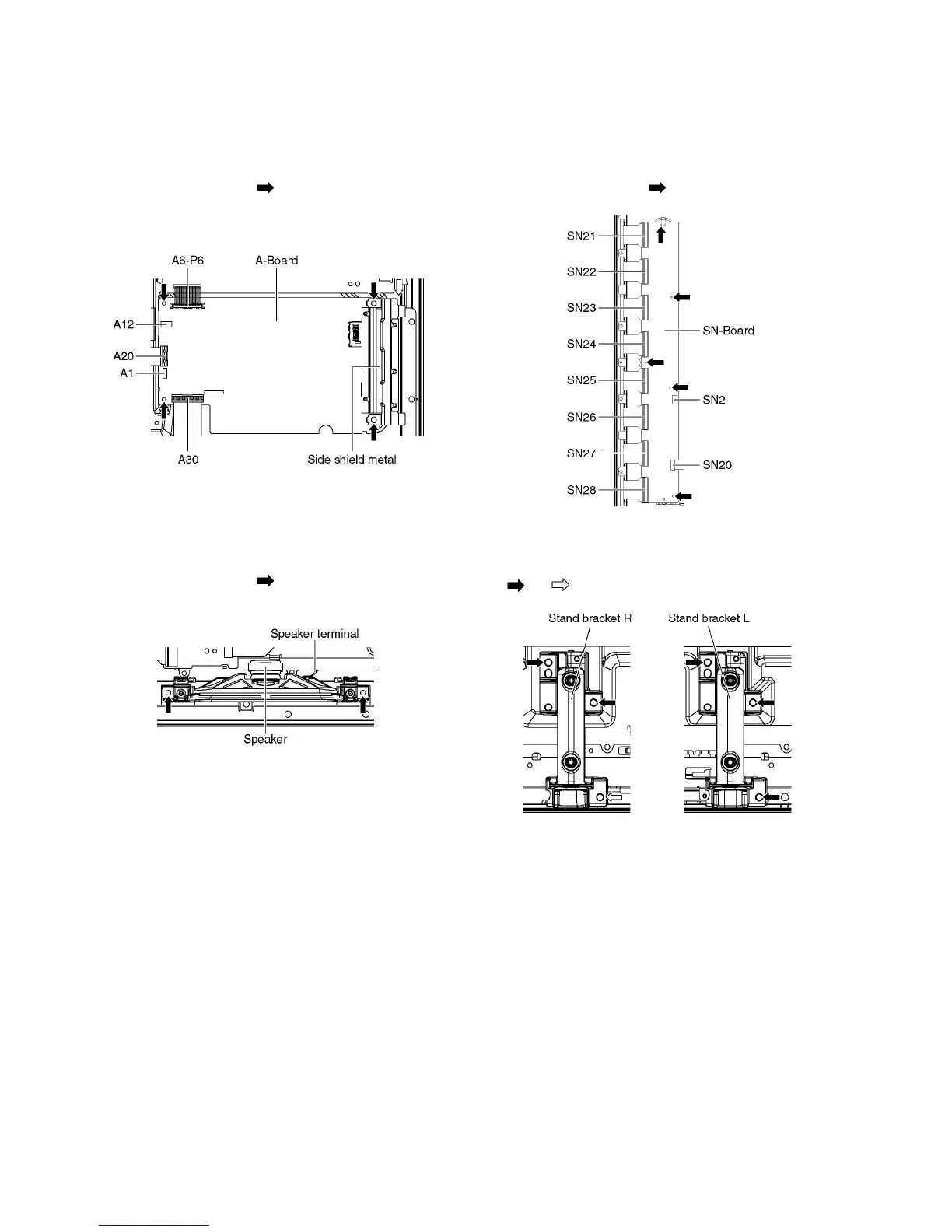
8.2.6. Remove the A-Board
1. Unlock the cable clampers and the tapes to free the
cables.
2. Disconnect the connectors (A1 and A12).
3. Disconnect the bridge connector (A6-P6).
4. Disconnect the flexible cables (A20 and A30).
5. Remove the screws (×4 ) and remove the Side shield
metal.
6. Remove the A-Board.
8.2.7. Remove the Speakers
1. Unlock the cable clampers and the tapes to free the
cables.
2. Disconnect the Speaker terminal.
3. Remove the screws (×2 each) and remove the
Speakers (L, R).
8.2.8. Remove the SN-Board
1. Remove the flexible cables (SN21, SN22, SN23, SN24,
SN25, AN26, SN27 and SN28) connected to the SN-
Board.
2. Disconnect the connector (SN2).
3. Disconnect the flexible cable (SN20).
4. Remove the screws (×5 ) and remove the SN-Board.
8.2.9. Remove the Stand bracket
1. Remove the Hanger metals (L, R) fastening screws (×5
, ×1 ) and remove the Stand bracket plate.



 To Next Page