English - 4 -
Maintenance
First, remove the mains plug from the mains
socket.
Display panel, Cabinet, Pedestal
Regular care:
Gently wipe the surface of the display panel, cabinet,
or pedestal by using a soft cloth to remove dirt or
ngerprints.
For stubborn dirt:
1.
First clean the dust from the surface.
2.
Dampen a soft cloth with clean water or diluted
neutral detergent (1 part detergent to 100 parts
water).
3.
W
ring out the cloth rmly. (Please note, do not
let liquid enter the TV inside as it may lead to
product failure.)
4.
Carefully wipe moisten and wipe away the
stubborn dirt.
5.
Finally
, wipe away all the moisture.
Caution
Do not use a hard cloth or rub the surface too hard,
otherwise this may cause scratches on the surface.
•
T
ake care not to subject the surfaces to insect
repellent, solvent, thinner or other volatile
substances. This may degrade surface quality or
cause peeling of the paint.
•
The
surface of the display panel is specially treated
and may be easily damaged. Take care not to tap
or scratch the surface with your ngernail or other
hard objects.
•
Do not allow the cabinet and pedestal to make
contact with a rubber or PVC substance for a long
time. This may degrade surface quality.
Mains plug
Wipe the mains plug with a dry cloth at regular
intervals.
Moisture and dust may cause re or electrical shock.
Assembling / Removing the pedestal
Preparations
Take out the pedestal and the TV from the packing
case and put the stand onto a work table or any other
even surface.
•
Use
a at and rm table or similar even surface that
can support the weight of the TV.
•
Do not hold the screen panel part.
•
Make sure not to scratch or break the
TV.
Assembling the pedestal
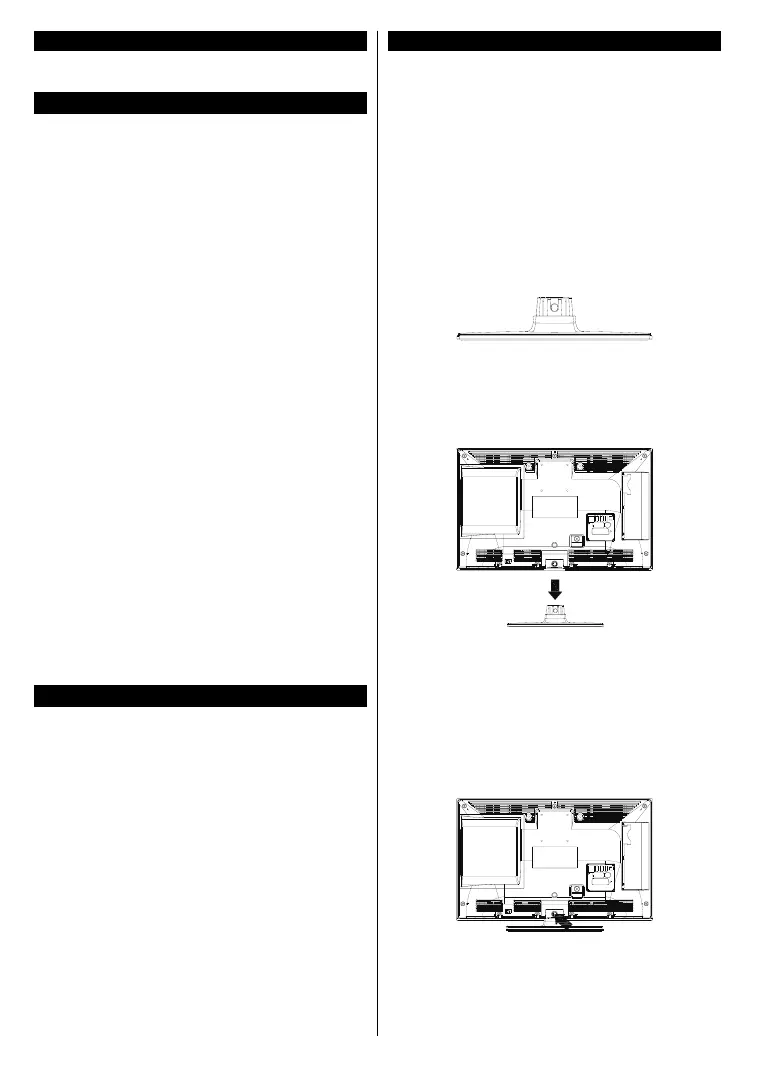
1. Place the stand on the table or similar even
surface.
2. Hold the TV over the stand so that it coincides
with the stand mouinting point and then lower it
to be mounted with its own weight. If the stand
is not tted properly, gently press down until the
latch/es snap/s into place.
Removing the pedestal from the TV
Be sure to remove the pedestal in the following way
when using the wall-hanging bracket or repacking
the TV.
• Put the TV onto a work table with the screen panel
down on the clean and soft cloth. Leave the stand
protruding over the edge of the surface.
• Press the button/s to release the latch/es.
• Remove the stand by pulling it away from the TV.


 To Next Page