English - 5 -
Mains plug
Wipe the mains plug with a dry cloth at regular
intervals.
Moisture and dust may cause re or electrical shock.
Assembling / Removing the pedestal
Preparations
Take out the pieces of the pedestals and the TV from
the packing case and put the TV onto a work table
with the screen panel down on the clean and soft
cloth (blanket, etc.)
• Use a at and rm table bigger than the TV.
• Do not hold the screen panel part.
• Make sure not to scratch or break the TV.
Assembling the pedestal
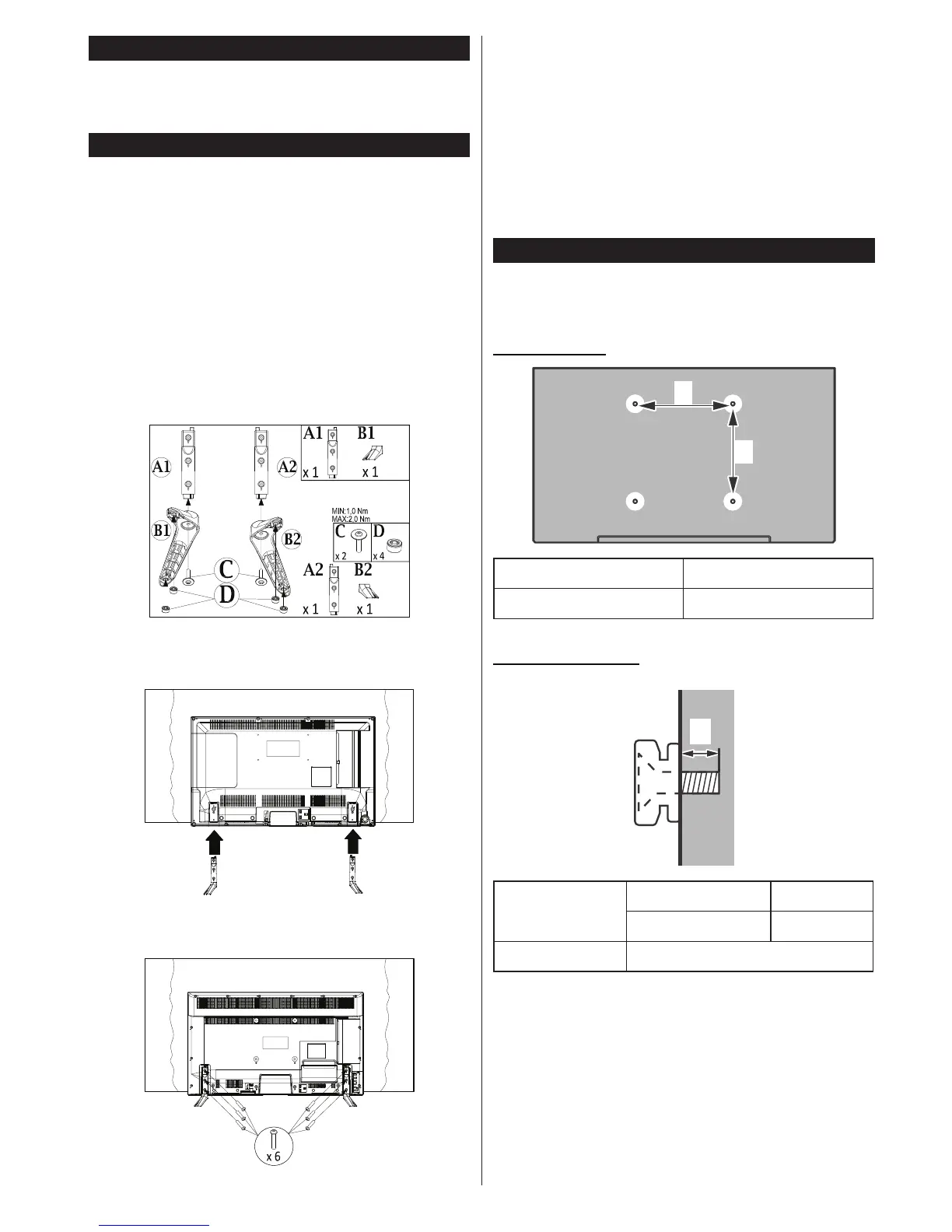
1. Screw the pieces of the pedestals together and
mount the rubber buffers.
2. Place the stand(s) on the stand mounting
pattern(s) on the rear side of the TV.
3. Insert the screws (M4 x 12) provided and tighten
them gently until the stand is properly tted.
Removing the pedestal from the TV
Be sure to remove the pedestal in the following way
when using the wall-hanging bracket or repacking
the TV.
• Put the TV onto a work table with the screen panel
down on the clean and soft cloth. Leave the stand(s)
protruding over the edge of the surface.
• Unsrew the screws that xing the stand(s).
• Remove the stand(s).
When using the wall-hanging bracket
Please contact your local Panasonic dealer to
purchase the recommended wall-hanging bracket.
Holes for wall-hanging bracket installation;
Rear of the TV
a
b
a (mm) 200
b (mm) 200
View from the side
a
Depth of
screw (a)
min. (mm) 5
max. (mm) 10
Diameter M6
Note: The screws for xing the TV onto the wall-hanging
bracket are not supplied with the TV.












 To Next Page