English
9
7 AV1 (SCART) (p. 9)
8 ETHERNET
(p. 9)
9 Terrestrial terminal
(p. 9)
10
AV2 (COMPONENT / VIDEO) (p. 10)
Basic connections
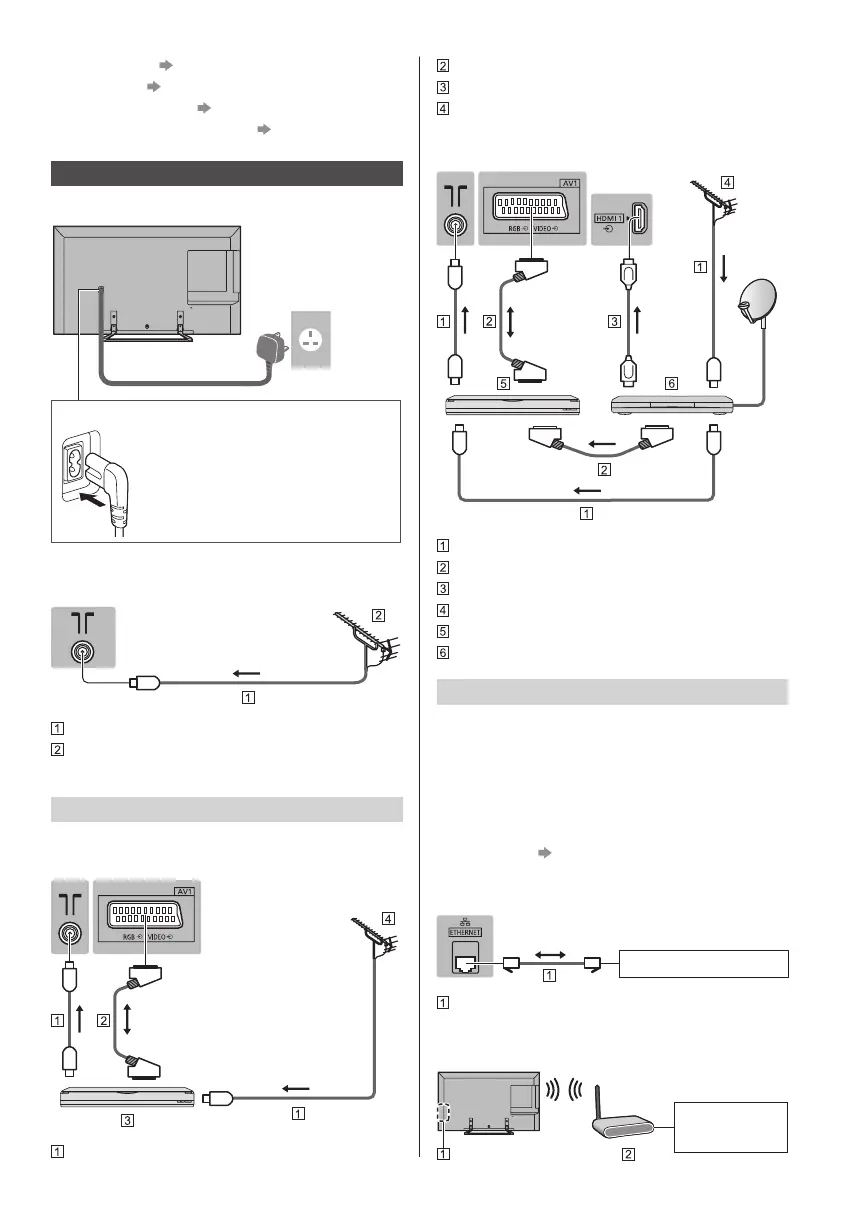
■ Mains lead
AC 220-240 V
50 / 60 Hz
Mains lead
(supplied)
Insert the mains plug firmly into place.
●
When disconnecting the mains lead,
be absolutely sure to disconnect the
mains plug from the mains socket
first.
■ Aerial
TV
RF cable
Terrestrial aerial
●
For DVB, Analogue
AV devices
■ DVD Recorder / VCR
TV
RF cable
SCART cable
DVD Recorder / VCR
Terrestrial aerial
■ DVD Recorder (VCR) / Satellite receiver
TV
RF cable
SCART cable
HDMI cable
Terrestrial aerial
DVD Recorder / VCR
Satellite receiver
Network
A broadband network environment is required to be able
to use internet services.
●
If you do not have any broadband network services,
please consult your retailer for assistance.
●
Prepare the internet environment for wired connection
or wireless connection.
●
Setup of the network connection will start when first
using the TV.
(p. 13)
■ Wired connection
TV
Internet environment
LAN cable (Shielded)
●
Use Shielded Twist Pair (STP) LAN cable.
■ Wireless connection
Internet
environment


 To Next Page