DVB-via-IP
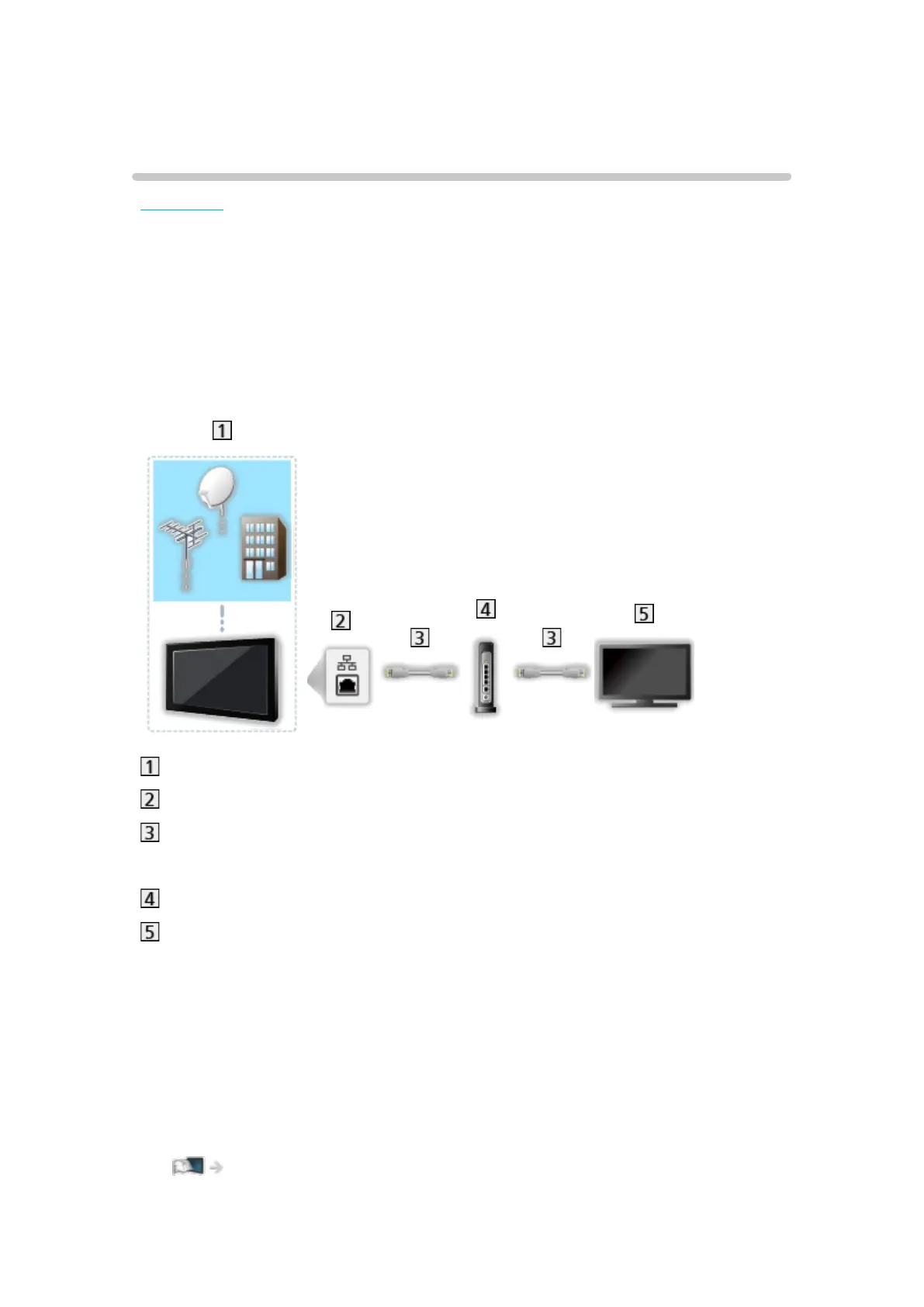
DVB-via-IP server connection
EX730 series
This TV can be configured as a DVB-via-IP server to provide broadcast
streaming to another TV supporting DVB-via-IP client function or SAT>IP
compatible devices.
Please ensure that the unit is disconnected from the mains socket before
attaching or disconnecting any cables.
■ Connection
TV (Satellite dish / Terrestrial aerial / Cable)
ETHERNET terminal
LAN cable (Shielded)
●
Use Shielded Twist Pair (STP) LAN cable.
Hub / Router
DVB-via-IP client (VIERA, etc.)
= Note =
●
External equipment and cables shown are not supplied with this TV.
●
Depending on the model, it may be necessary to remove the terminal
cover / cable cover before connecting or disconnecting cables.
●
Check the terminal type and cable plugs are correct for connection.
●
To use this function, set DVB-via-IP Server Settings.
Network > Network settings > DVB-via-IP Server Settings
- 227 -








 To Next Page