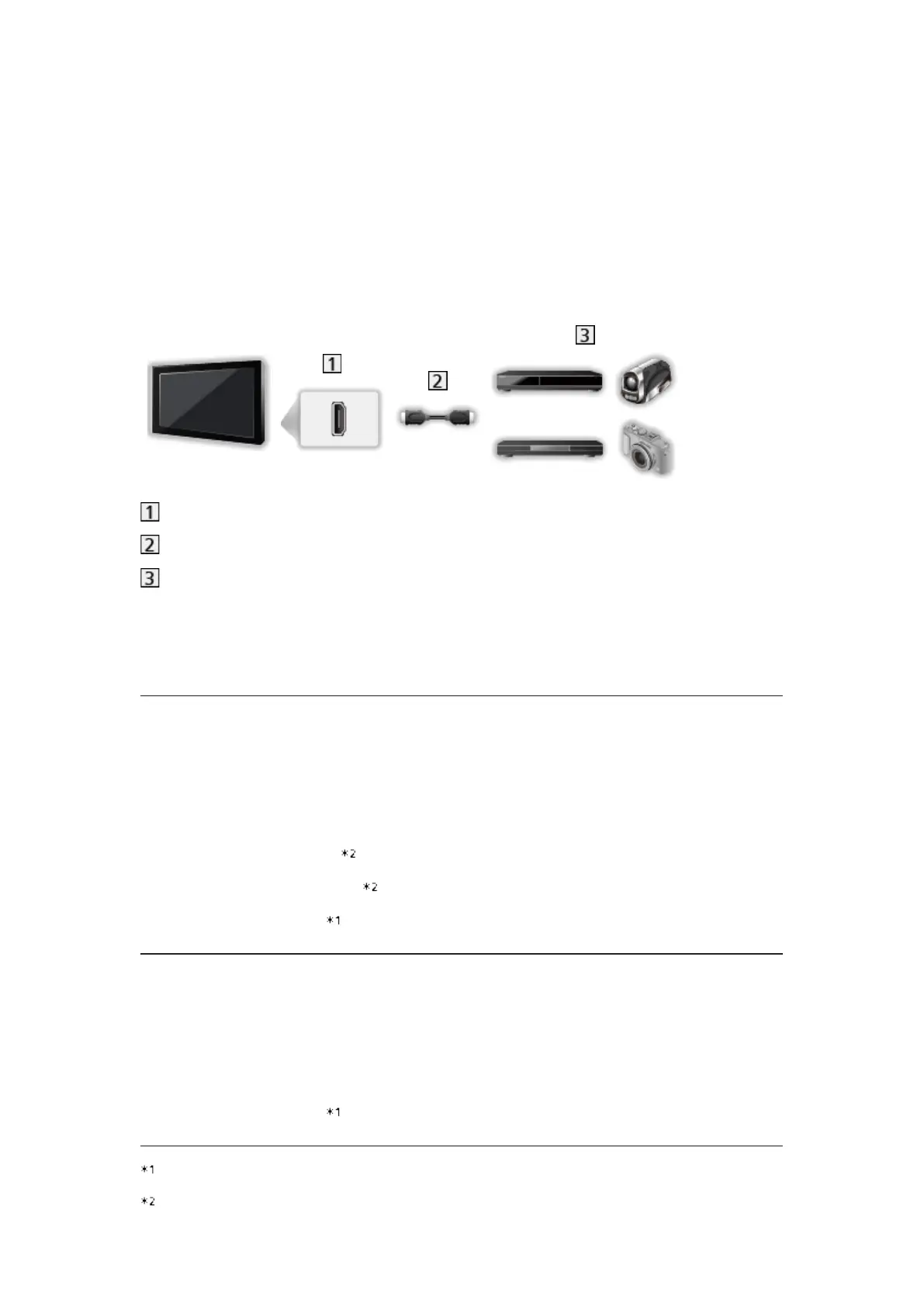
■ VIERA Link (HDMI connection)
●
Depending on the model, it may be necessary to remove the terminal
cover / cable cover before connecting or disconnecting cables.
●
Use a fully wired HDMI compliant cable.
●
Connect the equipment supporting VIERA Link to the TV’s HDMI terminal
via an HDMI cable.
About HDMI cable for connecting Panasonic HD Video Camera or LUMIX
Camera, read the manual of the equipment.
HDMI terminal
HDMI cable
Equipment with VIERA Link function (DVD Recorder / DVD Player / Blu-
ray Disc Player / HD Video Camera / LUMIX Camera)
■ Available features (HDMI connection)
DVD Recorder / DVD Player / Blu-ray Disc Player
●
Easy playback
●
Power on Link
●
Power off Link
●
Standby Power Save
●
Intelligent Auto Standby
●
VIERA Link Control
HD Video Camera / LUMIX Camera
●
Easy playback
●
Power on Link
●
Power off Link
●
VIERA Link Control
: For equipment which has “HDAVI Control 2 or later” function.
: For equipment which has “HDAVI Control 4 or later” function.
- 240 -




 To Next Page