258
UF-9000
APR 2006
Ver. 3.0
DP-180/190
7.3. Installation Procedure
Note:
1. Refer to each individual Installation Instructions when installing other Options.
2. The following machine illustrations, depict a UF-9000 with the USA standard configuration.
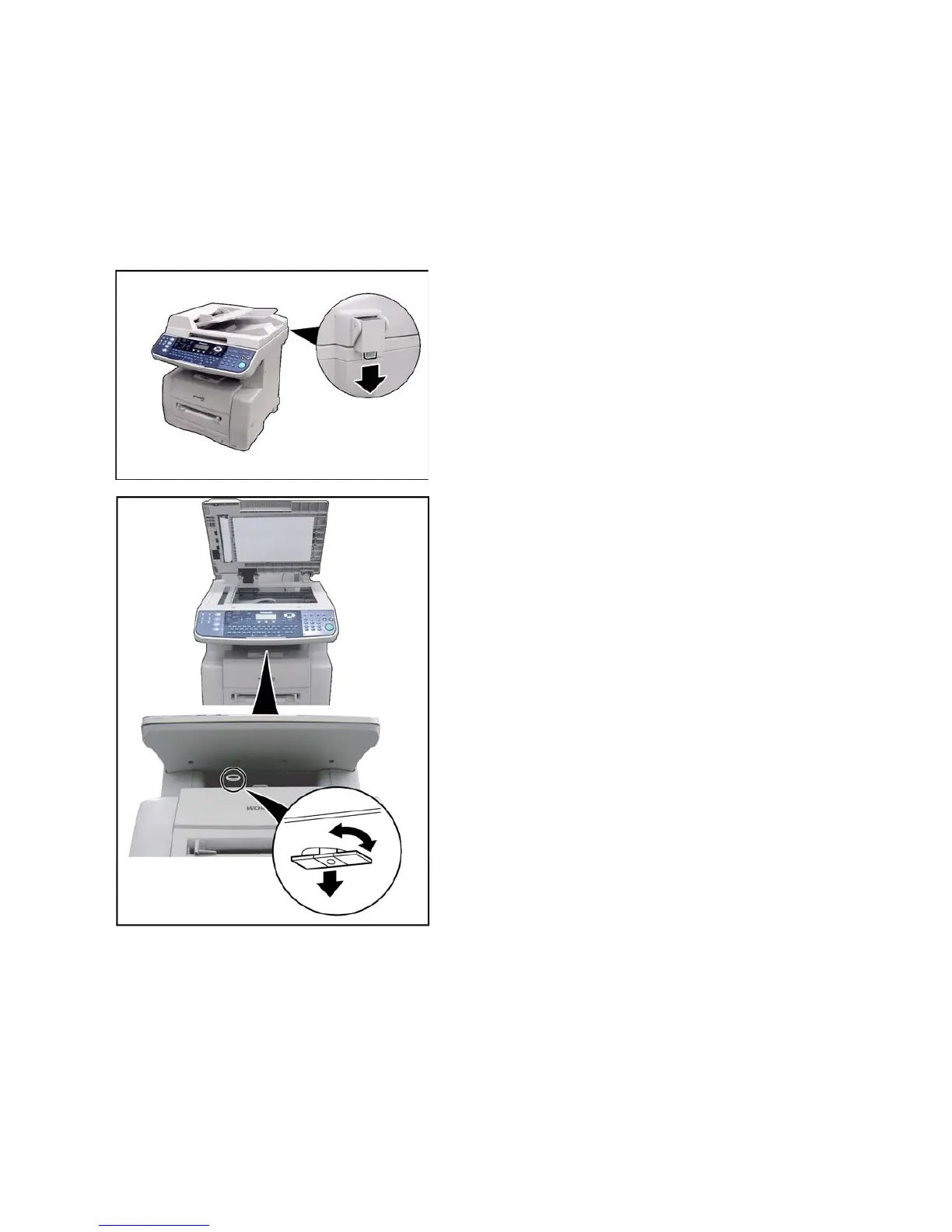
3. The scanner is held in place by a Shipping Bracket to prevent damage during transit.
Do Not turn the Power Switch ON before unlocking the scanner.
4. Please make sure to read the “Important Note!” at the end of these Installation Instructions.
7.3.1. Installation Procedure
<Remove the Shipping Materials>
(1) Remove the Shipping Rubber Cushion.
(2) Turn the Shipping Bracket in either direction of
the arrow to unlock and remove the bracket.
(To facilitate removal, open the ADF and observe
the position of the bracket through the Platen
Glass)
Caution:
Do Not turn the Power Switch ON before
unlocking the scanner.
Note:
Store the Shipping Materials (Rubber Cushion and
Shipping Bracket) in a safe place for future use.


 To Next Page