7
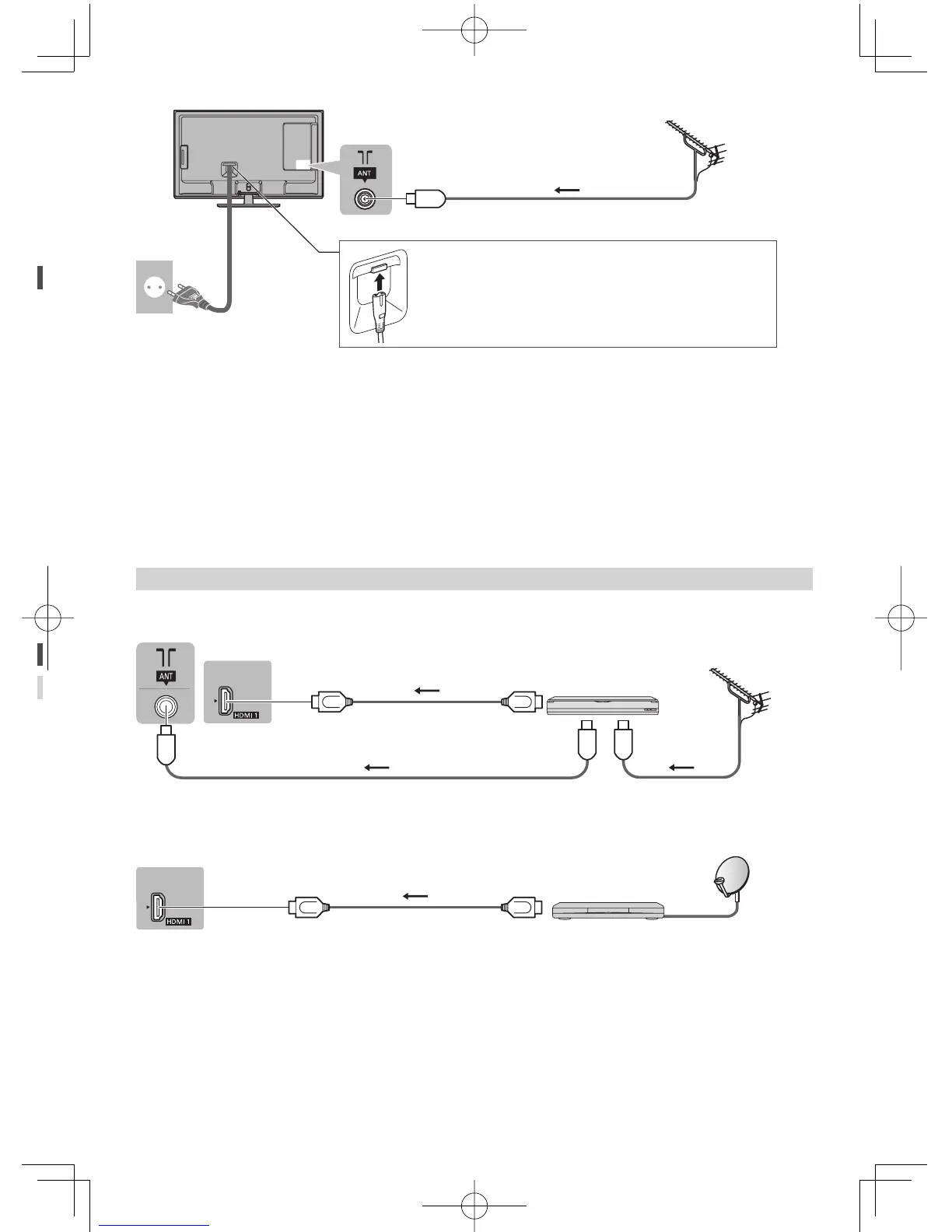
■ Digital TV, Analogue TV
AC 110-240 V
50 / 60 Hz
Mains lead
(supplied)
Aerial
RF cable
■ Mains lead
Insert the mains plug firmly into place.
●
When disconnecting the mains lead, be absolutely sure to
disconnect the mains plug at the socket outlet first.
●
Keep the space between the TV and RF cable to prevent distorted image.
●
Do not put the RF cable close to the mains lead to avoid noise.
●
Do not place the RF cable under the TV.
●
An aerial, correct cable (75 Ω coaxial) and correct terminating plug are required to obtain optimum quality picture and
sound.
●
If a communal aerial system is used, you may require the correct connection cable and plug between the wall aerial
socket and the TV.
●
Your local Television Service Centre or dealer may be able to assist you in obtaining the correct aerial system for your
particular area and the accessories required.
●
Any matters regarding aerial installation, upgrading of existing systems or accessories required, and the costs
incurred, are the responsibility of you, the customer.
●
To obtain optimum quality picture, select either an Aerial or a cable TV network.
AV devices
■ DVD Recorder / VCR
TV
DVD Recorder / VCR
RF cable
Aerial
RF cable
HDMI cable
■ Set top box
TV
Set top box
HDMI cable



 To Next Page