
 Need help?
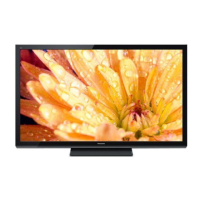
Do you have a question about the Panasonic Viera TC-50PU54 and is the answer not in the manual?
Lists common types of still images that can cause image retention on the plasma screen.
Provides advice on placing the TV and managing lighting to prevent image retention.
Covers warnings about electric shock, fire, moisture, and essential safety instructions.
Details safety concerning small parts, TV setup, wall mounting, and placement.
Instructions for safe handling and use of the power cord to prevent fire and electrical shock.
Guidelines for moving the TV, ventilation, panel care, and handling heavy equipment.
Details FCC regulations and cautions for device compliance and proper installation.
Provides detailed safety guidelines for children regarding TV setup, use, and furniture placement.
Lists all items included with the TV for setup and operation, such as remote and cables.
Describes optional accessories like wall-hanging brackets and their purchase.
Step-by-step instructions for attaching the TV pedestal using provided screws.
Procedures for safely removing the pedestal from the TV for wall mounting or packing.
Instructions for connecting the power cord and attaching the ferrite core to cables.
Steps for inserting batteries into the remote control, including polarity and cautions.
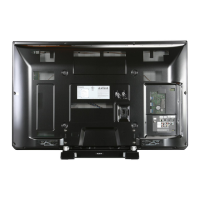
Identifies all connection terminals on the back of the TV for various inputs.
Explains how to connect antennas and cable TV services for reception.
Guides on connecting various AV devices using HDMI, Component, or Composite cables.
Details on connecting audio equipment via the TV's digital audio output terminals.
Identifies buttons, sensors, and indicators on the front and back of the TV.
Explains the purpose and function of each button on the remote control.
Guides through turning on the TV and initial setup steps like language and channel selection.
Covers the final steps and confirmation of the TV's first-time setup.
Explains how to select channels and use Secondary Audio Programming (SAP).
Details on enabling closed captions and displaying TV information banners.
How to change the picture's aspect ratio and zoom for optimal viewing.
Instructions for setting, deleting, and navigating favorite channels.
How to set the TV to automatically turn off after a specified period.
Guide to selecting and switching between different input sources for external devices.
Introduces the media player and its functions for photos, videos, and music.
Instructions for inserting and removing SD cards and USB flash memory devices.
Steps for inserting media and launching the media player interface.
Guides on selecting drives, files, and playing media content like photos, videos, and music.
Describes features like slideshow, single view, sorting, and playback options for photos.
Details on accessing photo options, slideshow settings, and thumbnail size adjustments.
Explains how to configure slideshow settings like frame, effects, and interval.
Guides on selecting music for slideshows and registering user-selected songs.
Details on playing video files, navigation, and playback controls.
Explains music playback, folder navigation, and repeat playback settings.
Explains simultaneous control of Panasonic components using the TV remote.
Specifies the need for compliant HDMI cables for VIERA Link functionality.
Guides on connecting Blu-ray players, home theater systems, and camcorders for VIERA Link.
Specific instructions for connecting HD camcorders and digital cameras via HDMI.
Steps to navigate the menu and select the VIERA Link settings option.
Instructions for turning VIERA Link on and adjusting its various operational settings.
Explains automatic input switching, power on/off links for connected devices.
Details on energy saving modes, unselected device saving, and speaker output selection.
Steps to display and access the VIERA Link menu options.
How to control speaker output and operate connected devices via VIERA Link.
Guides on accessing setup menus and configuring ANT/Cable input settings.
Instructions for performing an automatic scan to find available channels.
Steps for editing channel captions, favorites, and skipping channels.
How to check signal strength and interpret results for troubleshooting.
Instructions for displaying the TV's main menu and navigating its structure.
Details on adjusting Picture, Audio, Timer, Lock, Closed Caption, and Setup settings.
Lists TV and movie rating systems for parental control features.
Explains how to change the picture's aspect ratio and adjust zoom settings.
Provides specific details on H-size aspect ratios and their effects on the image.
Lists compatible file formats for photos, videos, and music on SD cards and USB drives.
Important warnings and messages related to handling SD cards and USB flash memory.
Details on HDMI connections and compatibility with VIERA Link™ functionality.
Explains digital audio output options and closed caption settings.
Lists compatible input signals for Component and HDMI connections.
Instructions for safely cleaning the TV's display panel and cabinet.
Guidelines for cleaning the pedestal and power cord plug.
Answers common questions regarding picture quality, aspect ratio, and snowiness.
Addresses issues related to sound, volume, distortion, and clicking sounds.
Answers questions about remote control, menu items, and resetting the TV.
Details power source, consumption, panel type, and screen size specifications.
Lists all connection terminals and physical dimensions of the TV.
Outlines warranty coverage, service options, and eligibility requirements.
Lists items and conditions not covered by the limited warranty.
Provides contact details for product information, operating assistance, and dealers.
Information on how to purchase parts, accessories, and instruction books.
Details the warranty terms, service options, and eligibility for Canadian customers.
Lists exclusions and limitations specific to the Panasonic Canada warranty.
Information on proper disposal and recycling regulations for the product.
Guidance on recording model and serial numbers for warranty and identification.
 General
| Screen Size | 50 inches |
|---|---|
| Display Type | Plasma |
| Resolution | 1920 x 1080 |
| Aspect Ratio | 16:9 |
| HDMI Inputs | 3 |
| USB Ports | 1 |
| Audio Output | 20W |
| Refresh Rate | 600Hz |
| Smart TV | No |
| 3D Capable | No |
| Inputs | HDMI, USB, Component, Composite |



 To Next Page
