Using the Menu Functions
17
ered
t.
e
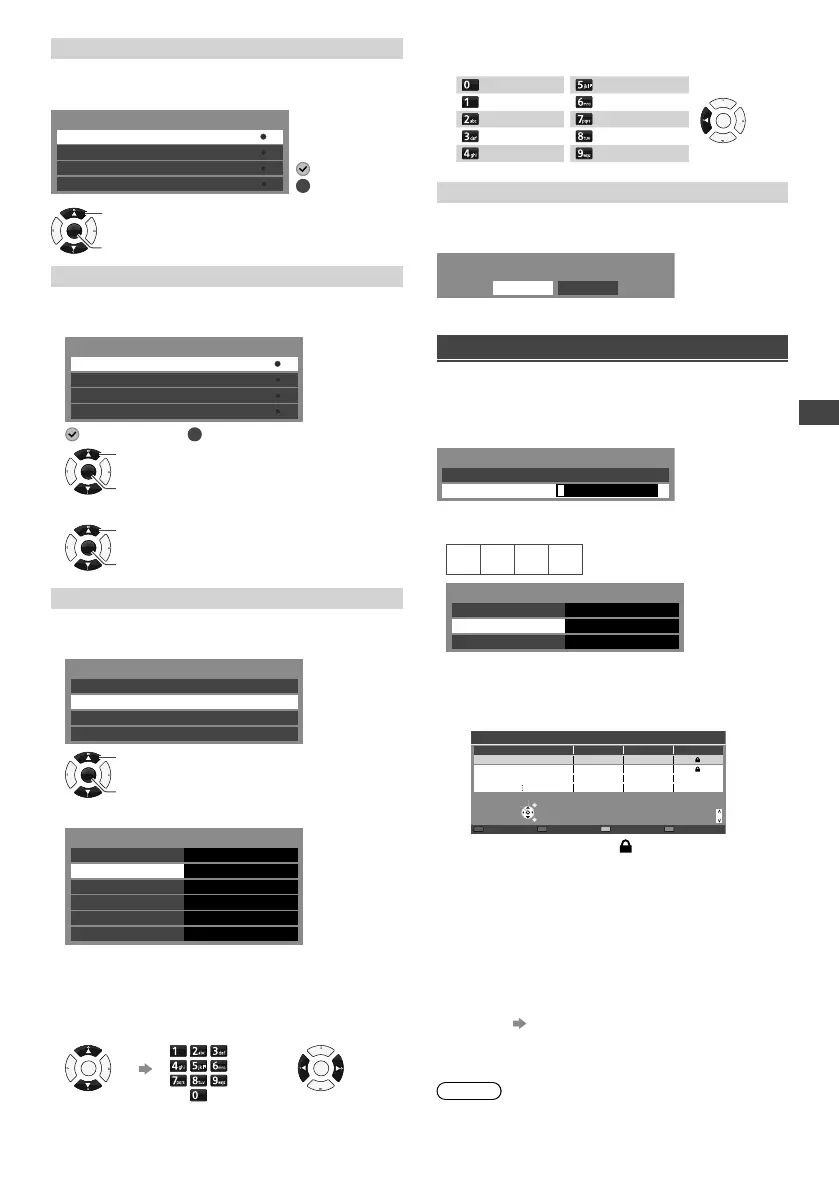
[Skip]
Skips or hides unwanted channels.
Select a channel, then reveal / hide.
Skip
4
901
40
902
Analogue
Digital
Analogue
Digital
: Hide (skip)
: Reveal
OK
Access
Select
[Sort]
Sorts channels.
1 Select a channel
Sort
4
901
40
902
Analogue
Digital
Analogue
Digital
: Selected
: Unselected
OK
Access
Select
2 Swap the channel position (if available).
OK
Access
Select
[Channel List Edit]
Edits channel settings.
1 Select a channel.
Channel List Edit
4
901
40
902
Analogue
Digital
Analogue
Digital
OK
Access
Select
2 Edit the channel settings.
Channel List Edit
Network Name
Frequency (MHz)
Channel Name
Sound System B/G
Channel
Colour System
40
Auto
48.25
• You cannot change the [Network Name].
• [Frequency], [Colour System] and [Sound System]
edit are available for Analogue channels only.
Select an
item.
Enter the new
settings.
Change the
settings.
OK
or
OK
• You can set the characters by using the numeric and
cursor buttons as follows:
0
J K L 5
OK
Backspace
. ! : # 1 M N O 6
A B C 2 P Q R S 7
D E F 3 T U V 8
G H I 4 W X Y Z 9
[Clear block]
Clears the entire channel list.
Select [OK] to clear.
Are you sure?
OK Cancel
Setting [Child Lock]
You can lock specific channels / AV input terminals.
When the locked channel / input is selected, a message
appears. Enter the PIN number to watch.
Enter the PIN number (4 digits).
* * * *
Please enter new PIN
PIN
Child Lock-PIN Entry
●
Enter the PIN number twice at first setting.
●
Write your PIN number here in case you forget it.
No Block
Change PIN
Access
Child Lock List
Parental Rating
Child Lock
■ To lock channels or inputs
1 Select [Child Lock List].
2 Select a channel / input, then lock it.
101 BBC 1 Wales
7 BBC THREE
14 E4C
Child Lock List - TV and AV
Name Input Type Lock
TV TV
TV TV
TV TV
EXIT
Page up
Select
RETURN
Page down
Lock all Unlock all
Lock
( : Locked input / channel)
■ To change the PIN number
1 Select [Change PIN].
2 Enter a new PIN number twice.
■ To set parental rating
To watch the Digital TV programme that has rating
information over the selected age, enter the PIN
number (depending on the broadcaster).
The availability of this function depends on the area
you select
(p. 8).
1 Select [Parental Rating].
2 Select the block setting.
Note
●
Setting [Shipping Condition] (p. 16) erases the PIN
number and all settings.
TH-32A400AZ.indd 17TH-32A400AZ.indd 17 1/10/2014 5:24:20 PM1/10/2014 5:24:20 PM











 To Next Page