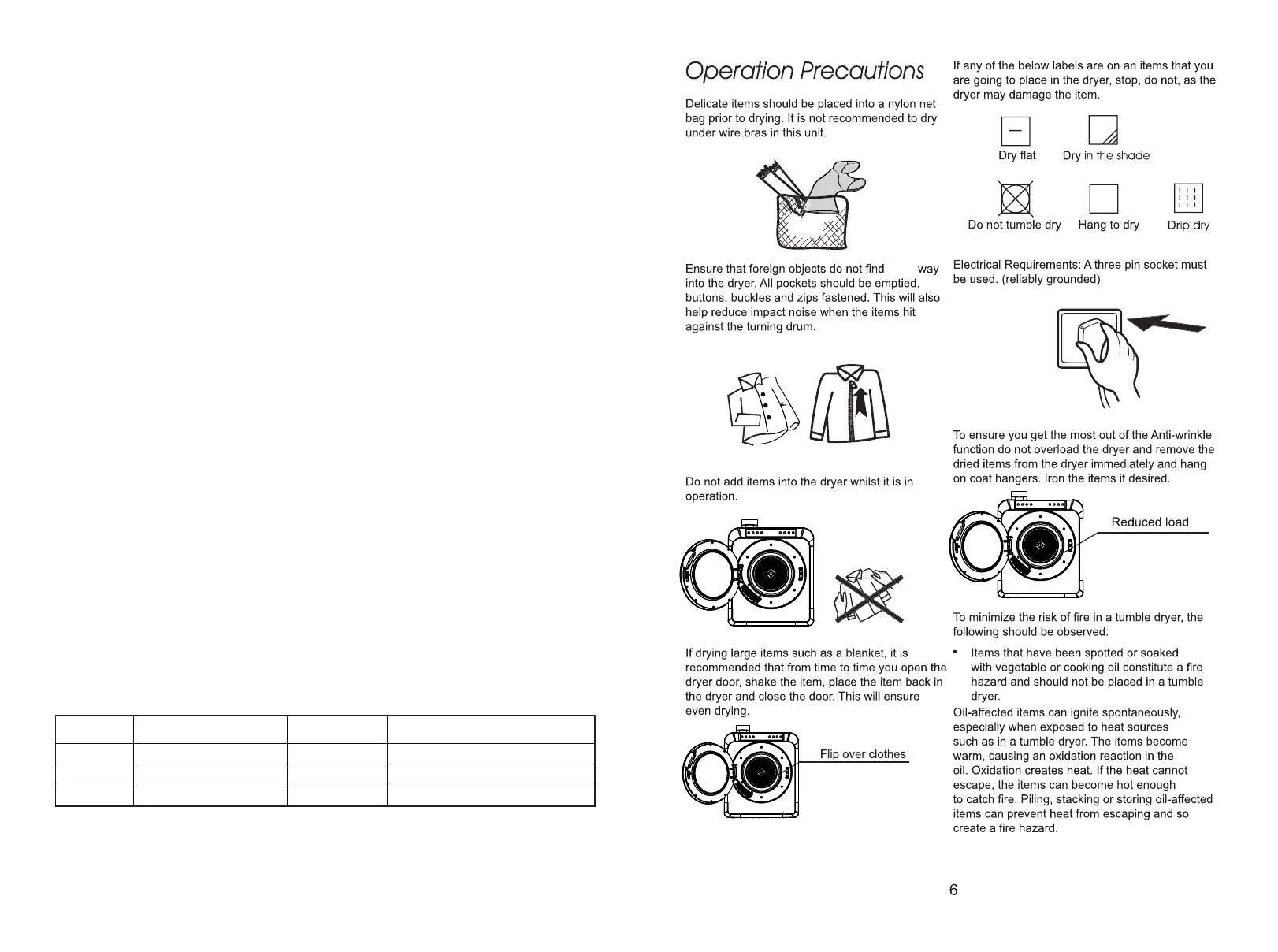
R
5
emove all objects from pockets such
as lighters and matches.
Program
Clothings type
Max dry time
Ma
x
vol
u
m
e o
f
dr
y
clothings
Bulky
Jeans,Cotton clothes,Sheet
Smart
1hour
8.8-13.2 lbs
3.5 lbs
4.4 lbs
150min
47min
60min
Cotton clothes
Cotton clothes,Sheet
1. Power
2. Start/Pause
3. Preset: Press "Preset" repeatedly to choose preset time from 1H, 2H, 4H and 8H, then press "Start/Pause" to
start program, the preset time shown in display window will countdown by minute.
4. Wrinkle Guard: Press "Wrinkle Guard", the wrinkle guard indicator will light up and the dryer will reverse the
rotation direction at the end of this drying cycle to improve drying efficiency. Press and hold "Wrinkle Guard" and
"Preset" simultaneously for 3 seconds to lock the control panel while the dryer is operating. Press and hold both
buttons at the same time for 3 seconds to unlock the setting.
5.Time Display: Estimated time remaining.
6. Temperature Indicator
7. Temp: Press "Temp" to choose temperature among High (high temperature), Med (medium temperature) and
Air (air dry)
8. Time: Press "Time" repeatedly to choose drying time from 30 minutes, 1 hour, 1 hour and 30 minutes, 2 hours.
9. Smart: For lightweight items weight less than 3.5lbs. Default drying time is 47 minutes.
10. Bulky: For jackets, jeans, comforters and heavyweight items. Total loaded weight does not exceed 13lbs.
11. Close Door indicator: This indicator will light up when the front door is open.
Cleaning indicator: This indicator will light up to remind to clean the lint filter.
Wrinkle Guard indicator: This indicator shows "Wrinkle Guard" function is selected.
Lock indicator: This indicator shows the control panel has been locked.


 To Next Page