11
© Copyright 2008 Panoramic Corporation
PC-1000 Installation
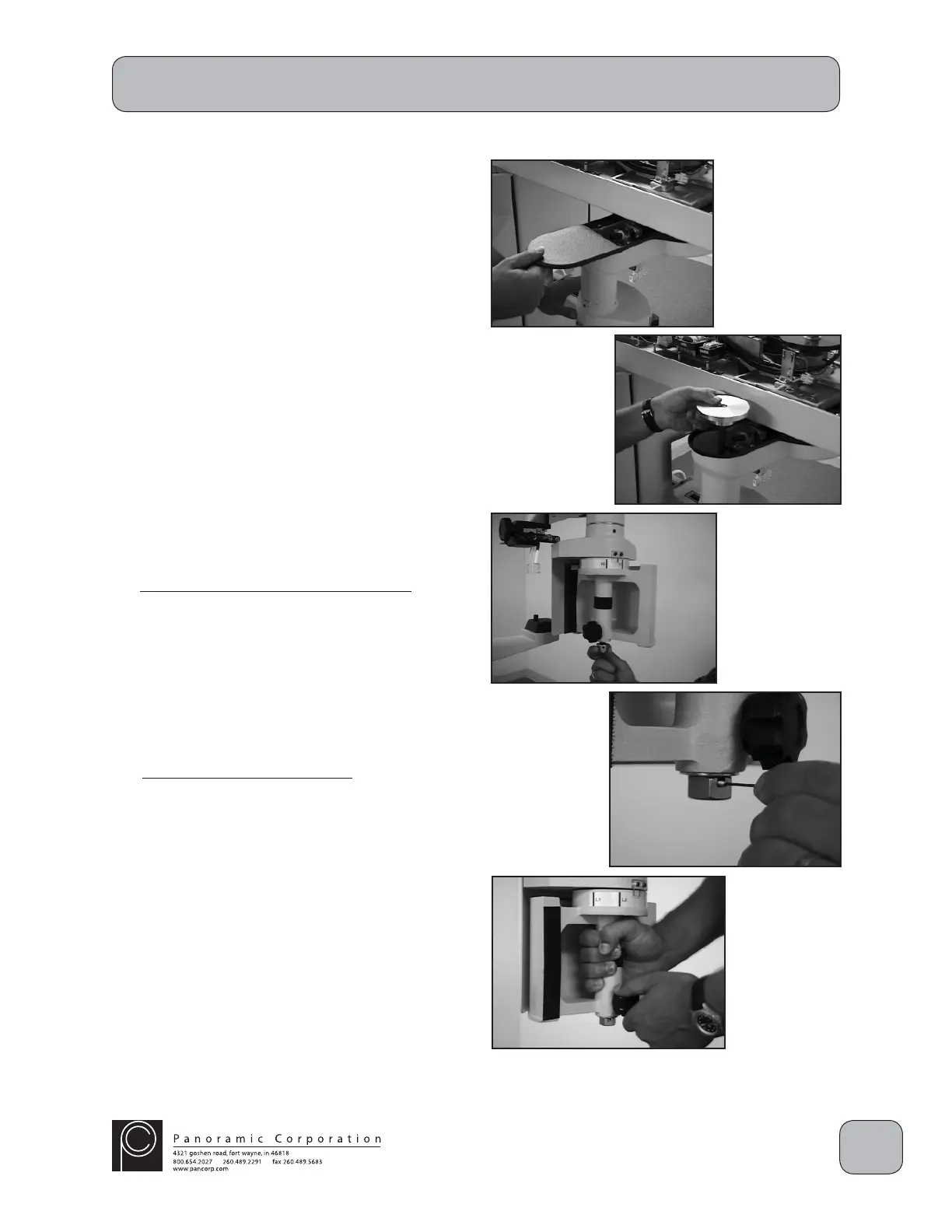
Install Film Drum Assembly
1. Slide the black plastic cover off of the end of
the rotating arm.
2. Remove the cardboard packing material from
the rotating arm.
3. Remove the set screw, crown nut, and washer
from the fi lm drum spindle.
4. Insert the fi lm drum spindle down through the
rotating arm.
5. Install the fi lm drum with the knob closest to the
fl oor. Slide the fi lm drum onto the spindle up
as far as possible and tighten the fi lm drum
knob to temporarily hold the fi lm drum in place.
6. Slide the fl at washer up on the fi lm drum
spindle.
7. Install the crown nut on the fi lm drum spindle
with the slots in the crown nut facing up.
8. Thread the crown nut until the lower edge of
the threaded hole in the fi lm drum spindle is
aligned to the lower edge of a slot in the crown
nut.
9. Insert the set screw in the threaded hole in the
fi lm drum spindle and tighten the screw.
10. While supporting the fi lm drum, loosen the fi lm
drum knob to allow the fi lm drum to rest on the
washer and crown nut.
11. Slide the black plastic cover back on the end
of the rotating arm.
Note: The fi lm drum will rotate with increased
friction after the fi lm drum knob is tightened.
Manual rotation, while the knob is tight, should
be avoided to prevent abnormal wear.


 To Next Page
 Loading...