EasyManua.ls Logo

Pantone PT-BS007L - User Manual

Pantone PT-BS007L
2 pages
Print Icon
To Next Page IconTo Next Page
Loading...
WIRELESS PORTABLE SPEAKER
MODELS: PT-BS007L, PT-BS007P, PT-BS007Y, PT-BS007N
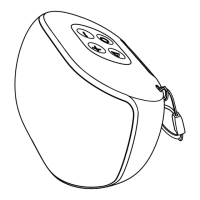
PRODUCT OVERVIEW
Top View Rear View
1 4
5
6 7
8
9
2
3
1. (mode) : press and hold to turn the speaker on. Press and hold again to
turn the speaker off.
2.
: press to decrease volume level. Press and hold to play the previous song.
3. LED light indicator
4.
: press to play/pause the song.
5.
: press to increase volume level. Press and hold to play the next song.
6. AUX port: use a 3.5mm audio cable (not included) to connect to an external
audio device.
7. USB port: plug in your USB stick to play the songs stored in your USB.
8. Micro SD card slot: insert your Micro SD card to play the songs stored in
your Micro SD card.
9. Micro USB port: use the supplied Micro USB cable to charge the speaker.
OPERATION
Power on and charging
Before rst time use, charge the speaker using the supplied micro USB cable.
Plug the cable into the Micro USB port on the speaker and the other end to a
power source. Charge for 6 hours. The LED light indicator will light up red
during charging and will turn off once fully charged.
Press and hold the (mode) button to turn the speaker on. The LED light
indicator will light up blue for 2 seconds.
Bluetooth mode
When the speaker is turned on, it will automatically enter Bluetooth mode. The
LED light indicator will light ash blue, indicating that the speaker is ready for
pairing. On your Bluetooth device, look for PT-BS007 in the list of detected
devices, and pair with it. Once successfully paired, a notication sound will ring
and the Bluetooth LED light indicator will light up blue.
The speaker and your Bluetooth device will remember each other and
automatically connect when they are both turned on.
AUX input mode
Press the button to play/pause the song. You can also control via your
Bluetooth device.
Press the / buttons to decrease/increase volume level. You can also
control via your Bluetooth device.
Press and hold the / buttons to play the previous/next song. You can also
control via your Bluetooth device.
Connect your audio device to the AUX port on the speaker using a 3.5mm
audio cable (not included). The speaker will automatically enter AUX mode.
Press the button to play/pause the song. You can also control via your
audio device.
Press the / buttons to decrease/increase volume level. You can also
control via your audio device.
USB and Micro SD card mode
Insert a USB stick or Micro SD into the USB port or Micro SD card slot on
the speaker. The speaker will automatically enter media playback.
Press the button to play/pause the song.
Press the / buttons to decrease/increase volume level.
Press and hold the / buttons to play the previous/next song.
Question and Answer IconNeed help?

Do you have a question about the Pantone PT-BS007L and is the answer not in the manual?

Summary

Product Overview

Operation Modes

Power On and Charging

Instructions for charging the speaker and powering it on, including LED indicator status.

Bluetooth Connectivity

Details on pairing, connecting, and controlling the speaker via Bluetooth.

AUX Input Mode

Guide for connecting and using the speaker with external audio devices via AUX.

USB and Micro SD Card Playback

Instructions for playing audio from USB drives and Micro SD cards.

Advanced Features

FM Radio Mode

How to connect the micro USB cable as an antenna and use FM radio functionality.

Hands-Free Phone Calls

Instructions for answering, ending, and rejecting phone calls using the speaker.

TWS Stereo Mode

Guide for pairing two speakers for stereo sound and automatic re-pairing.

Troubleshooting Common Issues

Speaker Not Turning On

Troubleshooting steps for when the speaker fails to power on, suggesting charging.

No Audio Output

Solutions for no sound, including checking volume and device proximity.

Music Dropping Out

Steps to resolve intermittent audio playback, like improving device connection.

Bluetooth Connection Failure

Guidance for resolving issues when failing to connect to Bluetooth devices.

FM Mode Station Issues

Troubleshooting unclear or missing FM stations, suggesting antenna adjustments.

Overview

The Pantone Wireless Portable Speaker, available in models PT-BS007L, PT-BS007P, PT-BS007Y, and PT-BS007N, is a compact audio device designed for versatile sound playback and hands-free communication.

Function Description:

This speaker serves as a portable audio output device with multiple input options. It supports Bluetooth connectivity for wireless audio streaming from compatible devices, an AUX input for wired connections, and direct media playback from USB sticks and Micro SD cards. Additionally, it features an FM radio function and can be used for hands-free phone calls. The speaker also incorporates True Wireless Stereo (TWS) mode, allowing two identical speakers to pair together for a stereo sound experience.

Important Technical Specifications:

  • Battery Capacity: 3.7V, 900mAh
  • Output Power: 4W
  • Charging Time: Approximately 4 hours
  • Play Time: Approximately 6 hours
  • Bluetooth Operation Range: <10 meters
  • Weight: 228 g
  • Dimensions (mm): 96(W) x 68(H) x 65(D)

Usage Features:

General Operation:

  • Power On/Off: Press and hold the "mode" button to turn the speaker on or off.
  • Charging: Use the supplied Micro USB cable. The LED indicator will be red during charging and turn off when fully charged. A full charge takes about 6 hours.
  • LED Indicator: Lights up blue for 2 seconds when turned on.

Bluetooth Mode:

  • Automatic Entry: The speaker automatically enters Bluetooth mode when turned on.
  • Pairing: The LED indicator flashes blue rapidly, indicating readiness for pairing. Search for "PT-BS007" on your Bluetooth device. A notification sound and a solid blue LED indicate successful pairing.
  • Automatic Reconnection: The speaker remembers and automatically connects to previously paired devices.
  • Playback Control:
    • Press the "▷" button to play/pause.
    • Press the "-/+" buttons to decrease/increase volume.
    • Press and hold the "-/+" buttons to play the previous/next song.
    • Controls can also be managed via the connected Bluetooth device.

AUX Input Mode:

  • Connection: Connect an audio device to the AUX port using a 3.5mm audio cable (not included). The speaker automatically enters AUX mode.
  • Playback Control:
    • Press the "▷" button to play/pause.
    • Press the "-/+" buttons to decrease/increase volume.
    • Controls can also be managed via the connected audio device.

USB and Micro SD Card Mode:

  • Media Playback: Insert a USB stick into the USB port or a Micro SD card into its slot. The speaker automatically enters media playback.
  • Playback Control:
    • Press the "▷" button to play/pause.
    • Press the "-/+" buttons to decrease/increase volume.
    • Press and hold the "-/+" buttons to play the previous/next song.

FM Mode:

  • Antenna: Connect the supplied Micro USB cable to the Micro USB port to serve as the FM antenna.
  • Switching Mode: Press the "mode" button to switch to FM mode.
  • Auto Search: Press and hold the "▷" button to auto-search for available channels.
  • Mute: Press the "▷" button to mute the channel after selection.
  • Channel Navigation: Press and hold the "-/+" buttons to play the previous/next channel.
  • Volume Control: Press the "-/+" buttons to decrease/increase volume.

Hands-Free Phone Call:

  • Answer Call: Press the "▷" button.
  • End Call: Press the "▷" button again.
  • Reject Call: Press and hold the "▷" button.

TWS (True Wireless Stereo) Mode:

  • Pairing: Two identical speakers can be paired. Press and hold the "mode" button on both speakers to turn them on. Both LED indicators will flash blue rapidly. Once paired, a notification sound will ring, one speaker will flash blue slowly, and the other will light up blue.
  • Bluetooth Connection: On your Bluetooth device, search for "PT-BS007" and pair.
  • Synchronized Playback: Music will play simultaneously on both speakers.
  • Automatic Reconnection: After initial pairing, the two speakers will automatically pair with each other.

Maintenance Features:

Troubleshooting:

  • Speaker Not Turning On: Charge the speaker for 4 hours and try again.
  • No Audio: Increase the volume on the Bluetooth device.
  • Music Dropping Out: Move the speaker closer to the Bluetooth device.
  • Failed to Connect to Bluetooth:
    • Place the phone and speaker closer together.
    • Check the Bluetooth menu on your phone for correct device connection.
    • Restart the speaker, turn Bluetooth off and on, and search again on your device.
  • Unclear/No FM Stations:
    • Connect a Micro USB cable/FM antenna to the Micro USB port.
    • In FM mode, press and hold the "▷" button to start auto-searching stations. Signal quality may vary by location.
    • Change the direction of the Micro USB cable/FM antenna.

The product complies with the Australian Safety Standard AS/NZS 62368.1. The Bluetooth® word mark and logos are registered trademarks of Bluetooth SIG, Inc. This product is an authorized PANTONE product manufactured under license by DATAplus Supplies, Inc.

Pantone PT-BS007L Specifications

General IconGeneral
BrandPantone
ModelPT-BS007L
CategoryPortable Speakers
LanguageEnglish