
 Need help?
Do you have a question about the Pantone PT-WE001 and is the answer not in the manual?
Long press the function button for 2s-4s to turn on, and more than 4s to turn off.
Charge via Micro USB; indicator light turns red when charging and blue when fully charged.
Press button for 2-4s to enter pairing mode, then search for PT-WE001 to connect.
Use button presses for next/previous song, volume up/down, play/pause, and redial.
Answer calls by pausing music, hang up by pressing the function button again.
Clean with a damp cloth; avoid solvents and liquids penetrating the housing.
Details FCC compliance, interference rules, and user guidance for proper operation.
This document describes the PANTONE Bluetooth Earphone, model PT-WE001, providing instructions for its operation, usage, and basic maintenance.
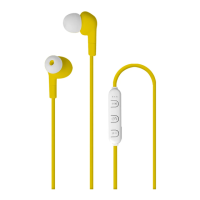
The PANTONE Bluetooth Earphone is a wireless audio device designed for listening to music and making phone calls. It connects to other devices via Bluetooth technology. The earphone features integrated controls for managing audio playback, answering calls, and adjusting volume directly from the device.
Power On/Off: To power on the earphone, long press the function button for 2-4 seconds. A voice prompt will confirm "power on." To power off, long press the function button for more than 4 seconds; a "power off" voice prompt will be heard.
Pairing: For initial pairing, turn on the earphone by long pressing the function button for 2-4 seconds until it enters pairing mode. A voice prompt will say "pairing," and the indicator light will flash red and blue alternately. Search for the Bluetooth device "PT-WE001" on your connecting device and select it. Once connected, a voice prompt will confirm "connected," allowing you to enjoy music and make phone calls.
Music Playback:
Call Management:
Charging: The earphone is charged via a Micro USB port (5V1A input). During charging, the indicator light will be red. Once fully charged, the indicator light will turn blue.
Controls Overview: The earphone features a multi-functional button system:
Cleaning: If necessary, clean the earphones with a damp cloth. Ensure the device is completely dry before subsequent use. It is crucial to avoid using any solvents, corrosive, or gaseous cleaning agents, and to prevent water or other liquids from penetrating the housing of the earphone.
Compliance Information: The device complies with Part 15 of the FCC Rules, indicating that it has been tested and found to meet the limits for a Class B digital device. This ensures reasonable protection against harmful interference in a residential installation. Users are advised that any changes or modifications not expressly approved by the party responsible for compliance could void the user's authority to operate the equipment. The device is designed to accept any interference received, including interference that may cause undesired operation. If interference occurs, users are encouraged to reorient or relocate the receiving antenna, increase the separation between the equipment and receiver, connect the equipment into an outlet on a different circuit, or consult a dealer or an experienced radio/TV technician for assistance.
The full text of the EU declaration of conformity is available online at http://dataplusgo.com/uploads/PT-WE001.jpg.
PANTONE and PANTONE Chip Design are registered trademarks of Pantone LLC. The product is manufactured under license by DATAplus Supplies, Inc.
 General
| Driver Size | 40 mm |
|---|---|
| Frequency Response | 20 Hz - 20 kHz |
| Impedance | 32 ohms |
| Cable Length | 1.2 m |
| Connector | 3.5 mm |

 To Next Page