COD. 93182
INSTALLATION :
1. Open the battery compartment and insert 2pcs new AA alkaline batteries. Then, put
the battery compartment back & tighten it with the unit.
2. Hold the unit steady. Screw the collar onto the faucet/tap until it is tight, then tighten
the locking collar. Turn on the faucet/tap. Don not use a wrench or pliers.
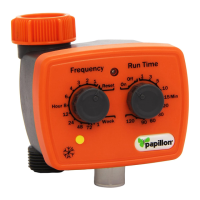
3. Turn the knob and set up the RUN TIME
4. Turn the FREQUENCY knob on RESET position. While the red light flashes, set up
the FREQUENCY TIME.
5. If you do not see the flash of red light. Check the battery and make sure they are
installed correctly.
6. Record your set up date and time, FREQUENCY TIME and RUN TIME in your note
book for future reference.
7. At any time you can use the manual ON/OFF function. When you turn the knob to
ON, valve will open 30 mins. Then, turn it off automatically. Or you can turn it to be
OFF position manually.
But remember the RUN TIME must be turned back to step no. 3 as your original set up
time when manual watering finished.
FOR EXAMPLE :
A. Every morning at 6:00 and afternoon at 6:00 for watering 10 minutes : The first day at
6:00AM or 6:00PM, turn the dot of frequency knob to 12 and the dot of RUN TIME
knob to 10. After 12 hours, the water timer will automatically be ON and supply
water 10 minutes. Later, it will automatically be OFF. Every day at the same time at
6:00AM and 6:00PM. Your ground can have water for 10 minutes.
TIME FREQUENCY RUN TIME
6:00 12 10
B. Every morning at 7:00 for watering 20 minutes : The first day at 7:00AM, turn the dot
of FREQUENCY knob to 24 and the dot of RUN TIME knob to 20. The next day at
7:00AM, the water timer will automatically be ON and supply water. 20 minutes
later, it will automatically be OFF. Every day at the same time at 7:00AM, your
ground can have water for 20 minutes.
TIME FREQUENCY RUN TIME
7:00 24 20
TROUBLE – SHOOTING GUIDE :
If the water can not come out, please check the following.
1. The faucet / tap should be turned ON.
2. Make sure your battery is in good condition.
3. Check the dot of FREQUENCY and RUN TIME if they are the same as your record.
4. FREQUENCY time must be “LONGER” than RUN TIME.
5. If the timer still doesn’t work, please contact the store from which you bought it.
TIME DELAY FEATURE :
You can delay your watering start time, using the time delay feature.
Depress the button for each hour you want to delay watering. You can delay watering in 1
hourly intervals only, up to a maximum of 12 hours. So to delay watering for 3 hours, depress
the time delay button 3 times.
TECHNICAL DATA :
1. Min. operation pressure : 0,5 bar (10PSI)
Max. operation pressure : 8 bar (120PSI)
1. Max. water temperature : 60°C
LOW BATTERY INDICATOR :
While the low battery indicator light remains on continuously, the valve will be shut off &
locked automatically. Please turn off the faucet/tap, replace 2pcs new AA batteries. Then
tighten the battery compartment with main unit.


 To Previous Page
 Loading...