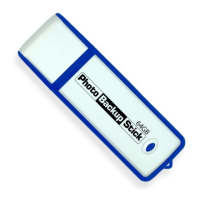
The Photo Backup Stick Universal is a versatile data backup device designed to simplify the process of saving photos and videos from various sources, including Windows and Mac computers, iPhones, iPads, and Android phones and tablets. Its primary function is to provide a convenient and reliable solution for users to preserve their digital memories.
Function Description:
The Photo Backup Stick Universal serves as a portable backup solution, allowing users to consolidate their photos and videos from multiple devices onto a single, external storage medium. It eliminates the need for cloud storage subscriptions or complex manual transfers, offering a straightforward plug-and-play experience. The device is designed to be user-friendly, with a clear interface for both computer and mobile applications.
For computer users (Windows 7 or higher, macOS 10.12 or higher), the Photo Backup Stick operates via a dedicated application, "PhotoBackupStartup.exe," which provides options for selecting backup sources (e.g., Pictures folder, entire C: drive, other locations) and managing backup preferences. It can back up photos and videos directly from the computer or from mobile devices connected to the computer. The application also includes features like language selection, duplicate removal, and the ability to organize backups.
For mobile users, the Photo Backup Stick Universal offers direct connectivity to iPhones/iPads and Android devices. It features an Apple Lightning connector for iOS devices and includes USB adapters for Android devices with OTG (On-The-Go) compatibility. Dedicated apps for iOS and Android facilitate direct backups from these devices without requiring a computer. The mobile apps allow users to choose between backing up all photos and videos, photos only, or videos only.
The device is capable of backing up a wide array of image and video file types, ensuring comprehensive coverage for most common media formats. This includes popular image formats like JPG, JPEG, PNG, GIF, HEIC, TIFF, and RAW, as well as various video formats such as M4V, WEBM, VOB, MP4, MKV, 3G2, MOV, TS, AVCHD, AVI, WMV, and 3GP.
Important Technical Specifications:
- Storage Capacity: The device is available in various capacities, with the example shown being 32GB.
- Connectivity:
- USB: High-Speed 3.0 USB certified for fast data transfer.
- Apple Lightning Connector: Integrated for direct connection to iPhones and iPads.
- USB Adapters: Included for Android devices with OTG compatibility.
- Compatibility Requirements:
- Windows: Microsoft Windows 7 or higher.
- macOS: Apple macOS 10.12 or higher.
- Android: Android with OTG compatibility.
- File System Limitation: The device is formatted with FAT32, which has a 4GB file size limit. This means that individual video files larger than 4GB cannot be backed up directly to the Photo Backup Stick and will be skipped.
Usage Features:
- Quick Start Guide: The device comes with a quick start guide for easy setup and operation.
- Intuitive Interface: Both the computer and mobile applications feature user-friendly interfaces with clear options for initiating and managing backups.
- Language Options: The computer application allows users to change the interface language from English to other supported languages.
- Flexible Backup Sources: Users can select specific folders, entire drives, or connected mobile devices as backup sources.
- Selective Backup: Options to back up all photos and videos, photos only, or videos only are available on both computer and mobile platforms.
- Duplicate Removal: The computer application includes a feature to remove duplicate files during the backup process, saving storage space.
- Backup Organization: Users can choose to keep their backups organized in a structured manner, mirroring the original file structure, or opt for a simpler, unorganized backup.
- Direct Connect for Mobile: The ability to directly connect to iPhones/iPads and Android devices without a computer offers significant convenience for mobile users.
- Refresh Function: On the computer application, a "Refresh" button allows users to rescan for newly connected phones or devices.
- Viewing Backed-Up Files:
- Windows: Plug the stick into the computer, open the "backup" folder, and navigate through sub-folders if the backup was organized.
- Android: Plug the stick into the Android device, go to "My Files," tap the USB drive, and open the "backup" folder.
Maintenance Features:
- Troubleshooting Support: In case of backup failures, the confirmation screen on the app provides a "Send logs to support" button, allowing users to send diagnostic logs to the support team for assistance. This requires email to be set up on the device.
- Comprehensive Help Files: Both the Windows and Mac applications include detailed help files that users can access for self-troubleshooting and guidance before contacting support.
- Software Updates: While not explicitly detailed in the provided manual, it is implied that the associated applications (for Windows, Mac, iOS, and Android) would receive updates to ensure compatibility and address any issues, which is a standard maintenance practice for such devices.
- Physical Care: As a USB device, general care such as protecting the connectors from damage, avoiding extreme temperatures, and storing it in a safe place would contribute to its longevity.

 Need help?

 To Next Page
 General