CH2 CH3 120V
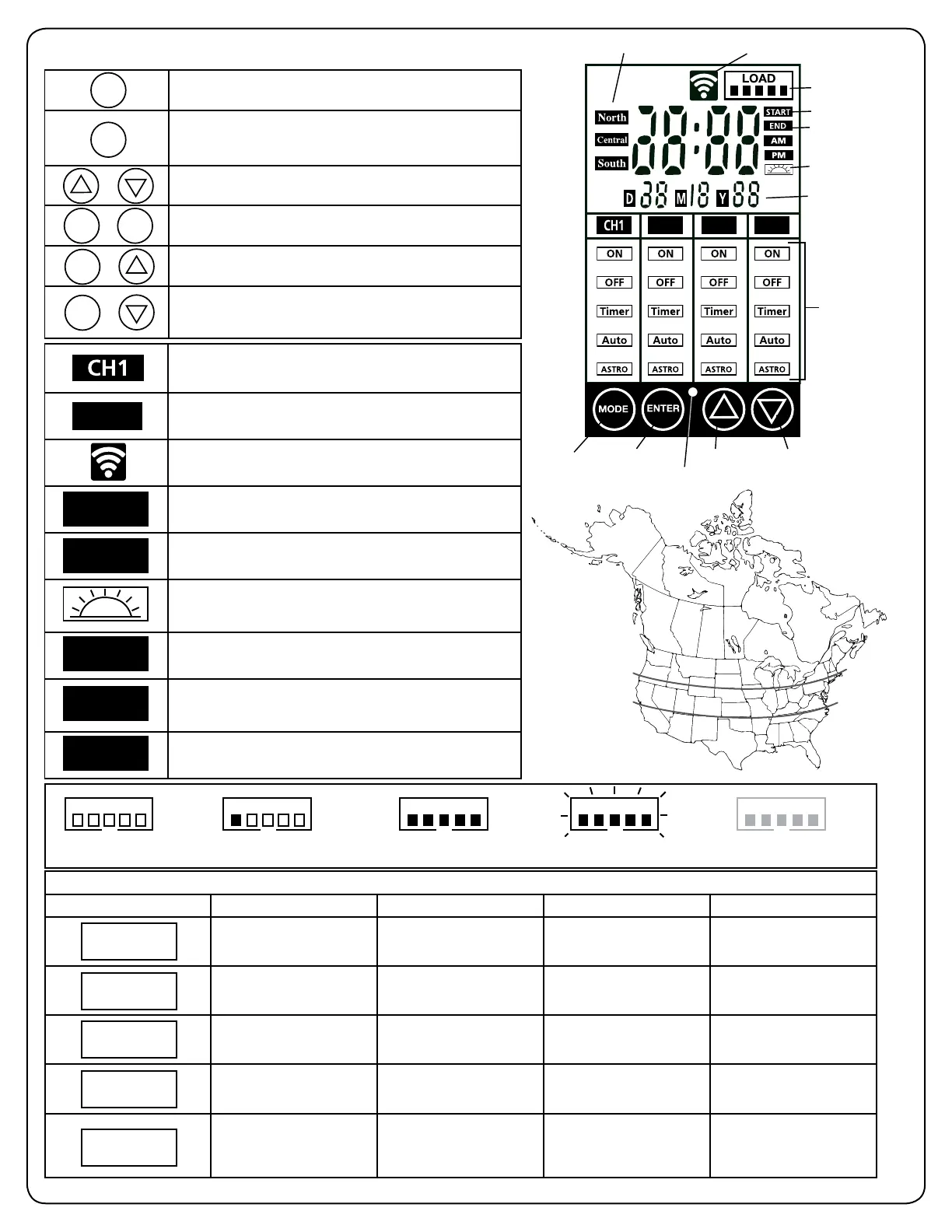
Mode
Zone Location (Sunwise)
Load Icon
Wi-Fi Icon
START Timer
END Timer
DAWN Icon
Date
Lighting Modes
Enter
Photocell
Up Down
North
Central
South
Recommended Control Settings
Modes Functionality Outdoor Indoor Dusk-to-Dawn
Always ON YES YES NO
Always OFF
YES YES NO
Fixed start and end time
(does not adjust to seasons)
YES YES NO
Uses the light sensor
(photocell) to Open/Close
the lights
YES NO YES
Astronomical timer
automatically adjusts to
local sunrise/sunset times
through the seasons
YES YES YES
ON
OFF
TIMER
AUTO
SUNWISE
0%: Normal Less than 20%: Normal Less than 100%: Normal
Over 120%, shuts down
reduce load
Blinking:
Overloaded over 100%
LOADLOADLOADLOADLOAD
*The channels will only turn on at the exact start time selected for Timer and dusk for Sunwise.
6. Transformer interface, controls and modes installation types
Press to confirm a selection.
Press to modify or change the MODE for the desired
channel. Press on this button to exit all settings without
saving.
Press these to select and go through the interface.
Press at the same time to change time and date. *Necessary
for Timer, Auto and Sunwise settings to work properly.
Press at the same time to change Sunwise time zone.
*Necessary for optimal Sunwise mode.
Press at the same time to enter pairing mode with Wi-Fi. Press
UP or DOWN until the Wi-Fi icon stops flasing, then press
ENTER.
ENTER
MODE
+
ENTERMODE
+
MODE
+
MODE
/
CH1, CH2 and CH3, they have a combined total load of
200 Watts. They each represent the landscape wires assigned
during installation.
120V electric outlet. In case of overload, press the reset button
over the outlet. The outlet is also fully controllable.
Wi-Fi icon flashes when pairing with smart phone and stays On
when there’s a connection.
The time at which the lights will turn On. This step comes after
selecting a Mode. (Shows up for Timer Mode only)
The time at which the lights will turn Off. This step comes after
selecting a Mode. (Auto, Timer and Sunwise only)
Select this to close the lights at dawn. When selecting an end
time, scroll using up and down until the icon shows up (Auto
and Sunwise only)
NORTH zone
Refers to locations from north of Chicago, IL.
CENTRAL zone
Refers to locations between Chicago, IL and southern
Missouri.
SOUTH zone
Refers to locations south of Missouri.
START
END
NORTH
SOUTH
CENTRAL
120V


 To Next Page