English
Technical Specifications
All specifications are subject to change without notice.
Tricolour LED Display
The DGP-R910 reader includes a tricolour LED display (red, green
and amber) that is used to indicate the reader’s status. The LED’s
intensity is adjusted through the DGP-ACM11.
Audible Tone
The DGP-R910 reader includes a built in beeper with a frequency
that is adjusted through the DGP-ACM11.
Weather Resistant
Mount indoors or outdoors.
Error Display
All DGP-R910 readers display communication errors between the
reader and the DGP-ACM11 by flashing the amber LED every sec-
ond.
Firmware Upgrade
Connect the CONV3USB as shown in Figure 2. Refer to the
CONV3USB installation manual for additional information.
Mounting on Metal
Metal may decrease the read range. The DGP-R910 card reader
can be mounted on metal but do not surround it by metal. If the
reader must be installed in a metal enclosure, ensure that the face
of the card reader is not covered and that there's at least 4cm (1.6")
between the card reader and the metal on all sides.
RESIDENTIAL EQUIPMENT
CLASS B DIGITAL DEVICE
INFORMATION TO USER
This device complies with Part 15 of the FCC Rules. Operation is subject to the following two condi-
tions: (1) This device may not cause harmful interference, and (2) This device must accept any inter-
ference received, including interference that may cause undesired operation.
This equipment has been tested and found to comply with the limits for Class B Digital Device, pursu-
ant to Part 15 of the FCC Rules. These limits are designed to provide reasonable protection against
harmful interference in a residential installation. This equipment generates, uses, and can radiate
radio frequency energy and, if not installed and used in accordance with the instructions, may cause
harmful interference to radio communications. However, there is no guarantee that interference will
not occur in a particular installation. If this equipment does cause harmful interference to radio or tele-
vision reception, which can be determined by turning the equipment off and on, the user is encouraged
to try to correct the interference by one or more of the following measures.
• Reorient or relocate the receiving antenna
• Increase the separation between the equipment and receiver
• Connect the equipment into an outlet on a circuit different from that to which the receiver is con-
nected
• Consult the dealer or an experienced radio/TV technician for help
Any changes or modifications not expressly approved by the party responsible for compliance could
void the user's authority to operate the equipment.
Power Input: 11Vdc to 14.5Vdc
Current Consumption 100mA, With Card 115 mA
Frequency: Exciter field 125 KHz Pulse Modulated
Operating Temperature: -35°C (-31°F) to +65°C (149°F)
Output Formats: RS-485
Cable Distance: 300m (1000 ft.)
Cables: 4-wire Cables (Twisted Pair recommended)
4-eres beltéri/kültéri Proximity olvasó
DGP-R910 V1.0
PRINTED IN CANADA - 08/2006 paradox.com DGPR910-TI01
DGP-ACM11
.
ra:
-w
re
onnec
on
-eres
e
s
Raccordement à 4 fils
1. Red / Piros / Rouge
2. Black / Fekete / Noir
3. Green / Zöld / Vert
4. White / Fehér / Blanc
2. ábra: Firmware Upgrade / Firmware frissítés/ Mise à niveau
du micrologiciel
1. Red / Piros / Rouge
2. Black / Fekete / Noir
3. Green / Zöld / Vert
4. White / Fehér / Blanc
To computer
Számítógépre
Vers l’ordinateur
CONV3USB
Do not connect more than one
DGP-R910 on a single DGP-ACM11.
Ne csatlakoztasson több DGP-R910
olvasót egy DGP-ACM11 modulhoz.
Ne pas raccorder plus d’un
DGP-R910 à un seul DGP-ACM11.
Supply / COMBUS
Tápellátás / KOMBUSZ
Alimentation / COMBUS
Jumper is ON.
Rövidzárdugó rajta.
Le cavalier est installé.

 Need help?
 General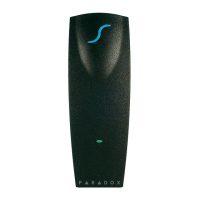

 To Next Page