GPRS14-EI00 06/2011 PARADOX.COM Printed in Canada
GPRS14 Plug-in Communicator Module
Installation Instructions
The following document guides you through the steps required to install the GPRS14 Plug-in Communicator Module. For
more information on how to setup the MG6250 console for GPRS, GSM and/or SMS reporting, please refer to the MG6250
Menu Programming Guide.
Description
The GPRS14 module is used to provide reporting via GPRS, GSM, and/or SMS to the MG6250 console. It also features dual SIM
cards for provider redundancy. The GPRS14 module is mounted directly onto the MG6250 console’s PCB.
Installation Instructions
The following describe the steps required to install the GPRS14 module onto the PCB of the MG6250 Console.
NOTE: Before installing the GPRS14 module, disconnect all power to the unit.
To Install the GPRS14 Module on the MG6250 Console
1) Unscrew the two bottom screws holding the top cover of the MG6250 console into place.
2) Lift and remove the front cover of the MG6250 console.

 Need help?
 General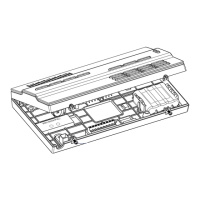

 To Next Page