GPRS14-EI00 06/2011 PARADOX.COM Printed in Canada
© 2011 Paradox Ltd. All rights reserved. Specifications may change without prior notice.
For complete patent, trademark, certification, and warranty information, please visit www.paradox.com.
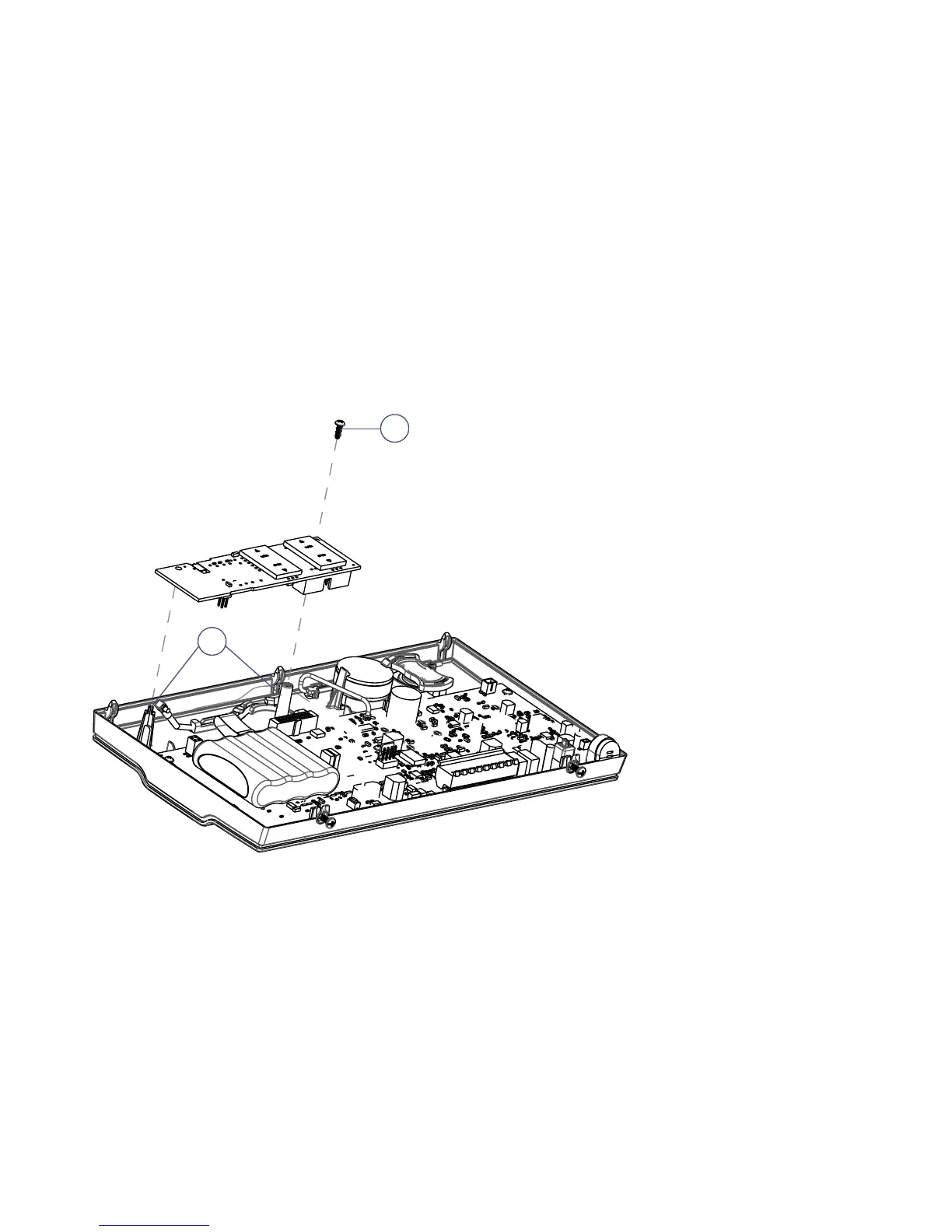
3) Place the GPRS14 module directly onto the MG6250’s plastic mounting rods and align with the 18-pin female connector
and snap into place.
4) Insert the screw provided into the plastic mounting rod; tighten using the appropriate screwdriver.
Once the GPRS14 module has been installed, re-assemble the MG6250 console and connect power to the unit.
What’s Next
This completes the installation of the GPRS14 module. The next step is to configure the MG6250 console for
reporting via the menu-driven user interface. Refer to the MG6250 Menu Programming Guide.


 To Previous Page
 Loading...