EasyManua.ls Logo

Pard NV007V - User Manual

Pard NV007V
6 pages
Print Icon
To Next Page IconTo Next Page
Loading...
Digital night vision
PARD
NV
007V
Operation Manual
Important note
2
3
1
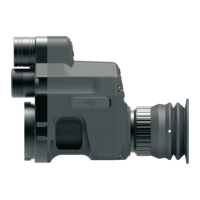
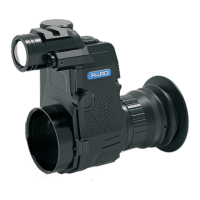
2.Indicator adjustment
4.Red dot indication
1.Stretchable fill light
3.Battery compartment cap
5.Sleeve base
1) Please do not look directly into the infrared light from the IR Torch
as this may result in permanent eye damage.
2) Due to the power of the Infrared light, DO NOT project the beam
onto any flammable object as this may result in a fire. When not in use,
switch off the device or place it in sleep mode.
3) This product can be used with any rifle scope that is parallax
adjustable however to get the best performance from this product use a
rifle scope that can parallax below 50m.
4) Caution Use of controls, adjustments or performance of
procedures other than those specified herein may result in hazardous
radiation
Question and Answer IconNeed help?

Do you have a question about the Pard NV007V and is the answer not in the manual?

Summary

Important Safety and Usage Notes

Infrared Light Safety

Warning against direct IR light exposure to prevent eye damage and fire hazards.

Rifle Scope Compatibility

Guidance on rifle scope compatibility and parallax adjustment for optimal performance.

Hazardous Radiation Caution

Caution regarding hazardous radiation from improper operation or procedures.

Device Installation

Battery Installation

Instructions for installing the 3.7V 18650 rechargeable lithium battery correctly.

Operational Instructions

Power, Sleep, and Wake-up

How to turn the device on/off and use sleep/wake-up modes.

Focusing and Adjustment

Adjusting eyepiece diopter and objective lens for clear focus.

IR Light and Laser Control

Controlling IR fill light and using the laser ranging function.

Menu Navigation and Settings

Accessing and navigating the device menu for various settings.

Advanced Menu Settings

Recording and Time Settings

Configuring auto recording, circulating recording, and time stamp.

Audio, WiFi, and Language

Managing audio sync, WiFi, and system language.

Date;Time, Formatting, and Factory Reset

Setting date/time, formatting storage, and restoring factory defaults.

Shortcuts and Specifications

User Interface Shortcuts

Quick access functions via button combinations.

Technical Specifications

Detailed technical specifications of the NV007V device.

After Sales Support and Warranty

Customer Support Information

How to obtain after-sales support and information required.

Product Warranty and Notice

Details of the one-year warranty and important operational notices.

Overview

The PARD NV007V is a digital night vision device designed to enhance visibility in low-light conditions, particularly when attached to a rifle scope. It functions as an optical attachment that converts existing rifle scopes into night vision optics, allowing users to observe and record targets in darkness. The device is powered by a 3.7V 18650 Lithium rechargeable flat battery, which is inserted into a dedicated compartment after removing the cap. Proper battery insertion, with the positive end first, and secure tightening of the cap are crucial to prevent intermittent faults.

Function Description:

The primary function of the NV007V is to provide digital night vision capabilities. It captures images using an infrared (IR) sensor and displays them on an internal screen, allowing users to see in conditions where traditional optics would be ineffective. The device features an integrated IR torch with adjustable brilliance and beam angle, which can be used to illuminate targets in complete darkness. The IR light has three power levels (1, 2, 3, and Off) and a zoom head for a tighter, further-reaching beam. A visual warning "IR" appears on the screen when the IR light is active.

In addition to night vision, the NV007V offers several recording functionalities. It can capture photos and record videos, storing them on a TF card (up to 128GB, not included). Users can switch between photo and video recording modes. The device also supports auto-recording, which can be set to "on" or "off" to automatically start recording. Circulating recording is another feature, allowing users to set recording durations of "off," "1min," "3 min," "5 min," or "10 min." A time stamp can be added to recordings, and audio synchronization can be enabled or disabled for recorded videos. The device also records keyboard press sounds when making recordings, if enabled.

The NV007V includes a laser ranging function, which can be activated or deactivated by pressing and holding the zoom in/red laser switch button. This feature assists in estimating distances to targets. The device also has Wi-Fi connectivity, which can be turned on or off. However, it's important to note that the menu cannot be accessed when Wi-Fi is active.

Usage Features:

The NV007V is designed for ease of use and integration with existing rifle scopes.

Installation and Alignment:

To install, the NV007V is fitted onto a rifle scope using a bayonet of the correct size, rotating clockwise until the sleeve lock clicks into place. Shims or packing may be used to ensure a tight fit. The entire assembly is then slid onto the eyepiece of the rifle scope. Critical to optimal performance is the alignment process:

  1. Diopter Adjustment: Upon powering on, the user should first adjust the eyepiece dioptric adjustment ring until the menu and icon characters on the screen appear sharp. This ensures a clear view of the device's interface, independent of the long-range image.
  2. Reticule Focus: The barrel adjuster on the NV007V is used to bring the rifle scope's reticule into sharp focus on the display.
  3. Field of View Alignment: The assembly is moved forwards and backwards to achieve a full image of the rifle scope's view on the display, aiming for the widest possible field of view. The reticule should be centered and level within the NV007V's display.
  4. Secure Fastening: Once aligned, the bayonet clamp bolts are tightened, ensuring the alignment remains centered and level. The QR sleeve is then slid over the rifle scope's eyepiece and locked tightly. The connection angle can be adjusted, and the fastening screw on the QR ring is tightened for a stable connection.
  5. Objective Lens Focusing: Finally, the rifle scope's objective lens focusing adjustment ring is used to achieve a crystal-clear image of the crosshairs in the center of the screen. To disconnect, the Pard unit is turned through a half turn.

Operation Modes:

  • Power On/Off: Press and hold the power button for approximately 1 second. The sleep/power indicator light will be constantly illuminated when on and off when the unit is off.
  • Sleep/Wake-up Mode: With the power on (indicator light constantly illuminated), press the sleep/wake-up button once to enter sleep mode, and press it again to wake up and power on the unit.
  • Daytime Use: For daytime use, the rifle scope's side wheel or adjustable objective is used to bring the target into sharp focus.
  • Night-time Use: For night-time use, the rifle scope is set to its lowest magnification, and night mode is activated. The IR beam angle is adjusted to fill the field of view. The reticule is focused using the NV007V's barrel adjuster, and then the rifle scope's side wheel or adjustable objective is used to focus on the target.

The menu is accessed by pressing the Menu button. The "+/-" buttons are used to select sub-menus, and the "OK/photo/recording" button enters settings.

  • Color/BW Mode: In the "Color" setting, users can switch between color and black & white (BW) modes.
  • IR Brilliance Control: This setting allows adjustment of the IR light levels (off, 1, 2, 3). Note that this setting takes effect upon the next startup, not instantly. For instant adjustment, users must enter BW mode and press the IR fill light brilliance control button.
  • Exposure Compensation: Options include "+2/3," "+1/3," "+0.0," and "-1/3."
  • Languages: Multiple language options are available, including English, French, Spanish, Portuguese, German, Italian, Simplified Chinese, Russian, Japanese, and Czech.
  • Date/Time: Users can set the year, month, date, hour, minute, and second, and choose a date display format (YY/MM/DD, MM/DD/YY, DD/MM/YY).
  • Center Position Adjustment: The "OK" button enters a sub-page where "+" or "-" adjusts the Y value, and the IR menu button adjusts the X value to center the sub-line in the optical telescope on the display. "OK" saves and exits.

Shortcuts:

  • Color/BW Mode Switch: Press and hold the IR fill light brilliance control / Color or BW mode button.
  • Wi-Fi On/Off: Press and hold the Wi-Fi button.
  • Playback: Press the playback button to view video clips stored on the SD card.
  • Photo/Video Mode Switch: Press the OK/photo/recording button.
  • Zoom In/Out: Press "+/-" buttons.
  • Red Dot Indication On/Off: Press "+" button.

Maintenance Features:

After-Sales Support:

PARD offers after-sales support services. Users needing support should visit the official website (www.pard-tech.com/support) to fill out and submit an information form. To facilitate better service, users are requested to provide:

  1. Where the machine was purchased.
  2. Country/name/email address/telephone number.
  3. Machine models requiring support.
  4. The SN code of the machine.
  5. A description of the problem encountered.

Warranty:

The product comes with a one-year warranty against defects in materials and workmanship from the date of purchase. This warranty is exclusively for the original purchaser.

Important Cautions:

  • Eye Safety: Never look directly into the infrared light from the IR Torch, as this can cause permanent eye damage.
  • Fire Hazard: Due to the power of the infrared light, do not project the beam onto flammable objects, as this may result in a fire. When not in use, switch off the device or place it in sleep mode.
  • Rifle Scope Compatibility: The product can be used with any parallax-adjustable rifle scope. However, for best performance, a rifle scope with parallax below 50m is recommended.
  • Radiation Warning: Using controls, adjustments, or procedures other than those specified in the manual may result in hazardous radiation.
  • Daylight Operation Warning: Operating the device in daylight or viewing strong radiation sources like the Sun, electric welding, or lasers directly can cause permanent damage to the internal parts of the device. Such damage is not covered by the warranty.
  • FCC Compliance: The device complies with FCC rules, meaning it should not cause harmful interference and must accept any interference received. Users are advised on measures to correct interference if it occurs, such as reorienting antennas or increasing separation from other equipment.
  • Wi-Fi Module Safety: In normal use, the Wi-Fi module should be kept at least 5mm away from the human body.

Pard NV007V Specifications

General IconGeneral
Display Resolution1024x768
Video Resolution1920x1080
IR Power5W
Photo Resolution2592x1944
Frame Rate30 fps
Diopter Adjustment-5 to +5
Battery Type18650

Related product manuals