EasyManua.ls Logo

Paremtech PT Level - User Manual

Paremtech PT Level
2 pages
Print Icon
To Next Page IconTo Next Page
Loading...
English Instructions
Let’s get started!
• PTLevel Transmitter
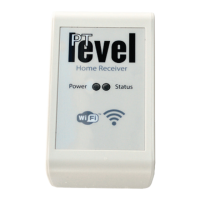
• PTLevel Receiver
• Power Supply
• 13’ of attached tubing
• Instructions
• Pressure chamber
• 4 AA Batteries
Contents
Watch Installation YouTube videos
Search for the ParemTech channel
PTDevices.com
Servers
110v Power
PTLevel
Receiver
Home Router
WiFi
Long Range
Wireless
Connection
5/32”
Black
Tubing
Pressure
Chamber
Cistern,
Well,
Tank, Etc..
Troubleshooting Maintenance
Calibration
Setup Overview
Can’t connect to WiFi
• Check the strength of the WiFi signal. Try moving the
receiver closer to your WiFi router.
• Ensure that the password you are entering is correct
during the setup. You can check by trying the password
with another device. Note: WiFi passwords are case
sensitive.
Level is not reading accurately
• Pull the weight out of the liquid volume, let it drain and
replace it back in the liquid. This resets the air pressure.
• Check for any possible air leaks along the tubing and
connections.
• Check for any water in the small back tube by applying
a slight vacuum to it.
Transmitter status conditions
• Three blinks slowly after pressing the connect button.
Successful connection
• Two quick flashes after pressing the connect button.
Cannot find/connect to the receiver. See below.
Receiver and Transmitter not connecting
• Check the distance and the objects in between. Try
moving the transmitter closer to see if a connection can
be established.
• Transmitter and receiver may not be linked for some
reason. Please contact us about this.
We recommend that once a season you remove the
pressure chamber from the liquid volume, let it drain,
then replace it into the liquid again. This resets the air
pocket and will keep the reading as accurate as
possible. Press the “connect” button on the transmit-
ter to update the online level. You should also
re-calibrate.
1. Measure the amount of liquid in the tank.
2. Divide that measurement by the full empty depth
of the tank.
Ie: 72” of water / 144” tank height = 0.5
3. Multiply the above result with 100 to get the
current percentage.
Ie: 0.5 * 100 = 50%
4. Enter the result from step 3 into the calibration
input online.
Make sure that your device is functioning and
connected online first.
Battery Replacement
Simply remove the four screws on the PTLevel
transmitter lid. Pull off the lid and the batteries will be
visible.
Question and Answer IconNeed help?

Do you have a question about the Paremtech PT Level and is the answer not in the manual?

Summary

Troubleshooting

Cant connect to WiFi

Check WiFi signal strength and ensure correct password entry for connection issues.

Level is not reading accurately

Troubleshoot inaccurate readings by resetting air pressure, checking for leaks, or water in tubes.

Receiver and Transmitter not connecting

Troubleshoot connection failures by checking distance, obstructions, or potential transmitter/receiver linking issues.

Maintenance and Calibration

Maintenance

Seasonally remove pressure chamber from liquid, drain, and re-insert to maintain accuracy.

Calibration

Calibrate by measuring liquid depth, calculating percentage of tank fill, and entering it online.

Setup and Installation

Setup Overview

Illustrates the physical components and connections for setting up the PTLevel system.

Battery Replacement

Instructions for removing the transmitter lid and replacing the four AA batteries.

Connecting the Home Receiver

Placement

Place the receiver inside where there is a power outlet and WiFi signal.

WiFi Connection Setup

Connect to the PTLevel WiFi via phone/tablet, enter 192.168.4.1, select strongest WiFi with internet.

Setting Up the Transmitter

Mounting the Transmitter

Mount the transmitter onto the tank securely, running the black tube through necessary holes.

Setup the Pressure Chamber

Connect the pressure chamber using the provided clamp, bushing, and tube, ensuring sealed connections.

Lower the Pressure Chamber

Slowly lower the connected pressure chamber into the liquid volume until it reaches the bottom.

Setting Up Online

Create an Account

Create an account on www.ptdevices.com or use social login.

Add Your Device

Add the PTLevel device to your account using its 12-character alphanumeric ID.

Final Setup

Complete setup by entering tank depth and configuring settings online.

Connecting and Finalizing Setup

Wait for the PTLevel to connect

Wait for the PTLevel to connect to the selected WiFi network.

Check the Wireless Connection

Verify connection by observing the transmitter's status LED blinking three times slowly.

Overview

The PTLevel is a device designed to monitor liquid levels in tanks, cisterns, or wells, providing real-time data through a wireless connection. It consists of two main components: the PTLevel Transmitter, which is installed at the liquid source, and the PTLevel Receiver, which connects to your home's WiFi network.

Function Description

The core function of the PTLevel is to accurately measure the liquid level using a pressure chamber. This chamber is submerged in the liquid, and the transmitter converts the pressure exerted by the liquid into a digital reading. This reading is then wirelessly sent to the PTLevel Receiver, which uploads the data to the cloud. Users can access this information online through the PTDevices.com website, allowing for remote monitoring of liquid levels. The system is designed to provide timely updates, helping users manage their liquid resources effectively.

Usage Features

Setup and Installation:

The setup process involves several steps to ensure accurate and reliable operation.

  1. Connecting the Home Receiver:

    • Placement: The receiver should be placed indoors in an area with a power outlet and a strong WiFi signal.
    • WiFi Connection Setup: Users connect their phone, tablet, or PC to the PTLevel WiFi network. They then open a browser and navigate to 192.168.4.1 to access the receiver's setup interface. From there, they select the strongest available WiFi signal with internet access, enter the password, and wait for the PTLevel to connect.
  2. Setting Up the Transmitter:

    • Mounting: The transmitter is mounted onto the tank being monitored, using screws or other suitable means. A drill hole is required for the tubing.
    • Pressure Chamber Assembly: The pressure chamber is connected to the transmitter using a black tube, clamp, and bushing. It is crucial to ensure all tubing connections are properly sealed to prevent inaccurate readings.
    • Lowering the Pressure Chamber: Once assembled and sealed, the pressure chamber is slowly lowered into the liquid volume until it reaches the bottom. It's important not to drop the chamber into an empty tank, as this could cause damage. The black tube can be cut shorter if needed, but this should only be done after pulling it out of the liquid and before disconnecting any tubing.
    • Wireless Connection Check: After installation, users press the "connect" button on the side of the PTLevel transmitter. If the status LED blinks three times slowly, it indicates a successful connection. Troubleshooting steps are provided if the LED does not blink as expected.
  3. Online Setup:

    • Account Creation: Users must create an account on www.ptdevices.com by selecting "Sign Up."
    • Device Addition: Once logged in, users select "Add PTLevel" from the menu or dashboard and enter the 12-character alphanumeric ID of their PTLevel device.
    • Connection Confirmation: After adding the device, the system waits for the device to connect. If the receiver is set up correctly, the waiting screen should disappear within a minute. If not, users can try removing and re-adding the device or reconnecting the WiFi.
    • Final Setup: Once connected, users should see a level reading online. Pressing the "connect" button on the transmitter provides a more recent reading. The "Please Setup" button allows users to enter the full depth of the tank and configure other settings.

Calibration:

Calibration is essential for accurate readings.

  1. Measure Liquid Amount: Determine the actual amount of liquid in the tank.
  2. Calculate Ratio: Divide the measured liquid amount by the full empty depth of the tank (e.g., 72" of water / 144" tank height = 0.5).
  3. Convert to Percentage: Multiply the result by 100 to get the current percentage (e.g., 0.5 * 100 = 50%).
  4. Enter Online: Input this percentage into the calibration field online and click the green button.

Troubleshooting:

The manual provides solutions for common issues:

  • Can't connect to WiFi: Check WiFi signal strength, move the receiver closer to the router, and verify the WiFi password (case-sensitive).
  • Level not reading accurately: Pull the weight out of the liquid, let it drain, and replace it to reset air pressure. Check for air leaks in tubing and connections, and inspect for water in the small back tube by applying a slight vacuum.
  • Transmitter status conditions: Three slow blinks indicate a successful connection, while two quick flashes mean the receiver cannot be found or connected.
  • Receiver and Transmitter not connecting: Check the distance between the components and any obstructing objects. Try moving the transmitter closer or contact support if the devices are not linked.

Maintenance Features

Seasonal Maintenance:

It is recommended to remove the pressure chamber from the liquid volume once a season. Allow it to drain completely, then replace it into the liquid. This process helps reset the air pocket, ensuring the reading remains as accurate as possible. After this, press the "connect" button on the transmitter to update the online level and re-calibrate the device.

Battery Replacement:

To replace the batteries, simply remove the four screws on the PTLevel transmitter lid. Lift off the lid to access and replace the AA batteries.

Paremtech PT Level Specifications

General IconGeneral
Power Supply12-36 VDC
TypeLevel Transmitter
Output4-20 mA, HART
Operating Temperature-40°C to +85°C
Process Connection1/2" NPT
Measurement Range0-1 m to 0-200 m
Resolution0.001 m