in
Parking and access control equipment manufactured in the UK
PF9700 Automated Hinge Gate
1. 2.
4.3.
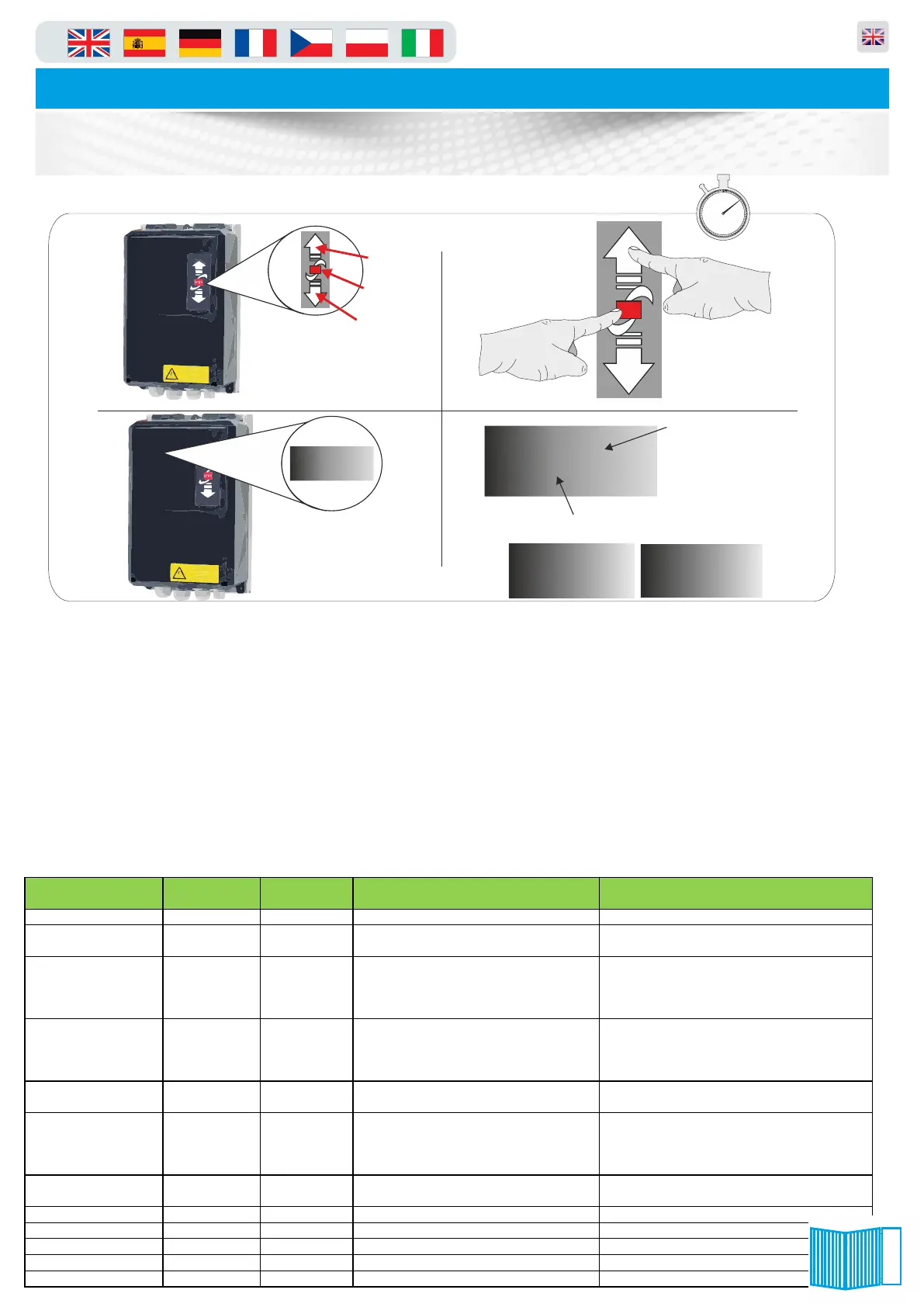
1. 1. On the front of the panel locate the function buttons (figure.1)
2. 2. Press and hold the up arrow and stop button together for 3 seconds (figure.2).
3. The LCD display and change to P.XXX (xxx will be a parameter number last used) you are now in
programming mode and can follow the next line of instructions. When finished and to exit programming mode
press and hold the stop button for 5 seconds.
4. To enter a parameter scroll using the arrow keys until the LCD display show the number you require
(figure.3) using the command buttons (figure.2). when the display shows the parameter number required in
the first column of the table below, press the STOP button for one second. You are now in that selected
parameter, should you wish to leave this parameter or discard any changes simply press the STOP button
again for 1 second ONLY!!. To make any adjustments in the selected parameter simply use the arrow keys
(figure.2) up or down, when the appropriate value is selected you should press and hold the STOP button
until the flashing dots between the value cease to flash (see figure.4). The value you selected has now been
saved to memory. To exit the menu press and hold the “stop” key for seven seconds until the LCD display
shows “STOP” or “AU” (figure.5) Below is a short list of commonly used parameters:
60
5
10
15
20
25
30
35
40
45
50
55
10 mins
STOP
UP ARROW
STOP BUTTON
DOWN ARROW
STOP
figure.2
P.999
figure.3
figure.1
.0.99
LED Dot
Normal State = Static
Changed State = Flashing
LED Letters
or numbers
figure.4
Pa ra m e te r D e sc rip tio n
Effe c t o f this ch a n g e:
P.999 1 3 Passw ord level to see A LL param eters A llo w s all param eters to b e seen
P.205 8 0 Tells p anel Lim its or en co d er
co nnected
8=encoder 0=m ech anical lim its
P.980 0 1~4 Th is param eter define s the m eth o d of
operation o f the barrier.
1=dead m an m o de
2= inp ut to open
3= inp ut to close
4= au to o pen/close (engin eers test m ode)
P.991 0101 4 options :- Th is param eter tells the p a nel w hat it
is con nected to . This is need ed as the
pan el is used on all of o ur produ cts
0101= Barrier m aster
0100=barrier slave
0300= Bi-Fo ldin g G ate
0200= Sliding Gate
P.460 0 1 Yo u ca n co nnect safety edges to th e
pan el, here yo u can turn it on o r off.
0= no safety edges co nnected
1= safety ed ge co nnected
P.010 0 Up to 1000 Th is param eter is w here yo u set the
“n o passage” tim er so if the ba rrier is
open ed and n o one drives th rou gh it
w ill clo se autom atically after this tim e
0=Tim er is de-activated
0-1000=tim e in secon ds
P.50A 0 1613 Th is says that yo u have co nnected a
second ary safety edge.
1=Seco nda ry safety edg e con nected
P.660 22 22 or 23 Defin es the op eration of loo p 1 22= Free Exit/E n try 23= Safety
P.670 22 22 or 23 Defin es the op eration of loo p 2 22= Free Exit/E n try 23= Safety
P.990 0 1 Resets th e p anel to its fa cto ry defau lt 1 = era se s all stored param ete rs
P.310 50 10~50 Increase or decrea se the op en sp eed Speed u p or slow d o w n op en ing
P.350 50 10~50 Increase or decrea se the close speed Sp eed up or slow dow n close
‘STOP’
figure.5
‘AU’
9
Panel Usage Guide


 To Next Page
 Loading...