18
Introduc` on
Key tasks of the program are idena#cabon and display of current posicon on the map, automadc and
manual see ng of route points, route planning, object search, calculafon and display of travel
informagon,
display and recording of trajectory of mohon in the form of a track, and much more.
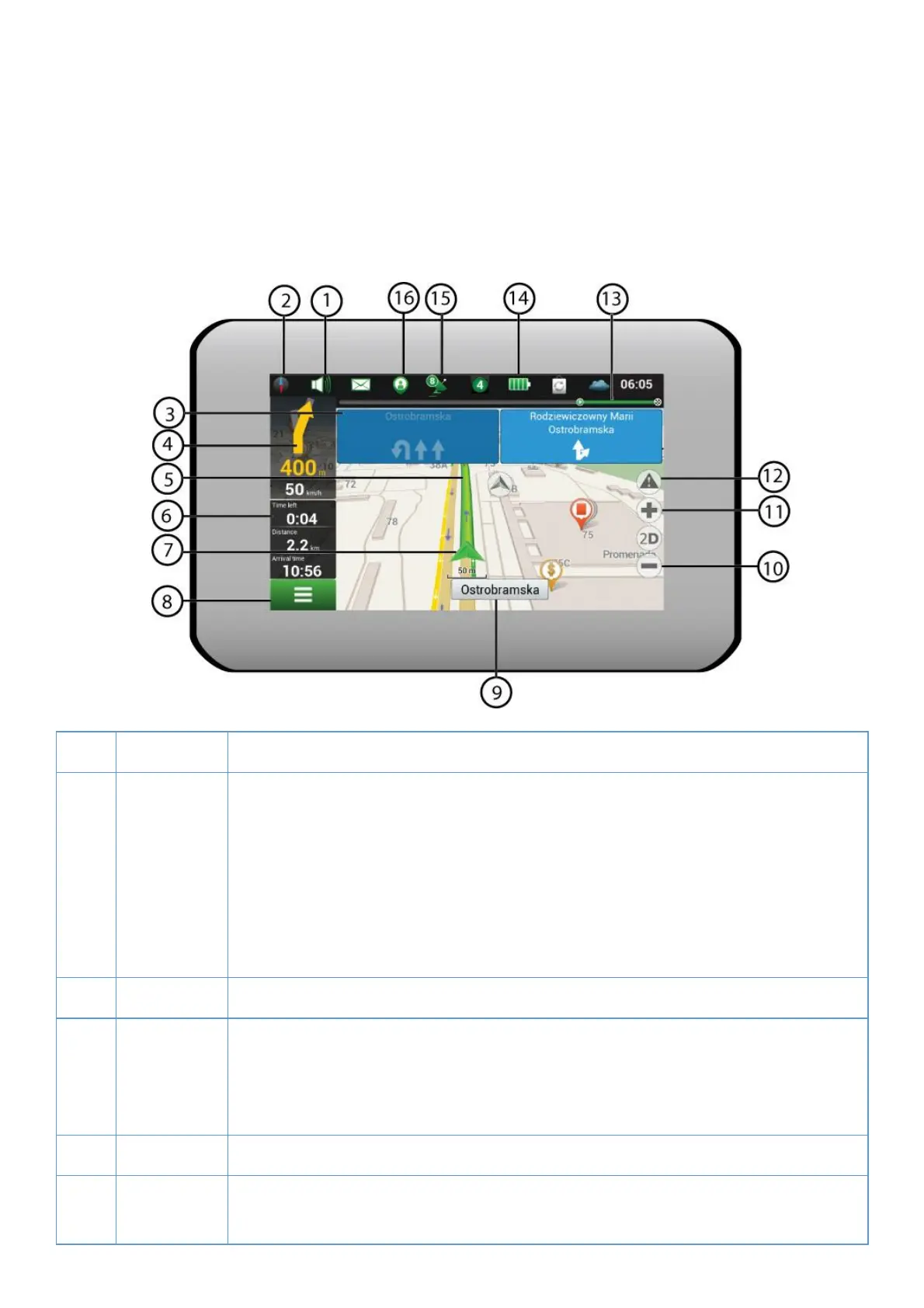
1. Program interface
1 Sound Tapping on the bui on opens the sound menu.
2 Compass Tapping on the bujon opens the context menu, which controls opkons of map
orientalon ("North up" – the map will always be oriented northwards, "Track up"
the map will always be oriented in the direcmon of movement along the route),
type of map view (Plain view "2D", Panoramic view "3D") and skins ("Night skin",
"Day skin", "Auto").
3 Road lanes The sign displays road lanes with possible manoeuvres.
4 Informanon
panel
The sign shows the upcoming manoeuvre (for example, turning) and distance to
the manoeuvre. Tapping on the sign opens the menu containing route opoons, for
instance an oppon which allows stopping route guidance.
5 Route Visualizaqon of a current route.
6 Informaron
panel
The panel shows current speed, the remaining sme to the destnauon point,
distance to the desvnawon point, and esx mated arrival yme.



 To Next Page
 Loading...