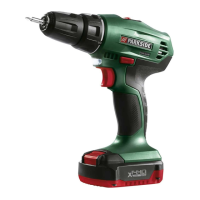
PABS 20-Li F7
■ 8
│
GB
│
IE
Checking the battery charge level
♦ To check the battery status, press the battery
charge level button 6 (see fig. E). The status/
remaining charge is shown on the battery
display LED 7 as follows:
GREEN/RED/ORANGE = maximum charge/
performance
RED/ORANGE = medium charge/performance
RED = low charge – charge the battery
Changing tools
Your cordless screwdriver has a fully automatic
spindle lock .
When the motor is at a standstill, the drive train is
locked so that you can open the drill chuck q by
turning it . After you have inserted the desired
tool and clamped it by turning the drill chuck ,
you can resume working immediately (see fig. F).
The spindle lock is released automatically when
the motor is started (by pressing the ON/OFF
switch 4).
Torque selection ring/drill setting
You can set the torque using the torque pre-
selection ring w (see fig. G).
♦ Select a low level for small screws or soft
materials.
♦ Select a high level for large screws, hard
materials or for removing screws.
♦ For drilling operations, select the drill setting
by moving the torque preselection ring w to
the
position.
2-speed gearbox
CAUTION!
► Operate the speed selector switch 1 only
when the appliance is at a standstill. Other-
wise the appliance could be damaged.
In first gear (speed selector switch 1 in
position 1) you can reach a speed of approx.
400 rpm and ahigh torque. This setting is suitable
for all screw driving jobs.
In second gear (speed selector switch 1 in
position 2) you can reach a speed of approx.
1400 rpm for carrying out drilling work.
Changing the cutter knife blade
WARNING!
■ Wear protective gloves!
♦ Press the red button on the rear end of the
cutter knife to pull out the spare blade holder
completely.
♦ Carefully remove the worn upper blade.
♦ Slide the spare blade holder back into the
housing.
Detaching the blunt cutter
knife blade
♦ Break the blunt section of the blade off at the
defined breaking point using a pair of pliers.
Use
Switching on/off
Switching on
♦ Press and hold the ON/OFF switch 4 to start
up the appliance.
The LED work light 0 lights up when the ON/
OFF switch 4 is pressed slightly or fully,
and illuminates the working area in low light
conditions.
Switching off
♦ Release the ON/OFF switch 4 to switch off the
appliance.



 To Next Page
 Loading...