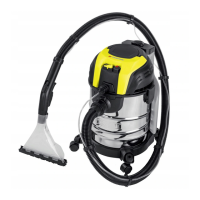
EasyManua.ls Logo

Parkside PWS 20 C2 - User Manual

Parkside PWS 20 C2
116 pages
Go to English
Print Icon
To Next Page IconTo Next Page
Loading...
IAN <<IAN>>IAN 419071_2210
Čistič koberců a čalounění
Překlad originálního provozního návodu
Teppich- und Polsterreiniger / Carpet and upholstery
cleaner PWS 20 C2
Środek do czyszczenia dywanów
i tapicerki
Tłumaczenie oryginalnej instrukcji obsługi
Čistič na koberce a čalúnenia
Preklad originálneho návodu na obsluhu
Teppich- und Polsterreiniger
Originalbetriebsanleitung
Carpet and upholstery cleaner
Translation of the original instructions
Čistać za tepihe i jastuke
Prijevod originalnih uputa za uporabu
Препарат за почистване на
килими и тапицерии
Превод на оригиналното ръководство за експлоатация
Produs pentru cuțat covoare
și tapițerie
Traducerea instrucţiunilor de utilizare originale
MD

Table of Contents

Other manuals for Parkside PWS 20 C2

Questions and Answers

  • K
    Kyle CunninghamAug 12, 2025
    What to do if my Parkside Vacuum Cleaner has low suction?
    • D
      Dr. Isaac ClayAug 12, 2025
      If your Parkside Vacuum Cleaner has low suction, it could be due to several reasons. First, check if the suction hose or nozzle is blocked and remove any obstructions. Ensure the air control on the handle is closed. Also, make sure the container is closed and not full; empty it if necessary. The filter might be full or clogged, so empty, clean, or replace it. Finally, check if the float in the filter basket can move freely; if not, release it. If the float is faulty, it should be repaired by Customer Care.
  • M
    Mason BrooksAug 16, 2025
    Why Parkside PWS 20 C2 has low suction?
    • A
      Anthony BurnsAug 16, 2025
      The Parkside Vacuum Cleaner might have low suction due to several reasons. The suction hose or nozzle could be blocked; remove any obstructions. The air control on the handle might be open; close it. The container might be open or full; ensure it's closed and empty it if necessary. The filter might be full or clogged; empty, clean, or replace the filter. The float in the filter basket might be stuck; release it. If the float is faulty, it requires repair by Customer Care.
  • M
    Melinda ThomasAug 20, 2025
    What to do if dust is blown out of my Parkside PWS 20 C2?
    • C
      Christina BowersAug 20, 2025
      If dust or dirt is being blown out of your Parkside Vacuum Cleaner, it's likely that the filter is either missing or not correctly assembled. To resolve this, either install the missing filters or ensure that the existing filter is positioned correctly.
  • K
    kathleenacostaAug 25, 2025
    How to fix a Parkside PWS 20 C2 that does not start?
    • M
      michaelwilliamsAug 25, 2025
      If your Parkside Vacuum Cleaner isn't starting, the issue might stem from a few causes. First, ensure that mains voltage is present by checking the plug socket, cable, line, plug, and fuse. If any of these are defective, have them repaired by an electrical specialist. A defective on/off switch may also be the cause, which requires repair through customer service. Other potential causes are worn carbon brushes or a defective motor.
  • C
    Christy NguyenAug 27, 2025
    What to do if Parkside PWS 20 C2 Vacuum Cleaner blows out dust?
    • E
      emilytorresAug 27, 2025
      If your Parkside Vacuum Cleaner is blowing out dust or dirt, the filter might be incorrectly assembled or missing. Ensure you are using the correct filters and that they are positioned correctly.
  • K
    Kim DanielsAug 31, 2025
    Why won't my Parkside PWS 20 C2 start?
    • J
      Jamie BrayAug 31, 2025
      If your Parkside Vacuum Cleaner won't start, the issue could stem from a few potential causes. Begin by verifying that the mains voltage is present by checking the plug socket, cable, line, plug, and fuse. If any of these components are defective, have them repaired by an electrical specialist. A defective on/off switch may also be the culprit, which should be repaired through customer service. Other potential causes are worn carbon brushes or a defective motor, but the manual does not specify solutions for these.
  • J
    James DavisSep 3, 2025
    What to do if the float doesn't switch off my Parkside PWS 20 C2 Vacuum Cleaner?
    • C
      Christopher CollinsSep 3, 2025
      If the float in the filter basket of your Parkside Vacuum Cleaner is not switching the appliance off, the float may not be moving freely. Release the float to ensure it can move. If the float is still faulty, it should be repaired by Customer Care.
  • C
    cody15Sep 7, 2025
    Why doesn't the float switch off my Parkside PWS 20 C2?
    • S
      Sarah SheltonSep 7, 2025
      If the float in the filter basket of your Parkside Vacuum Cleaner isn't switching the appliance off, it could be that the float is stuck and cannot move; try releasing it. Alternatively, the float itself may be faulty, requiring repair by Customer Care.

Summary

Introduction

Intended Purpose

Specifies the intended use of the carpet cleaner as a household appliance for cleaning carpets and wet/dry vacuuming.

General Description

Extent of Delivery

Lists all items included in the packaging of the appliance and its accessories.

Product Overview

Provides a breakdown of the main housing components of the carpet cleaner with reference numbers.

Description of Operation

Technical Data

Symbols and Icons

Symbols Used in Instructions

Explains symbols indicating hazards, precautions, and basic operations like plugging in the device.

Symbols on Appliance

Illustrates symbols found on the appliance, such as for electrical safety and disposal.

Nozzle and Filter Pictograms

Illustrates pictograms that denote the specific application for various nozzles and filters.

Safety Information

General Safety Precautions

Provides essential safety measures to prevent accidents, injuries, and fire risks when using the appliance.

Electrical Safety Precautions

Details crucial safety measures to prevent electric shocks, including cable checks and proper connection.

Assembly Instructions

Installing Accessories

Step-by-step instructions for connecting the vacuum hose, suction pipes, water tank, and nozzles.

Operation

Switching On and Off

Instructions on how to connect the mains plug and use the On/Off switch to start and stop the appliance.

Washer Function Operation

Taking Breaks

Dry Vacuuming

Using Paper Filter Bag for Dry Vacuuming

Instructions on how to correctly insert and use the paper filter bag for dry dirt collection.

Vacuuming Fine Dust

Recommendations for vacuuming fine dust, including using an optional fine dust filter bag.

Wet Suctioning

Carpet Cleaning Function

Cleaning and Maintenance

General Cleaning Procedures

Instructions for general cleaning of the appliance, emphasizing avoiding water contact and using specific cleaning agents.

Storage Instructions

Disposal and Environmental Protection

Troubleshooting Guide

Device Does Not Start

Lists possible causes and corrections for the appliance failing to start, such as checking power and switches.

Low or Lack of Suction

Troubleshooting steps for reduced suction power, including checking for blockages and filter condition.

Float Not Switching Off Appliance

Addresses issues where the float mechanism fails to shut off the appliance, suggesting float release or repair.

Dust;Dirt Blown Out of Device

Explains causes and solutions for dust or dirt being expelled from the device, related to filter assembly.

Replacement Parts and Accessories

Guarantee Information

Guarantee Terms

Details the duration, coverage, and conditions of the 3-year guarantee for material and manufacturing defects.

Guarantee Period and Statutory Claims

Explains that the guarantee period is not extended by service and covers pre-existing defects.

Guarantee Cover Details

Specifies what the guarantee covers (material/manufacturing defects) and what it excludes (wear parts, misuse).

Processing Guarantee Claims

Provides instructions on how to process a guarantee claim, including necessary information and contact methods.

Service Center Information

Importer Information

Repair Service

Exploded Drawing

Parkside PWS 20 C2 Specifications

General IconGeneral
BrandParkside
ModelPWS 20 C2
CategoryVacuum Cleaner
LanguageEnglish

Related product manuals