Downloading and Starting the App
1. install the URBAN fit App on your smartphone.
Please search for URBAN fit on Android Play Store or
iOS App Store.
3. Enter your information and press the OK button to
complete the setting. (User information is provided
based on the terms and conditions of the privacy policy.)
2. Select either URBAN Pro on the initial screen.
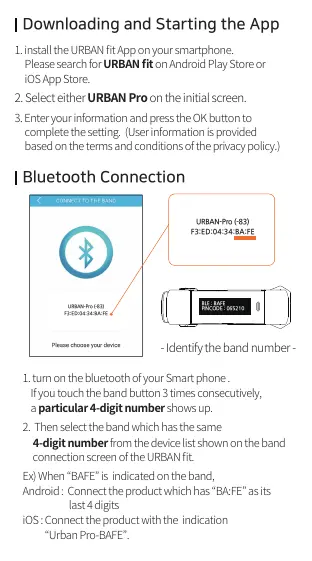
1. turn on the bluetooth of your Smart phone .
If you touch the band button 3 times consecutively,
a particular 4-digit number shows up.
2. Then select the band which has the same
4-digit number from the device list shown on the band
connection screen of the URBAN fit.
Ex) When “BAFE” is indicated on the band,
Android : Connect the product which has “BA:FE” as its
last 4 digits
iOS : Connect the product with the indication
“Urban Pro-BAFE”.
- Touch a Screen once -
(It moves on to the next information screen.)
- Touch the Screen twice -
(Exercise mode starts.
When you press and hold the button of the
band, the Exercise mode will be finished.)
Bluetooth Connection
BLE : BAFE
PINCODE : 065210
- Identify the band number -
URBAN-Pro (-83)
F3:ED:04:34:BA:FE
URBAN-Pro (-83)
F3:ED:04:34:BA:FE
All manuals and user guides at all-guides.com



 To Next Page