EasyManua.ls Logo

PASCO Pasport AirLink2 - User Manual

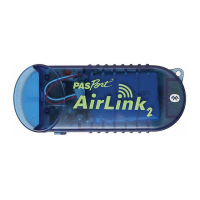
PASCO Pasport AirLink2
12 pages
Print Icon
To Next Page IconTo Next Page
Loading...
!
!"#$%&'$()"*+,"&,-
./01////23
PASPORT AirLink
2
PS-2010
*012-1111 4*
Equipment and Software
Introduction
!"#$%&'%()!$&*+,*-.
/
$*0$1$0#-02+$*-3#+415#$42+$%&'%()!$
0#-02+0$3"13$6*+#7#0078$52--#530$32$*%19:;$*%"2-#<$1-9$
*%29$32=5"<$9#>*5#0$1-9$?15*-320"<$1-9$@*-9260<$52AB
C=3#+0$3"+2=D"$E7=#3223":F$!"#$&*+,*-.
/
$=0#0$1$+#5"1+D#1G7#$
7*3"*=A$C278A#+$H,*B%278I$G133#+8$H*-03177#9I$1-9$52A#0$6*3"$1$
J'E$51G7#$3"13$177260$3"#$G133#+8$32$G#$+#5"1+D#9$6"*7#$3"#$
&*+,*-.
/
$*0$52--#53#9$32$1$52AC=3#+K0$J'E$C2+3$2+$1$J'E$
C26#+$0=CC78F$
About the Manual
%1+3$(-#$24$3"*0$A1-=17$9#05+*G#0$"26$32$=0#$3"#$&*+,*-.
/
$
6*3"$3"#$*%19;$*%"2-#$2+$*%29$32=5";$*-57=9*-D$"26$32$926-B
7219$1-9$+=-$3"#$'%&)L>=#$1CC7*513*2-$2-$3"#$*%19;$*%"2-#$2+$
*%29$32=5"F$%1+3$!62$9#05+*G#0$"26$32$=0#$3"#$&*+,*-.
/
$0#-02+$
*-3#+415#$6*3"$1$52AC=3#+$1-9$3"#$%&'M($N131'3=9*2$C+2B
D+1AF$
Bluetooth Requirements
!"#$*%19;$*%"2-#$1-9$*%29$32=5"$1+#$E7=#3223"$52AC13*G7#F$
M2-0=73$82=+$52AC=3#+K0$925=A#-313*2-$32$9#3#+A*-#$*4$*3$*0$
E7=#3223"B51C1G7#F$O2=+$?15*-320"$52AC=3#+$A=03$G#$+=--*-D$
?15$('$P$QRF/FQ$2+$"*D"#+$1-9$82=+$@*-9260$52AC=3#+$A=03$
G#$+=--*-D$@*-9260$P%$6*3"$'#+>*5#$%15.$/$H'%/I$2+$"*D"#+F$
Q
S4$82=+$52AC=3#+$*0$-23$17+#198$E7=#3223"$51C1G7#;$82=$A18$
G#$1G7#$32$199$E7=#3223"$51C1G*7*38$G8$C=+5"10*-D$1$E7=#3223"$
A29=7#$3"13$52--#530$32$1$52AC=3#+K0$J'E$C2+3$H0=5"$10$3"#$
%&'M($%'B/TTU$E7=#3223"$J'E$&91C3#+IF$@"#-$0#33*-D$=C$1$
@*-9260$52AC=3#+$6*3"$E7=#3223";$*3K0$G#03$32$3+8$3"#$9#41=73$
456477*89($':
;,"<,%=*;))>
?%@@"*;AB
C@- -)9*; AB
D@=*;AB
E83*F)%$*
G")$*#:)9"H
Included Part Number
FI8J4*I(%;("K
0
*8@"#)%*!"$@%L,'@ F810./.
E83*J,M-@N*L)%*?;O*)%*8FIDP*
8'(@"'@*;@,%"("Q*8<#$@R
F810S0T
N*")$*#:)9"
Also Required
FI8F4DU*8@"#)%
#@@*',$,-)Q*)%*9@M*#($@
,"=
(F,=*)%*(F:)"@*V?*)%*(F:)"@*V?8*)%*
(F)=*$)&':*G0"=*)%*V%=*Q@"@%,$()"H
#@@*999W,>>-@W')R
8FIDPX&@*,>>
#@@*999W($&"@#W')R6,>>#6
)%
B,$,8$&=()*8)L$9,%@*G/WYWT%Y*)%*-,$@%H
#@@*',$,-)Q*)%*9@M*#($@
3-&@$))$:*')R>,$(M-@*')R>&$@%
/

Questions and Answers

  • B
    Bethany RogersAug 3, 2025
    What to do if PASCO Pasport AirLink2 Accessories AirLink drops connection?
    • R
      russelljasonAug 3, 2025
      If your PASCO Accessories AirLink connection drops, here are a couple of things to try: First, you might be too far away from the AirLink. Try moving closer and reconnecting. Second, the battery could be low, so try recharging the device.
  • D
    Derrick VasquezAug 13, 2025
    What to do if software does not see PASCO Pasport AirLink2 AirLink?
    • D
      darin52Aug 13, 2025
      If the software isn't detecting your PASCO Accessories AirLink, check these things: * Make sure the AirLink is powered on. * Ensure the AirLink is within range. * Verify that the AirLink isn't already connected to another device (check the Status LEDs table). * If you're using Windows, confirm that the COM port in the DataStudio Setup window matches the COM port your computer has assigned to the AirLink.
  • M
    Melissa GoodAug 23, 2025
    What to do if software does not see sensor attached to PASCO Pasport AirLink2 Accessories AirLink?
    • I
      ilewisAug 23, 2025
      If the software isn't recognizing the sensor attached to your PASCO Accessories AirLink, try the following: 1. Make sure you're connected to the AirLink. 2. Check that the sensor is securely connected to the AirLink. 3. Try turning the interface off and then back on. Note that you'll need to reconnect after doing this.

Summary

Equipment and Software

PASPORT AirLink2 Sensor Interface

The PASPORT AirLink2 is a sensor interface for PASPORT sensors that wirelessly connects to devices.

Required Components and Software

Lists essential items like sensors, compatible devices, and necessary software like SPARKvue and DataStudio.

Powering and Status Indicators

Part One: Using with iPad, iPhone, iPod touch

Setting Up Apple Devices for Connection

Provides a step-by-step guide to pair and connect the AirLink2 with Apple mobile devices via Bluetooth.

Part Two: Using with a Computer

Macintosh OS X Bluetooth Setup

Windows 7 Bluetooth Setup

Windows XP SP2 Bluetooth Setup

Connecting PASPORT Sensors

Connecting AirLink2 with DataStudio

PASCO Pasport AirLink2 Specifications

General IconGeneral
BrandPASCO
ModelPasport AirLink2
CategoryAccessories
LanguageEnglish