3
P8036
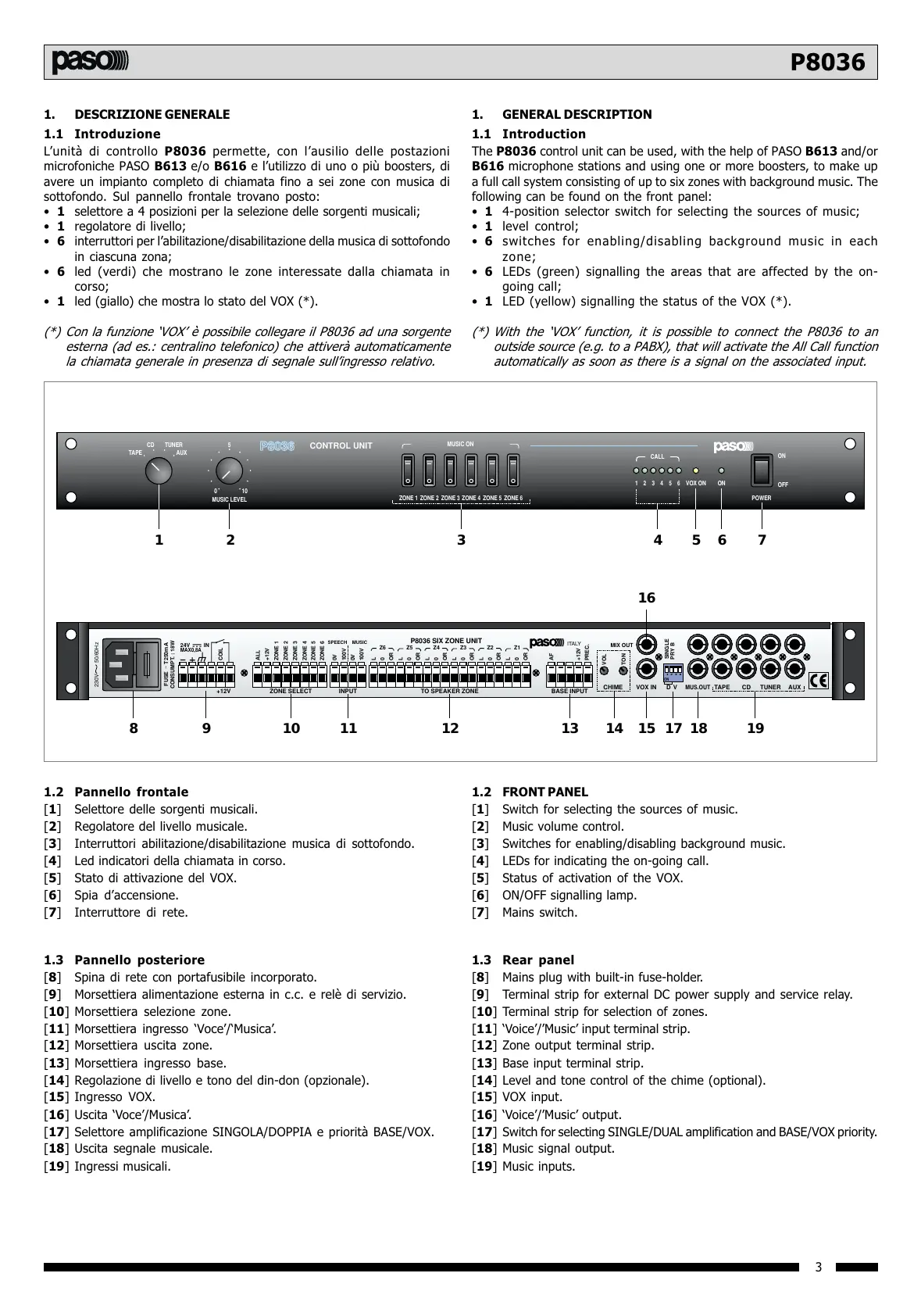
1.2 Pannello frontale
[1] Selettore delle sorgenti musicali.
[2] Regolatore del livello musicale.
[3] Interruttori abilitazione/disabilitazione musica di sottofondo.
[4] Led indicatori della chiamata in corso.
[5] Stato di attivazione del VOX.
[6] Spia daccensione.
[7] Interruttore di rete.
1.3 Pannello posteriore
[8] Spina di rete con portafusibile incorporato.
[9] Morsettiera alimentazione esterna in c.c. e relè di servizio.
[10] Morsettiera selezione zone.
[11] Morsettiera ingresso Voce/Musica.
[12] Morsettiera uscita zone.
[13] Morsettiera ingresso base.
[14] Regolazione di livello e tono del din-don (opzionale).
[15] Ingresso VOX.
[16] Uscita Voce/Musica.
[17] Selettore amplificazione SINGOLA/DOPPIA e priorità BASE/VOX.
[18] Uscita segnale musicale.
[19] Ingressi musicali.
1. DESCRIZIONE GENERALE
1.1 Introduzione
Lunità di controllo P8036 permette, con lausilio delle postazioni
microfoniche PASO B613 e/o B616 e lutilizzo di uno o più boosters, di
avere un impianto completo di chiamata fino a sei zone con musica di
sottofondo. Sul pannello frontale trovano posto:
1 selettore a 4 posizioni per la selezione delle sorgenti musicali;
1 regolatore di livello;
6 interruttori per labilitazione/disabilitazione della musica di sottofondo
in ciascuna zona;
6 led (verdi) che mostrano le zone interessate dalla chiamata in
corso;
1 led (giallo) che mostra lo stato del VOX (*).
(*) Con la funzione VOX è possibile collegare il P8036 ad una sorgente
esterna (ad es.: centralino telefonico) che attiverà automaticamente
la chiamata generale in presenza di segnale sullingresso relativo.
TAPE
CD TUNER
AUX
5
010
MUSIC LEVEL
CONTROL UNIT
1 2 3 4 5 6 VOX ON ON
ON
OFF
POWER
CALL
O O O O O O
ZONE 1 ZONE 2 ZONE 3 ZONE 4 ZONE 5 ZONE 6
MUSIC ON
12 3 4567
ON
1234
ITALY
+12V ZONE SELECT INPUT TO SPEAKER ZONE
P8036 SIX ZONE UNIT
BASE INPUT
CHIME VOX IN D V
MUS.OUT
TAPE CD TUNER AUX
FUSE
ALL
+12V
ZONE 1
ZONE 2
ZONE 3
ZONE 4
ZONE 5
SPEECH MUSIC
ZONE 6
0V
0V
100V
100V
CONSUMPT. : 18W
24V
MAX0,8A
IN
T250mA
L
0
OR
Z6
L
0
OR
Z5
L
0
OR
Z4
L
0
OR
Z3
L
0
OR
Z2
L
0
OR
Z1
AF
VOL
MIX OUT
TON
+12V
PREC.
SINGLE
PRY B
~
230V 50/60Hz
COIL
8 9 10 11 12 13 14 15
16
17 18 19
1.2 FRONT PANEL
[1] Switch for selecting the sources of music.
[2] Music volume control.
[3] Switches for enabling/disabling background music.
[4] LEDs for indicating the on-going call.
[5] Status of activation of the VOX.
[6] ON/OFF signalling lamp.
[7] Mains switch.
1.3 Rear panel
[8] Mains plug with built-in fuse-holder.
[9] Terminal strip for external DC power supply and service relay.
[10] Terminal strip for selection of zones.
[11] Voice/Music input terminal strip.
[12] Zone output terminal strip.
[13] Base input terminal strip.
[14] Level and tone control of the chime (optional).
[15] VOX input.
[16] Voice/Music output.
[17] Switch for selecting SINGLE/DUAL amplification and BASE/VOX priority.
[18] Music signal output.
[19] Music inputs.
1. GENERAL DESCRIPTION
1.1 Introduction
The P8036 control unit can be used, with the help of PASO B613 and/or
B616 microphone stations and using one or more boosters, to make up
a full call system consisting of up to six zones with background music. The
following can be found on the front panel:
1 4-position selector switch for selecting the sources of music;
1 level control;
6 switches for enabling/disabling background music in each
zone;
6 LEDs (green) signalling the areas that are affected by the on-
going call;
1 LED (yellow) signalling the status of the VOX (*).
(*) With the VOX function, it is possible to connect the P8036 to an
outside source (e.g. to a PABX), that will activate the All Call function
automatically as soon as there is a signal on the associated input.
All manuals and user guides at all-guides.com


 To Next Page
 Loading...