www.scanitparts.com
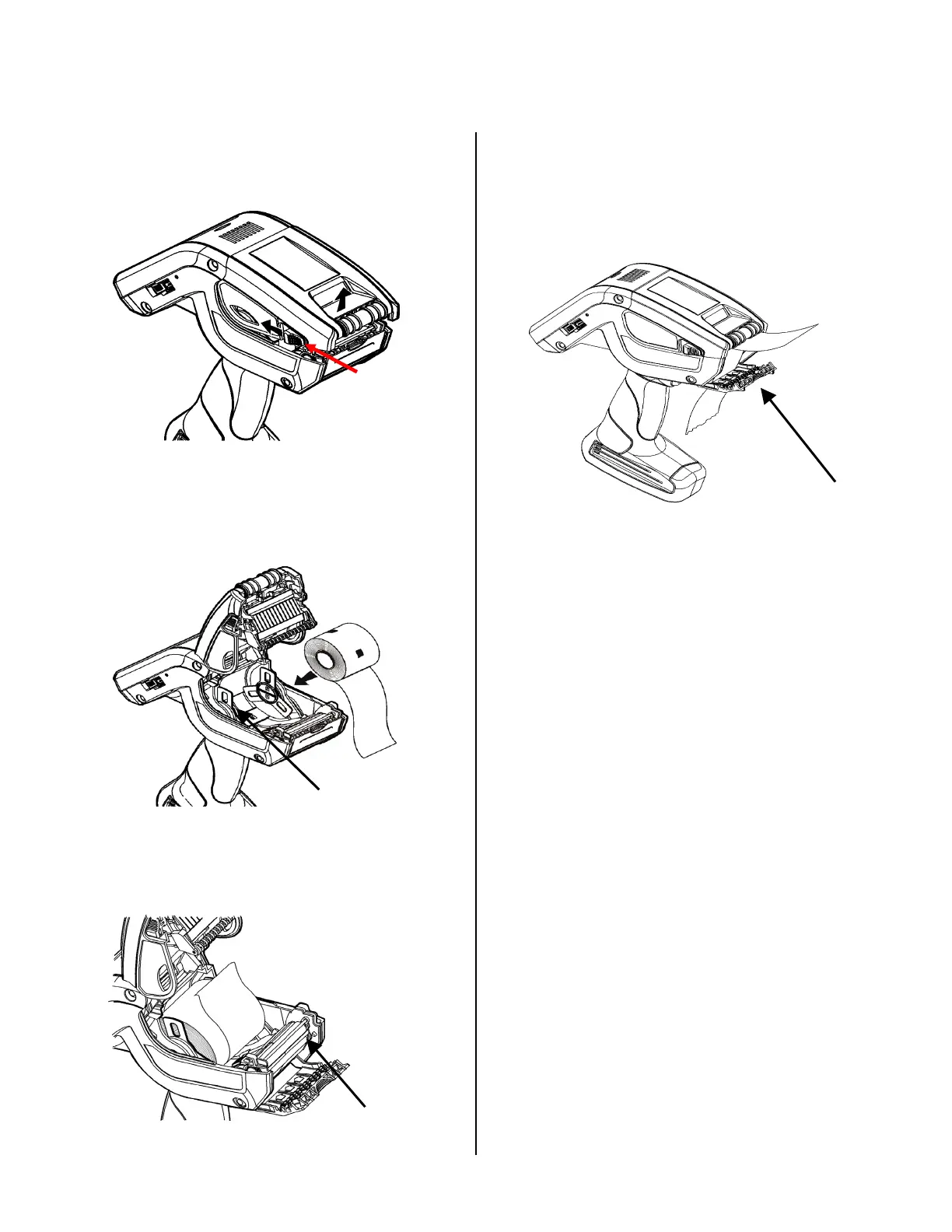
Load Labels in 10 Steps
1. Turnonthescanner
2. Pressthelatchbuttonsandopenthesupply
cover.
3. Peelanddiscardthefirstfourlabelsfromthe
backingpaper.
4. Placethelabelrollinthesupplyholdersothe
labelsfeedfromthebottom.
5. FeedtheblankbackingpaperOVERthepeel
bar.
PeelBar
6.FeedthepaperTHROUGHtheslotatthe
baseofthelabeldeflector.
Label
Deflector
7.Leave1/2inchoffirstlabelexposed.
8.Closethesupplycover.
9.Holdthebackingpaperandpushupthe
labeldeflectoruntilitsnapsintoplace.
10.ThenselecttheHotKeybuttonandpress
PaperFeed.Thescannershouldprinta
labelthatreads"PaperFeed".
Su
l
Holder



 To Next Page