Need help?
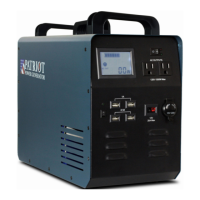
Do you have a question about the Patriot Power Generator 4.1L and is the answer not in the manual?
Highlights zero emissions, indoor use, and environmental safety.
Describes quiet operation and powering via natural resources.
Details the unit's compact size, weight, and value proposition.
Defines warning and caution symbols used for safety guidance.
Provides definitions for essential terms like AC, DC, kW, and PV.
Essential safety and operating instructions before unit use.
Covers risks of shock, cord inspection, and handling AC/DC connections.
Advises against disassembly and emphasizes professional repair for safety.
Guide to starting and understanding the manual for optimal use.
Lists the items received with the Patriot Power Generator.
Explains battery gauges, AC/DC outputs, and input status.
Important notes on powering off, storage, and battery care.
Identifies power button, LCD, AC outlets, switches, and DC ports.
Identifies cooling fan, AC/DC input ports, and expandable battery port.
Instructions for charging via AC power, including safety warnings.
Instructions for charging via DC sources like solar panels, with safety notes.
How to use AC outlets, power limits, and overload protection.
Using DC outlets for various devices up to specified amperage limits.
Details USB output limits per port and shared total output.
Information on connecting an optional external battery.
Troubleshoots power-on issues, suggesting battery recharge.
Addresses unit not charging, focusing on cable and connection checks.
Explains charge retention and maintenance for optimal battery life.
Discusses battery capacity, efficiency, and calculating device runtimes.
Methods to verify if the generator is fully charged from AC or DC sources.
How to read the battery gauge and avoid over-discharging.
Connecting solar panels via Anderson connectors and compatible power sources.
Tips for optimal solar panel positioning and avoiding obstructions for charging.
Instructions for connecting multiple solar panels in series for charging.
Discusses battery behavior with solar panels at night and proper disconnection.
Explanation of fans running after the unit is turned off for cooling.
Addresses potential odors and when to seek professional service.
Managing power consumption and battery life when using various devices.
Explains why the battery gauge might show a full charge quickly.
Details the 1500W limit and automatic cutoff for AC output ports.
Addresses power stops when using high-draw devices like space heaters.
Diagnosing why a tablet might not charge through USB ports.
Critical safety actions and warnings if the generator gets wet.
Clarifies that generators cannot be daisy-chained or connected in parallel.
Discusses the total AC/DC input limit and risks of over-charging.
Details unit controls, AC/DC input specifications, and output port capabilities.
Defines what defects and damages are included under the warranty.
Lists damages and usage scenarios not covered by the warranty.
Covers terms for damage, repairs, and the return process.
 General
| Brand | Patriot Power Generator |
|---|---|
| Model | 4.1L |
| Category | Portable Generator |
| Language | English |

 To Next Page