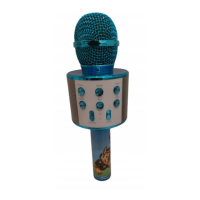
PL © 2021 PSI PATROL. Wszystkie prawa zastrzeżone Bezprzewodowy mikrofon karaoke
1
INSTRUKCJA OBSŁUGI
Bezprzewodowy mikrofon karaoke
Nr partii: 202106
Dane producenta:
mPTech Sp. z o. o.
ul. Nowogrodzka 31
00-511 Warszawa
Polska
Infolinia: (+48 71) 71 77 400
E-mail: pomoc@mptech.eu
Punkt dostarczania sprzętu:
mPTech Sp. z o. o.
ul. Krakowska 119
50-428 Wrocław
Polska
Zaprojektowano w Polsce
Wyprodukowano w Chinach
Spis treści
1. Bezpieczeństwo użytkowania .................................................................................. 1
2. Specyfikacja techniczna .............................................................................................. 3
2.1 Dane techniczne ................................................................................................................................... 3
2.2 Zawartość zestawu ............................................................................................................................. 3
3. Wygląd urządzenia ....................................................................................................... 4
4. Obsługa urządzenia ...................................................................................................... 5
4.1 Ładowanie akumulatora .................................................................................................................... 5
4.2 Połączenie poprzez Bluetooth ze źródłem muzyki (parowanie) ........................................ 5
4.3 Podłączanie pamięci masowej USB z muzyką ........................................................................... 5
4.4 Podłączanie karty pamięci z muzyką ............................................................................................ 5
4.5 Sterowanie odtwarzaniem muzyki z Bluetooth i USB ........................................................... 5
4.6 Podłączanie słuchawek lub zewnętrznego głośnika poprzez gniazdo minijack .......... 6
4.7 Przełączanie się pomiędzy kilkoma źródłami dźwięku ......................................................... 6
4.8 Efekty audio dla mikrofonu – tryb karaoke ............................................................................... 6
4.9 Migawka aparatu – tryb selfie ......................................................................................................... 6
5. Rozwiązywanie problemów ....................................................................................... 6
6. Konserwacja urządzenia ............................................................................................. 7
7. Prawidłowa utylizacja zużytego sprzętu i akumulatorów .............................. 7
8. Korzystanie z instrukcji ............................................................................................... 8
9. Gwarancja ........................................................................................................................ 8
10. Deklaracja zgodności z dyrektywami UE ............................................................ 8
1. Bezpieczeństwo użytkowania


 To Next Page
 General