
 Need help?
Do you have a question about the PBX Viper PBTWS50 and is the answer not in the manual?
Important safety guidelines to ensure proper and safe use of the device.
Key technical details like Bluetooth version, range, and battery capacity.
Lists all items included in the package for the user.
Identifies LED indicators and charging contacts on the case.
Details LED indicators and touch controls on the earbuds.
Explains how to charge the charging case and earbuds using a PC or outlet.
Details how to charge the earbuds using the charging case.
Instructions for powering the earbuds on and off.
Steps to pair the earbuds with a Bluetooth-enabled device.
How to play/pause music and adjust volume using touch controls.
Instructions for answering, ending, and rejecting phone calls.
How to activate and deactivate Siri on compatible devices.
Steps to re-pair earbuds if they lose connection or only one pairs.
Regulatory compliance statements and caution notices.
Details of the product's limited warranty and service.
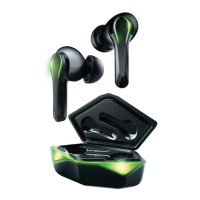
This document describes the PBTWS50 Viper True Wireless Gaming Earbuds, a device designed for an immersive audio experience, particularly for gaming, with features tailored for convenience and ease of use. The earbuds come with a charging case that not only protects them but also serves as a portable power source.
The PBTWS50 Viper earbuds are true wireless gaming earbuds, meaning they operate without any physical connection to a source device or to each other, offering complete freedom of movement. They are designed to provide high-quality audio for gaming, music, and video playback, and also support hands-free calling. The earbuds utilize Bluetooth technology for wireless connection to compatible devices.
The earbuds offer flexible power management. They automatically turn on when the charging case is opened, providing a seamless start to your audio experience. Alternatively, you can manually power them on by pressing and holding the touch control on both earbuds for 5 seconds, after which you will hear a "Power on" prompt. To power off, simply place the earbuds back into the charging case and close the cover; they will automatically shut down. Manual power-off is also possible by pressing and holding the touch control on both earbuds for 5 seconds, followed by a "Power off" prompt.
Pairing the earbuds with your device is a straightforward process. First, remove the earbuds from the charging case. They will automatically turn on, and their LED indicators will begin to flash, signaling they are in pairing mode. Next, navigate to the Bluetooth settings on your Bluetooth-enabled device and select "PBTWS50" from the list of available devices. Once successfully paired, you will hear a "Connected" prompt, and the LED indicators on both earbuds will flash slowly, confirming the connection.
In instances where the earbuds become unpaired from each other or only one earbud connects to your device, a re-pairing procedure is available. Begin by going to your device's Bluetooth settings, finding "PBTWS50" in the list, tapping the information icon (ⓘ), and manually selecting "Forget" the earbud(s). Then, turn off your device's Bluetooth. Place the earbuds back into the charging case and close the cover to turn them off. After a moment, take them out again to turn them back on. The earbuds should then automatically link to each other, and their LED indicators will flash. Finally, re-enable Bluetooth on your device and select "PBTWS50" from the list once more to complete the re-pairing process.
Controlling media playback is intuitive with the touch controls. A double-click on the touch control of either earbud will play or pause music or video. Volume adjustment is also managed via touch controls. To increase the volume, tap the touch control on the right earbud. To decrease the volume, tap the touch control on the left earbud. A subtle beep will confirm each volume change, and a clear beep will sound when the maximum or minimum volume is reached.
The earbuds facilitate hands-free calling. To answer an incoming call, double-click the touch control on either earbud. To end an active call, double-click the touch control on either earbud. If you wish to reject an incoming call, press and hold the touch control on either earbud for 2 seconds.
For users with Apple devices, the earbuds integrate with Siri. To activate Siri, press and hold the touch control on either earbud for 2 seconds. To deactivate Siri, press and hold the touch control on either earbud for 2 seconds again, and you will hear a beep confirming deactivation.
The PBTWS50 Viper earbuds and their charging case are designed for convenient charging. To charge both the case and the earbuds, ensure both earbuds are securely stored inside the charging case, and then close the case cover. Connect the small connector of the included USB Type-C charging cable into the charging port located on the charging case. The other end of the cable should be plugged into a USB power source, such as a USB port on a computer, or into a 5V USB adapter (not included) connected to an electrical outlet. While the case is charging, the LED indicators on the case will flash three times repeatedly. Once the charging case and earbuds are fully charged, these LED indicators will turn off.
The charging case itself acts as a portable power bank for the earbuds, allowing you to recharge them on the go. To charge the earbuds using the case, first ensure that the charging case itself is charged. Then, place the earbuds into their respective slots within the charging case. Close the cover of the charging case. The LED indicators on the charging case will light up to indicate that the earbuds are being charged. When the earbuds are fully charged, the LED indicators on the charging case will turn off. This feature is particularly useful when the earbud batteries are running low during use, providing extended listening time without needing an external power source.
To ensure the longevity and safe operation of your PBTWS50 Viper earbuds, it is crucial to follow certain guidelines. Always use manufacturer-approved batteries, chargers, accessories, and supplies. The device is not a toy and should not be used by children or pets. Avoid disassembling, modifying, or repairing the device yourself. Do not expose the earbuds to extreme temperatures (hot or cold), open flames, or humid/wet conditions, and never submerge them in water. Low power can affect Bluetooth connection quality and sound. Prevent overcharging the battery. If using a USB adapter, ensure it is not damaged. Keep the USB port and cable connectors free from dust, water, or conductive materials. The earbuds and case contain built-in batteries and should be disposed of responsibly, not with regular household waste. Consult local authorities for proper disposal methods.
 General
| Bluetooth Version | 5.0 |
|---|---|
| Frequency Response | 20Hz - 20kHz |
| Connection | Bluetooth |
| Connectivity | Wireless |
| Model | PBTWS50 |

 To Next Page