EasyManua.ls Logo

Peak Performance PKC0RB - User Manual

Peak Performance PKC0RB
4 pages
Print Icon
To Next Page IconTo Next Page
Loading...
Model No.: PKC0RA
Wireless Back-Up Camera and Monitor
OWNER’S MANUAL & WARRANTY INFORMATION
IMPORTANT:
READ THESE INSTRUCTIONS BEFORE USE AND RETAIN
FOR FUTURE REFERENCE.
1
Dear Customer,
CONGRATULATIONS. The PKC0RA Wireless Back-Up Camera and Monitor, when used as
described, will improve your ability to see behind your car, truck, RV, or mini-van. We have taken
numerous measures in quality control to ensure that your product arrives in top condition, and
will perform to your satisfaction.
Before You Install
Automotive video equipment installations can be difficult at times, even to the most
experienced of installation technicians. If you are not confident working with 12 volt DC
vehicle wiring, removing and reinstalling interior panels, carpeting, dashboards or other
components of your vehicle, contact the vehicle’s manufacturer, or consider having the
Wireless Back-Up Camera and Monitor professionally installed.
This device, as well as all other wireless devices, may be subject to interference.
Interference may be caused by cell phones, Bluetooth headsets, Wi-Fi routers,
power lines and other various electrical equipment, etc.
This device complies with Part 15 of the FCC Rules. Operation is subject to the following two
conditions: (1) this device may not cause harmful interference, and (2) this device must accept
any interference received, including interference that may cause undesired operation.
Parts
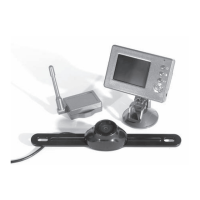
1. Monitor and Mounting Arm 2. Camera
3. Transmitter Box 4. Camera Mounting Accessories
5. Monitor Power Cable 6. Transmitter Box Power Cable
2
Some states or local governments may have regulations or laws that restrict the use of
anything that might impair the clear view of a license plate. Please check local laws for
compliance.
Question and Answer IconNeed help?

Do you have a question about the Peak Performance PKC0RB and is the answer not in the manual?

Summary

Parts Identification

Monitor and Mounting Arm

Identifies the monitor and its mounting hardware for the camera system.

Camera Unit

Identifies the primary camera component of the backup system.

Transmitter Box

Identifies the wireless transmitter unit for the camera system.

Camera Mounting Accessories

Lists the hardware provided for installing the camera.

Monitor Power Cable

Identifies the cable used to power the monitor from the vehicle.

Transmitter Box Power Cable

Identifies the cable used to power the transmitter.

Monitor Installation Guide

Choosing Monitor Location and Routing Cable

Guides selecting a mounting spot and routing the monitor power cable.

Mounting the Monitor

Details steps for attaching the monitor's suction mount to a surface.

Monitor Power Connection

Explains connecting the monitor to the vehicle's 12V power outlet.

Camera Installation Guide

Mounting Camera with License Plate

Attaches the camera using license plate bolts and provided spacers.

Routing Camera Power Cable

Guides routing the camera's power cable through the vehicle body.

Connecting Camera to Transmitter

Details connecting the camera cable and power to the transmitter box.

Locating Reverse Light Wire

Instructs on finding the vehicle's reverse light positive wire for power.

Monitor Controls and Testing

Blue LED Power Indicator

Explains the function of the blue LED indicator light on the monitor.

Power Button Operation

Describes how to turn the monitor display on and off.

Contrast Control Adjustment

Details how to adjust the screen contrast levels using the control button.

Brightness Adjustment

Explains how to adjust the screen brightness levels using the control button.

System Testing Procedure

Guides the user through testing the camera system's functionality.

Important Information

FCC Compliance Statement

Details FCC rules and potential interference for the device.

California and Minnesota Driving Notice

Advises on state laws regarding suction mount usage on windshields.

Limited Warranty Details

Outlines the ninety (90) day warranty and exclusions for the system.

Obtaining Service

Provides instructions and contact information for warranty service.

Overview

The provided manual describes the PEAK PKCORA Wireless Back-Up Camera and Monitor, a device designed to enhance a driver's ability to see behind their car, truck, RV, or mini-van. It aims to improve safety and convenience during reversing maneuvers.

Function Description:

The PKCORA system consists of a wireless camera and a monitor. The camera is typically mounted near the vehicle's license plate, providing a view of the area behind the vehicle. This video feed is wirelessly transmitted to the monitor, which is installed inside the vehicle, usually on the windshield or dashboard. When the vehicle is put into reverse, the monitor automatically displays the camera's image, allowing the driver to see potential obstacles or hazards that might not be visible in rearview mirrors. The system is designed to be a supplemental aid for reversing.

Important Technical Specifications:

The manual does not explicitly list detailed technical specifications such as camera resolution, wireless frequency, or monitor screen size. However, it does provide crucial electrical and regulatory information:

  • Power Source: The monitor is powered via a 12 Volt DC cigarette lighter adapter. The camera and its transmitter box are powered by connecting to the vehicle's reverse light circuit, which is typically a 12V+ wire.
  • FCC Compliance: The device complies with Part 15 of the FCC Rules, meaning it is designed to operate without causing harmful interference and to accept any interference received. Users are cautioned that the device, like all wireless devices, may be subject to interference from other electronic equipment such as cell phones, Bluetooth headsets, Wi-Fi routers, and power lines. Changes or modifications not expressly approved by the manufacturer could void the user's authority to operate the equipment.
  • Operating Conditions for Suction Mount: For optimal performance of the monitor's suction mount, the surface temperature should be between 70°F and 100°F (21°C and 38°C). Application below 50°F (10°C) should be avoided, and the mount should not be applied in direct sunlight. It should also be protected from direct sunlight for 24 hours after application.

Usage Features:

  • Wireless Operation: The primary feature is its wireless connectivity between the camera and monitor, simplifying installation by reducing the need for extensive wiring through the vehicle's interior.
  • Automatic Activation: The monitor automatically displays the camera's image when the vehicle is shifted into reverse gear, provided the monitor is powered ON (or in STANDBY mode).
  • Adjustable Camera Angle: The camera includes wedge-shaped spacers to adjust its mounting angle vertically, ensuring an optimal view despite variations in license plate mounting.
  • Monitor Mounting Flexibility: The monitor can be mounted on a smooth surface like the windshield or dashboard using a suction cup mount. The mounting arm allows for adjustment of the viewing angle.
  • Monitor Controls: The monitor features several user-adjustable controls:
    • Power ON/OFF Button: To turn the display on or off. A blue LED indicates when the monitor is ON.
    • Contrast Control: Allows adjustment through 10 levels to optimize image clarity.
    • Brightness Control: Allows adjustment through 10 levels to optimize image visibility in various lighting conditions.
    • Image Orientation Control: To correct the image if it does not match the driver's rear view mirror perspective.
  • Power Connection Options: The monitor uses a 12 Volt cigarette lighter adapter for power. The camera system connects directly to the vehicle's reverse light circuit, ensuring it activates only when needed.
  • Interference Warning: The manual explicitly warns about potential interference from other wireless and electrical devices, advising users to be aware of this possibility.
  • Installation Guidance: The manual provides detailed, step-by-step instructions for both monitor and camera installation, including advice on routing cables, drilling holes (with safety precautions), and connecting to the vehicle's electrical system. It also recommends seeking professional installation if the user is not confident with 12-volt DC vehicle wiring.

Maintenance Features:

The manual does not detail specific routine maintenance tasks for the device itself, such as cleaning or software updates. However, it does provide information related to:

  • Troubleshooting Interference: If interference occurs, users are advised to reorient or relocate the receiving antenna, increase separation between equipment and receiver, connect to a different circuit, or consult a technician.
  • Warranty Information: The product comes with a ninety (90) day limited warranty covering defects in material and workmanship. For service, customers are instructed to call a toll-free number and send the unit, postage prepaid and insured, to the manufacturer's technical services department, along with a copy of the original sales receipt.
  • Installation Best Practices: The installation instructions implicitly serve as maintenance guidelines by emphasizing secure cable routing, proper electrical connections, and avoiding damage to vehicle components, which can prevent future issues. For example, using the grommet when drilling a hole for the camera wire prevents the metal edge from cutting the cable.

Regulatory Compliance and Safety:

  • Local Laws: Users are advised to check local laws regarding anything that might impair the clear view of a license plate, as some states or local governments may have restrictions.
  • California and Minnesota Windshield Mounts: Drivers in California and Minnesota are prohibited by state law from using suction mounts on their windshields while operating motor vehicles. Alternative dashboard or friction mounting options are recommended in these states.
  • Installation Safety: Strong emphasis is placed on safety during installation, particularly when working with vehicle wiring and drilling. Users are warned to check what is behind drilling locations to avoid damaging electrical parts or fuel system components.
  • Screen Stabilization: Under extremely bright light conditions, the screen image may take a few seconds to stabilize, and users are advised to wait until the image has stabilized before backing up.

Peak Performance PKC0RB Specifications

General IconGeneral
BrandPeak Performance
ModelPKC0RB
CategoryAutomobile Electronics
LanguageEnglish