
 Need help?
Do you have a question about the PEAKMETER PM8908C and is the answer not in the manual?
Important warnings to prevent electric shock or personal injury during tester use.
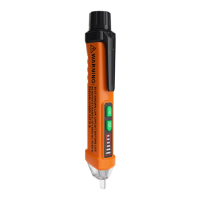
The NCV induction head for voltage detection.
Light indicating the presence of an induction voltage signal.
The integrated LED torch for illumination.
Indicators for high, medium, and low AC voltage signal strength.
Controls for powering the device and activating the torch.
Compartment for housing the batteries.
Instructions for turning the tester unit on and off.
Guide for turning the built-in torch on and off.
Procedure for detecting and indicating AC voltage levels.
Method to distinguish between live and zero wires.
Details on the automatic power-off functionality.
How the tester signals a low battery condition.
Steps for safely removing the battery compartment cover.
Guidance on inserting new batteries with correct polarity.
This document describes a non-contact AC voltage tester, designed for safety and ease of use in detecting live wires and AC voltage.
The primary function of this device is to detect AC voltage without direct contact, indicating its presence through sound and light alarms. It can identify AC voltage ranging from 12V to 1000V at frequencies of 50Hz/60Hz. The tester is equipped with an NCV (Non-Contact Voltage) induction head (1) that senses electrostatic fields produced by AC voltage. When voltage is detected, an induction voltage indicator light (2) flashes, and the device emits different alarm sounds. The intensity of the detected signal is indicated by three LED lights: high (4), medium (5), and low (6) signal intensity indicators. This allows users to gauge the proximity and strength of the AC voltage.
Beyond voltage detection, the tester also features a torch lamp (3) for illuminating work areas, which can be turned on and off using the torch key (8). The device includes a zero/live wire judgment function, which helps differentiate between live and neutral wires by detecting stronger signals on live wires and weak or no inductive signals on zero wires.
For power management, the tester has a power key (7) with an integrated power indicator. It also incorporates an auto power-off feature, which turns off the device automatically after approximately 5 minutes of inactivity or if no voltage signal is detected, conserving battery life. A low battery indication alerts the user when the battery voltage drops below 2.6V, flashing the power indicator and beeping before shutting down.
Turning On/Off the Tester: To turn on, press the power key (7) for more than 1 second; the power indicator light will illuminate. To turn off, press the power key; the power indicator light will turn off.
Turning On/Off the Torch: To turn on the torch, press the torch key (8). To turn off the torch, press the torch key again. If left on, the torch will automatically turn off after approximately 5 minutes.
AC Voltage Detection: Insert the probe into a power socket or bring it close to a live wire. When AC voltage is detected, the induction voltage signal lamp (2) will flash. The tester will illuminate the corresponding signal intensity indicator (high, medium, or low) based on the signal strength, and the buzzer will emit different alarm sounds. A low signal intensity indicator lights up for initial detection, while higher voltage signals will activate the medium and then high intensity indicators.
Zero/Live Wire Judgment: Separate the two wires to be tested as much as possible. Bring the tester's probe close to each wire. If testing a socket, insert the probe into the socket. A strong signal indicates a live wire, while a weak or no inductive signal indicates a neutral (zero) wire.
Safety Instructions: Users are advised to strictly follow the instructions to ensure the protection function of the tester. Do not use the device if the power indicator is off or if the tester appears damaged (e.g., cracked or broken probe). Always test on a known live power source before use to confirm the product is working correctly. The tester indicates effective voltage when the AC voltage produces a sufficiently strong electrostatic field; very low field strengths may not be detected. Factors such as shielded wires, insulation thickness, distance from the voltage source, and socket design can affect detection. Do not apply voltage exceeding the tester's rated voltage. Exercise special care when testing AC voltage above 30V due to the risk of electric shock. Always use proper protective equipment and comply with local and national safety regulations.
Low Battery Indication: When the battery voltage drops to approximately 2.6V, the power indicator will flash 3 times, and the buzzer will beep before the device automatically shuts off. This indicates that the batteries need to be replaced.
Battery Replacement:
 General
| Brand | PEAKMETER |
|---|---|
| Model | PM8908C |
| Category | Circuit Tester |
| Language | English |

 To Next Page