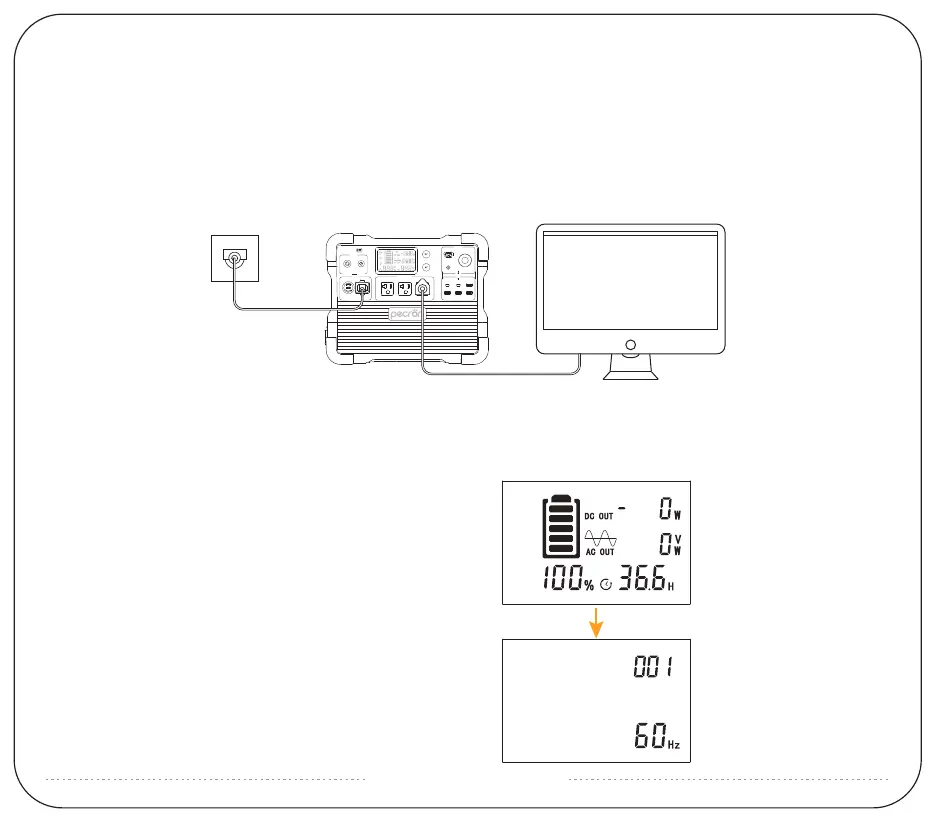
UPS FUNCTION
The E1500 LFP supports UPS function. It can provide the loads(such as computers, data centers, telecommunication equipment)
near-instantaneous(within 8~20ms) protection from unexpected power interruptions of the main power supply.
Note: Not applicable to specific applications that need transfer time under 8ms, such as servers and workstations.
This UPS function only support protection for loads under 1800W(120V), we recommend that you only connect one
device at a time to avoid overload and thus result in protection failure.
PECRON is not responsible for any devices damege or loss of data resulting from failing to follow the instructions.
support@pecron.com
1:After power on, long press the AC + DC switch,
see the battery symbol flashing, enter the setting
item;
2:See item 001 setting, which is the AC output frequency,
short press DC, switch 50/60Hz; short press AC, enter
the next item;
HOW TO ADJUST THE AC OUTPUT FREQUENCY VOLTAGE
AND NO-POWER AUTOMATIC SHUTDOWN TIME OF E1500 LFP.
E1500
100V~120V-15A(MAX)
AC INPUT AC OUTPUT-2200W
DC 输出
12V-30A(MAX)
12V-5A 12V-10A
12V-10A
USB
100W 18W 18W
18W 18W 18W
32V~95V
700W(MAX)
12V~18V
100W(MAX)
DC INPUT


 To Next Page