ISSUED: 07-25-11 SHEET #: 090-9203-1
6 of 6
Visit the Peerless Web Site at www.peerlessmounts.com
For customer care call 1-800-865-2112
© 2011 Peerless Industries, Inc. All rights reserved.
All other brand and product names are trademarks or registered trademarks of their respective owners.
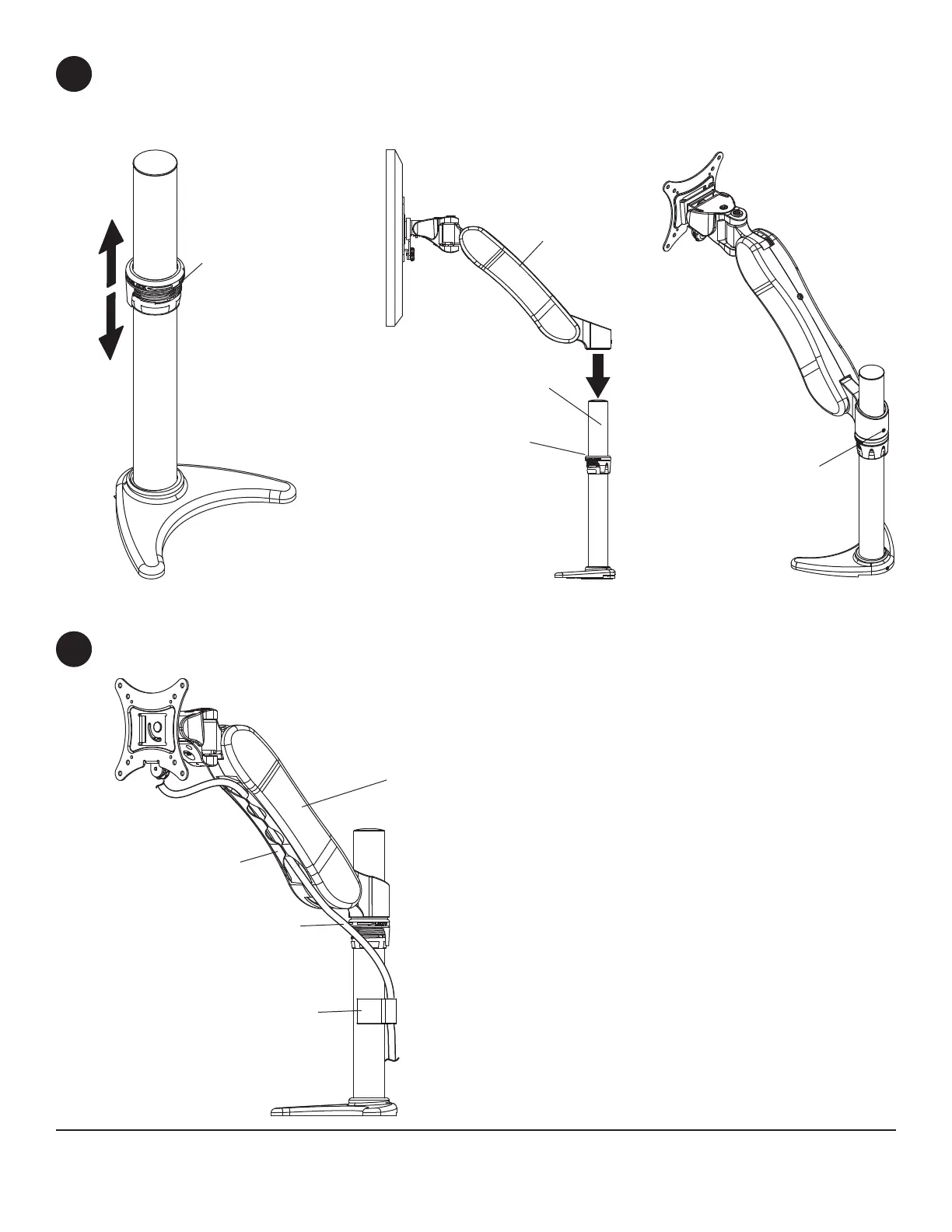
Cables may be routed using cavity in arm
assembly (B) and cable clip (M).
6
B
B
M
A
LOCK COLLAR
SET SCREW
CABLES
CAVITY
Loosen and position lock collar to desired height and retighten lock collar as shown in fi gure 5.1.
Insert
arm assembly (B) onto column assembly (A) and let it rest on lock collar as shown in fi gure 5.2.
Tighten set screw on rear of arm assembly (B) using 2.5 mm allen wrench (L) as shown in fi gure 5.3.
5
LOCK COLLAR
fi g. 5.1 fi g. 5.2 fi g. 5.3



 To Previous Page