7 of 32
ISSUED: 03-31-10 SHEET #: 095-9347-6 03-22-12
• Do not lift more weight than you can handle. Use additional man power or mechanical lifting equipment to safely
handle placement of the screen.
• Do not tighten screws with excessive force. Overtightening can cause damage to mount. Tighten M10 x 15mm
screws (E) to 40 in. • lb (4.52 N.M.) maximum torque.
WARNING
NOTE: Refer to PLP model instruction sheet for attachment of dedicated PLP plate to screen.
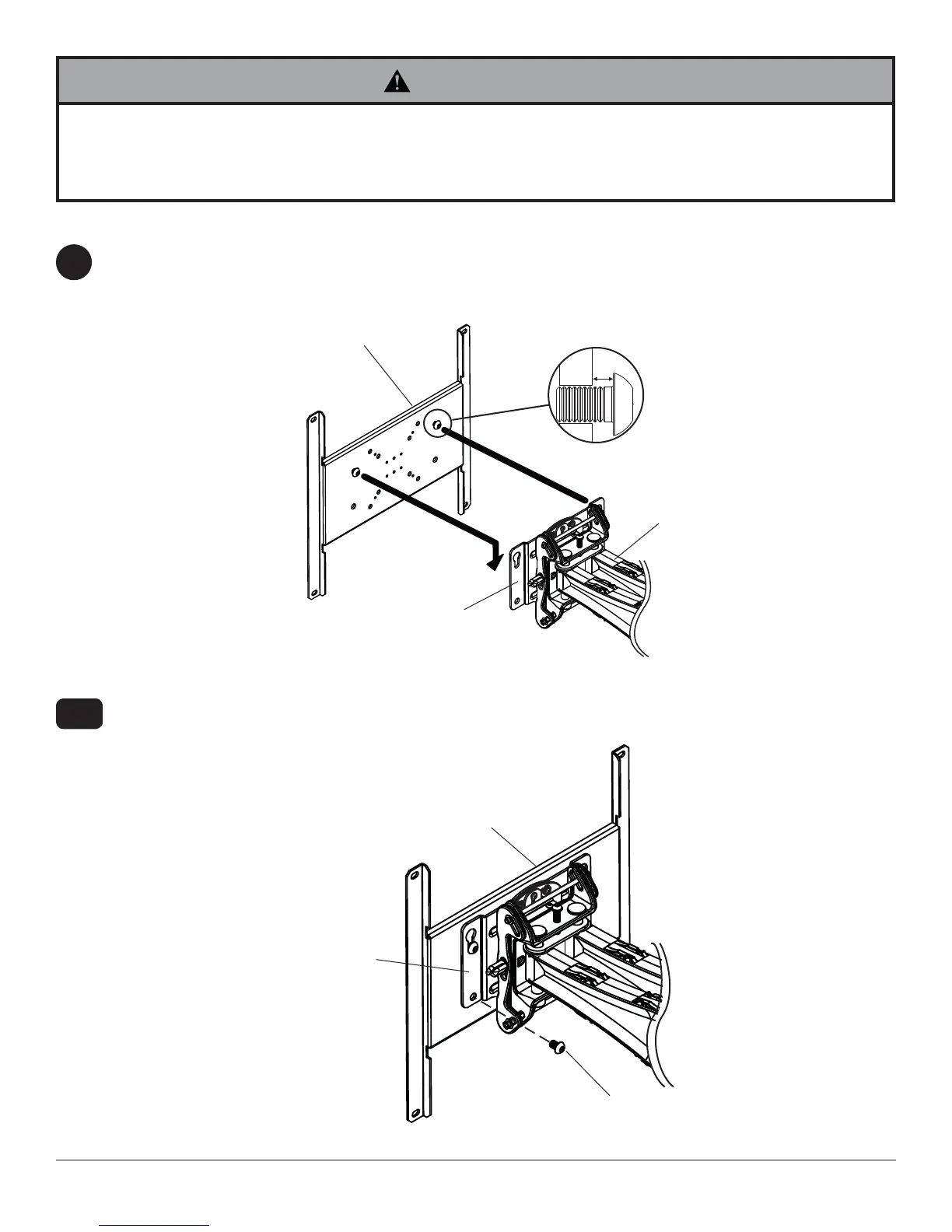
Install two M10 x 15mm screws (provided with dedicated PLP plate) into top two holes of dedicated PLP plate
leaving 1/4" of exposed thread as shown in fi gure 4.1.
Insert two M10 x 15mm screws (E) into bottom holes of adapter plate as shown in fi gure 4.2. Tighten all fasteners
with 6mm allen wrench (H).
4-1
Mounting Flat Panel Screen
4
A
DEDICATED
PLP PLATE
ADAPTER PLATE
M10 X 15MM
SCREW
1/4"
fi g. 4.1
fi g. 4.2
ADAPTER PLATE
DEDICATED PLP PLATE
E




 To Next Page