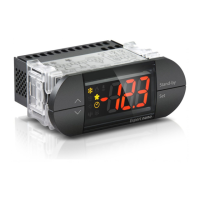
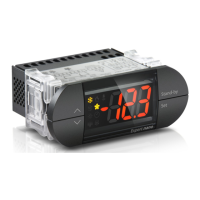
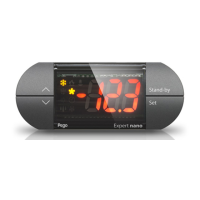
Termoregolatore elettronico / Electronic thermostat
Manuale d’uso e manutenzione / Use and maintenance manual
Manuale d’uso e manutenzione / Use and maintenance manual
PEGO S.r.l.
Via Piacentina, 6/b - 45030 - ROVIGO
Tel : +39(0)425 762906 - Fax: +39(0)425 762905
www.pego.it - e-mail: info@pego.it
200NAN2ZN_01-12_ITA_ENG # Rev.01-12 # 26/01/2012
Manuale d’uso e manutenzione / Use and maintenance manual
LIST OF FIRST LEVEL VARIABLES
(User level)
Temperature differential in relation to principal
SET‐POINT 1.
< Range: 0,2 ÷ 10,0°C >
Expressed in absolute values and defines hysteresis
(positive if mOd=2 or negative if mOd=0, 1 or 3) of
temperature in relation to SET POINT 1.
Temperature differential in relation to principal
SET‐POINT 2.
< Range: 0,2 ÷ 10,0°C >
Expressed in absolute values and defines hysteresis
(positive if mOd=3 or negative if mOd=0, 1 or 2) of
temperature in relation to SET POINT 2.
Minimum temperature alarm.
< Range: - 45 ÷ (A2-1)°C >
Absolute temperature referred to by the ambient
probe below which, following the ALD delay, the
LOW temperature alarm is triggered, activating the
buzzer (if active) and showing the letters EL
alternating with the temperature on the display, as
well as the flashing alarm icon. When the alarm is
reset the alarm icon remains on without flashing to
indicate that the event occurred, until the UP key is
pressed.
Maximum temperature alarm.
< Range: (A1+1) ÷ 99°C >
Absolute temperature referred to by the ambient
probe above which, following the ALD delay, the
HIGH temperature alarm is triggered, activating the
buzzer (if active) and showing the letters EH
alternating with the temperature on the display, as
well as the flashing alarm icon. When the alarm is
reset the alarm icon remains on without flashing to
indicate that the event occurred, until the UP key is
pressed.
LIST OF SECOND LEVEL VARIABLES
(Installer level)
Minimum time between each turning off and on of
an output.
< Range: 0 ÷ 15 min >
Electronic regulator operating mode.
< Range: 0 ÷ 3 >
0 = Neutral zone
1 = Neutral zone with double setpoint
2 = Double setpoint (Cold calling)
3 = Double setpoint (Hot calling)
Minimum value attributable to set points.
< Range: -45 ÷ (HSE-1) °C >
Maximum value attributable to set points.
< Range: +99 ÷ (LSE+1) °C >
Ambient probe value correction.
< Range: -10,0 ÷ 10,0 °C >
Delay time for signalling and display of minimum
and maximum temperature alarm.
< Range: 0 ÷ 240 > (0 = instantaneous alarm)
Network address for connection to TeleNET or
Modbus supervision system.
< Range: 0 ÷ 31 (con SEr=0)
1 ÷ 247 (con SEr=1) >
RS‐485 communication protocol.
< Range: 0 ÷ 1 >
0= TeleNET protocol
1= Modbus-RTU protocol
Modbus baudrate.
< Range: 0 ÷ 8 >
0 = 300 baud
1 = 600 baud
2= 1200 baud
3 = 2400 baud
4 = 4800 baud
5 = 9600 baud
6 = 14400 baud
7 = 19200 baud
8 = 38400 baud
Modbus parity control configuration.
< Range: 0 ÷ 2 >
0 = none parity
1 = even parity
2 = odd parity
Modbus stop bit configuration.
< Range: 1 ÷ 2 >
1 = 1 stop bit
2 = 2 stop bits
Buzzer state.
< Range: 0 ÷ 1 >
0 = disactivated buzzer
1 = attivated buzzer
Password: protection type
( active when PA is different from 0)
< Range: 0 ÷ 3 >
0= Displays only the set point 1 and allows alarm
stop
1= Blocks access to levels 1 and 2 during
programming (all other functions permitted)
2= Blocks access to level 2 during programming (all
other functions permitted)
Password (see P1 for protection type)
< Range: 0 ÷ 999 / 0=Disabled >
THERMOSTAT FUNCTION MODES (mOd)
The variable mOd allows the selection of function mode of the
thermostat, in particular:
NEUTRAL ZONE MODE (mOd=0)
DO1 output is activated when the ambient temperature
measured by the probe reaches or exceeds the value of SET
POINT 1 + r2, and remains active until the temperature drops
below the SET POINT 1. In this mode the DO1 output is
combined to cold icon power up.
DO2 output is activated when the ambient temperature
measured by the probe reaches or drops below the value of SET
POINT 1 - r1 and remains active until the temperature exceeds
the SET POINT 1. In this mode the DO2 output is combined to
hot icon power up.
NEUTRAL ZONE WITH DOUBLE SETPOINT MODE (mOd=1)
DO1 output is activated when the ambient temperature
measured by the probe reaches or exceeds the value of SET
POINT 2 + r2, and remains active until the temperature drops
below the SET POINT 2. In this mode the DO1 output is
combined to cold icon power up.
The output DO2 is activated when the ambient temperature
measured by the probe reaches or drops below the value of SET
POINT 1 - r1 and remains active until the temperature exceeds
the SET POINT 1. In this mode the DO2 output is combined to
hot icon power up.
When the temperature measured by the probe is between
Setpoint 1 and Setpoint 2 the output is not activated.
DOUBLE SET POINT COLD CALLING MODE (MOD = 2)
DO1 output is activated when the ambient temperature
measured by the probe reaches or exceeds the value of SET
POINT 1 + r1 and remains active until the temperature
decreases and drops below the SET POINT 1. In this mode the
DO1 output is combined to cold icons and Setpoint 1 icon
power on.
DO2 output is activated when the ambient temperature
measured by the probe reaches or exceeds the value of SET
POINT 2 + r2, and remains active until the temperature
decreases and drops below the set point 2. In this mode the
DO2 output is combined to to cold icons and Setpoint 2 icon
power on.
DOUBLE SET POINT HOT CALLING MODE (MOD = 3)
DO1 output is activated when the ambient temperature
measured by the probe reaches or drops below the value of SET
POINT 1 - r1 and remains active until the temperature rises and
exceeds the SET POINT 1. In this mode the DO1 output is
combined to hot icons and Setpoint 1 icon power on.
DO2 output is activated when the ambient temperature
measured by the probe reaches or drops below the value of SET
POINT 2 - r2, and remains active until the temperature rises and
exceeds the SET POINT 2. In this mode the DO2 output is
combined to hot icons and Setpoint 2 icon power on.
PASSWORD FUNCTION
The password function is activated by entering a value other
than 0 for the PA parameter. See parameter P1 for various
protection levels. The protection is activated automatically if
the keyboard remains inactive for about 30 seconds. The figure
000 appears on the display. Use the up/down keys to change
the number and the SET key to confirm. The password entry
template 000 disappears if the keyboard is not activated within
30 seconds.
If you forget the password, use the universal number 100.
RS-485 CONNECTION
Connection to a RS485 network must be chain type, avoiding
star connections and observing A and B polarity. It is advisable
to use BELDEN 8762 cables. The configuration of the device in
the TeleNET program is performed by entering the module
name such as “Expert Nano 2 ZN device” and assigning to it the
same network address entered in the variable Ad. For a
Modbus-RTU network connection and for details on the
protocols of these devices, refer to the manual “MODBUS-
RTU_NANO_2ZN” which can be downloaded from our internet
site at www.pego.it.
DIAGNOSTICS
The display shows ‘orH’ for temperature out of range
greater than +99.9°C, or ‘orL’ for temperature out of range
less than -45.0°C.
In the case of faults, the “Expert nano” control unit informs the
operator by means of alarm codes shown on the display and an
acoustic signal emitted by the buzzer (if active). The acoustic
alarm can be stopped by pressing the UP key and can be
reactivated by pressing the SET key. In the event of an alarm,
one of the following messages is displayed:
ALARM CODE TABLE
Functional fault of ambient probe.
EEPROM memory error. All outputs are deactivated except for
alarm outputs if present.
Minimum temperature alarm. The letters EL flash alternating
with the temperature (see parameter A1).
Maximum temperature alarm. The letters EH flash alternating
with the temperature (see parameter A2).


 To Next Page
 Loading...