
 Need help?
Do you have a question about the Peltor Tactical 500 and is the answer not in the manual?
Instructions for installing 1.5V AA batteries or the optional rechargeable battery pack.
Procedure for charging the rechargeable battery pack using a micro-USB cable and power source.
Guidance on how to properly extend sliders and position earcups for optimal fit and seal.
How to turn the headset on/off and adjust ambient volume using the up/down arrows.
Understanding low battery alerts and the automatic power-off feature to conserve battery.
Explanation of adaptive suppression time and clear voice tracking for enhanced audio experience.
Steps to connect the hearing protector to an audio device using the 3.5mm audio cable.
Using the hearing protector for volume control and device track navigation (play/pause, forward/back).
Instructions for pairing your Bluetooth-enabled device with the hearing protector.
How to answer, reject, or disconnect calls, and how alerts affect audio playback.
Information on the typical wireless range and factors affecting signal quality.
Overview of button functions, including power, volume, and track controls.
A chart detailing button press actions for Bluetooth, Audio Input, and Phone Call modes.
Defines product's intended use and explains signal word consequences (Warning, Caution).
Precautions regarding battery handling, mixing, charging, and potential risks like explosion and fire.
Ensuring proper fit, maintenance, and usage for effective protection against harmful noise.
Safety regarding battery storage, chemical exposure, and proper disposal of electronic waste (WEEE).
FCC and ISEDC warnings and compliance statements for radio frequency device operation.
The NRR measure, its limitations, and its applicability to continuous vs. impulse noise.
An example calculation showing how NRR reduces environmental noise level to the ear's exposure level.
Discussion on NRR overestimation due to fit, skill, and the recommendation to reduce NRR by 50%.
Detailed mean attenuation and standard deviation across various frequencies, including NRR and CSA Class.
Guidelines on managing audio input levels to prevent harmful noise exposure, especially with PMPs.
Information on the one-year limited warranty, coverage, and requirements for verification.
How to enter setup mode and navigate between features using the headset controls.
Details on Adaptive Suppression Time, Surround Sound Filtering, Auto Power-Off, Bluetooth, and Dosimeter/Limiter settings.
 General
| Noise Reduction Rating | 26 dB |
|---|---|
| Bluetooth | Yes |
| Microphone | Yes |
| Automatic Shut-off | Yes |
| Sound Amplification | Yes |
| Color | Black |
| Water Resistance | No |
| Battery Type | 2 AA batteries |
| Features | Bluetooth connectivity, Dynamic suppression time |
| Audio Input | 3.5 mm jack |
| Compatibility | Bluetooth enabled devices |
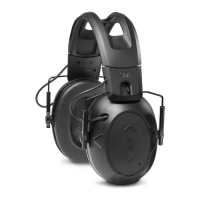
| Type | Electronic Earmuffs |
| Weight | 14.08 ounces |

 To Next Page