EasyManua.ls Logo

Pentax 645N - Taking a Picture

Pentax 645N
86 pages
Print Icon
To Next Page IconTo Next Page
To Previous Page IconTo Previous Page
Loading...
(ƏNILOOHS)
NOLWH3dO
2ISV8
LI LI
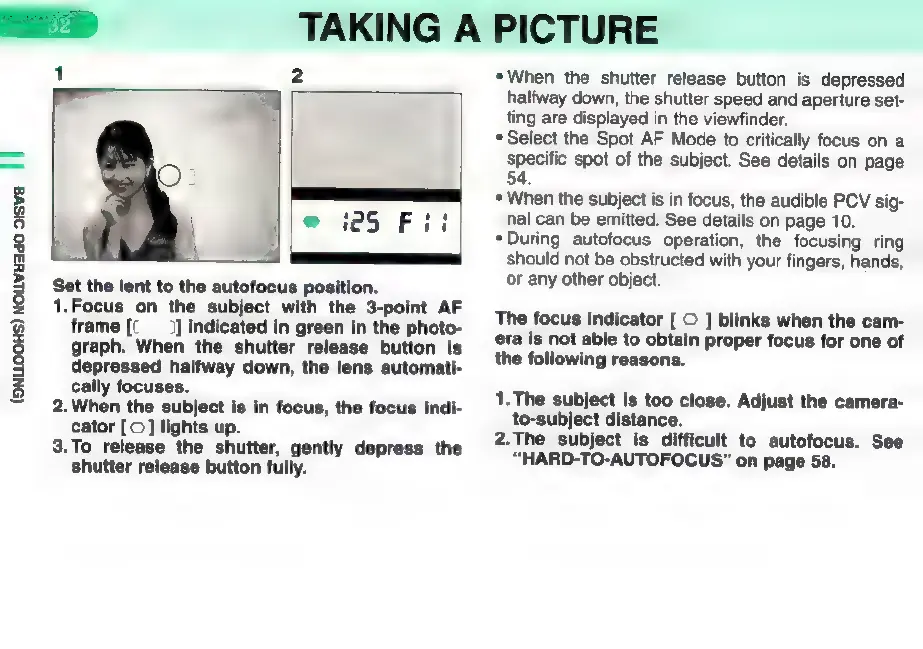
Set
the
lent
to
the
autofocus
position.
1.Focus
on
the
subject
with
the
3-point
AF
frame
[(
]
indicated
in
green
in
the
photo-
graph.
When
the
shutter release
button
is
depressed
halfway
down,
the
lens
automati-
cally
focuses.
2.
When
the
subject
is
in
focus,
the
focus
indi-
cator
[©]
lights
up.
3.To
release
the
shutter,
gently
depress
the
shutter
release
button
fully.
TAKING
A
PICTURE
*When
the
shutter
release
button
is
depressed
halfway
down,
the
shutter
speed
and
aperture
set-
ting
are
displayed
in
the
viewfinder.
*
Select
the
Spot
AF
Mode
to
critically
focus
on
a
specific
spot
of
the
subject.
See
details
on
page
54.
*
When
the
subject
is
in
focus,
the
audible
PCV
sig-
nal
can
be
emitted.
See
details
on
page
10.
*During
autofocus
operation,
the
focusing
ring
should
not
be
obstructed
with
your
fingers,
hands,
or
any
other
object.
The
focus
indicator
[
O
]
blinks
when
the
cam-
era
is
not
able
to
obtain
proper
focus
for
one
of
the
following
reasons.
1.
The
subject
is
too
close.
Adjust
the
camera-
to-subject
distance.
2.The
subject
is
difficult
to
autofocus.
See
"HARD-TO-AUTOFOCUS"
on
page
58.

Other manuals for Pentax 645N

Related product manuals