EasyManua.ls Logo

Pentax 645N - Page 41

Pentax 645N
86 pages
Print Icon
To Next Page IconTo Next Page
To Previous Page IconTo Previous Page
Loading...
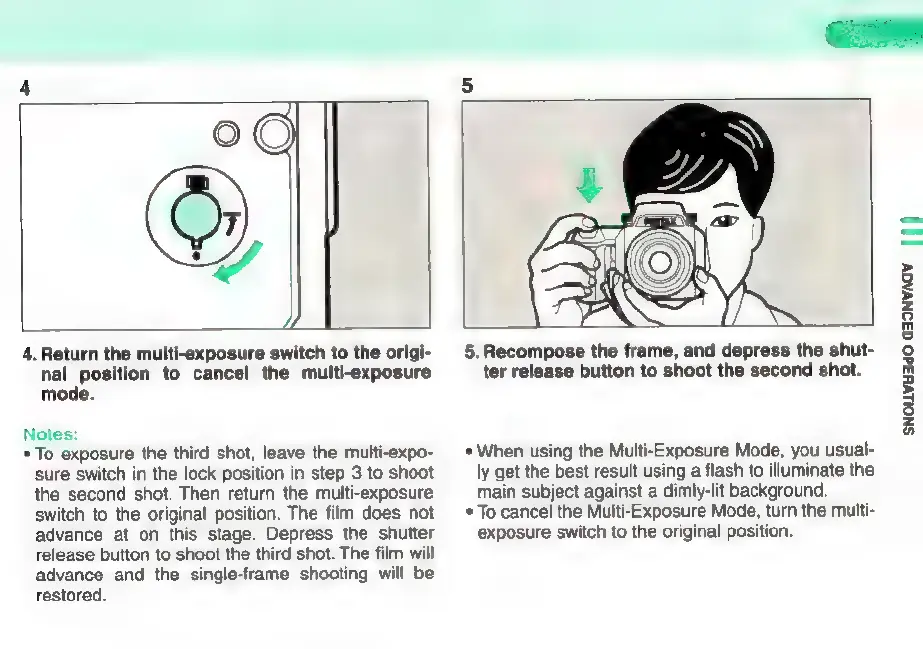
4.
Return
the
multi-exposure
switch
to
the
origi-
nal
position
to
cancel
the
multi-exposure
mode.
Notes:
*
To
exposure
the
third
shot,
leave
the
multi-expo-
sure
switch
in
the
lock
position
in
step
3
to
shoot
the
second
shot.
Then
return
the
multi-exposure
switch
to
the
original
position.
The
film
does
not
advance
at
on
this
stage.
Depress
the
shutter
release
button
to
shoot
the
third
shot.
The
film
will
advance
and
the
single-frame
shooting
will
be
restored.
5.
Recompose
the
frame,
and
depress
the
shut-
ter
release
button
to
shoot
the
second
shot.
*
When
using
the
Multi-Exposure
Mode,
you
usual-
ly
get
the
best
result
using
a
flash
to
illuminate
the
main
subject
against
a
dimly-lit
background.
*
To
cancel
the
Multi-Exposure
Mode,
turn
the
multi-
exposure
switch
to
the
original
position.
SNouvH3dO
G3ONVAGV
|||

Other manuals for Pentax 645N

Related product manuals