EasyManua.ls Logo

Pentax 645N - Exposure Modes Explained

Pentax 645N
86 pages
Print Icon
To Next Page IconTo Next Page
To Previous Page IconTo Previous Page
Loading...
EE
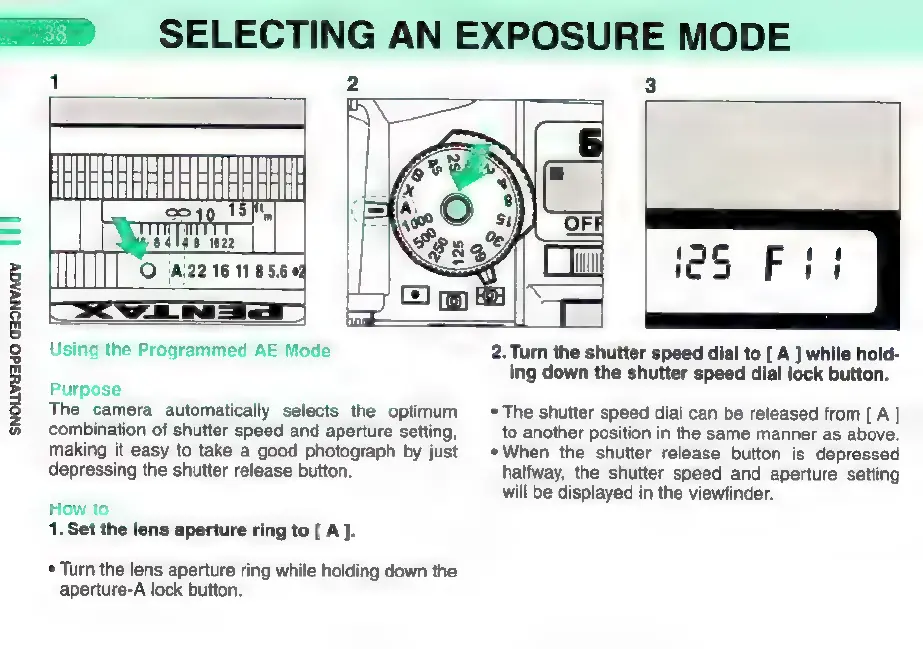
SELECTING
AN
EXPOSURE
MODE
SNouvsado
G3ONVAGY
||
|
1
2
3
ii
5
3
Mes
îm
O
EJA
E
Ss»
Cm
|
jS
Fil
Oe
-EH
Using
the
Programmed
AE
Mode
Purpose
The
camera
automatically
selects
the
optimum
combination
of
shutter
speed
and
aperture
setting,
making
it
easy
to
take
a
good
photograph
by
just
depressing
the
shutter
release
button.
How
to
1.
Set the
lens
aperture
ring
to
[
A
].
*
Turn
the
lens
aperture
ring
while
holding
down
the
aperture-A
lock
button.
2.
Turn
the
shutter
speed
dial
to
[
A ]
while
hold-
ing
down
the
shutter
speed
dial
lock
button.
*
The
shutter
speed
dial
can
be
released
from
[ A
]
to
another
position
in
the
same
manner
as
above.
*When
the
shutter
release
button
is
depressed
halfway,
the
shutter
speed
and
aperture
setting
will
be
displayed
in
the
viewfinder.

Other manuals for Pentax 645N

Related product manuals