EasyManua.ls Logo

Pentax 645N - Page 44

Pentax 645N
86 pages
Print Icon
To Next Page IconTo Next Page
To Previous Page IconTo Previous Page
Loading...
SNOLvH34O
G3DNVAGY
|
| |
|
T
MLO
A236
v
e
ss
e26
[|]
DA
COSV
INE
Hec
77
Using
the
Aperture-Priority
AE
Mode
Purpose
When
the
desired
aperture
is
selected,
an
appro-
priate
shutter
speed
is
automatically
set
by
the
camera
for
a
proper
exposure.
This
mode
is
ideal
for
shooting
landscapes
with
increased
depth
of
field,
or
a
portrait
against
a
blurred
background.
How
to
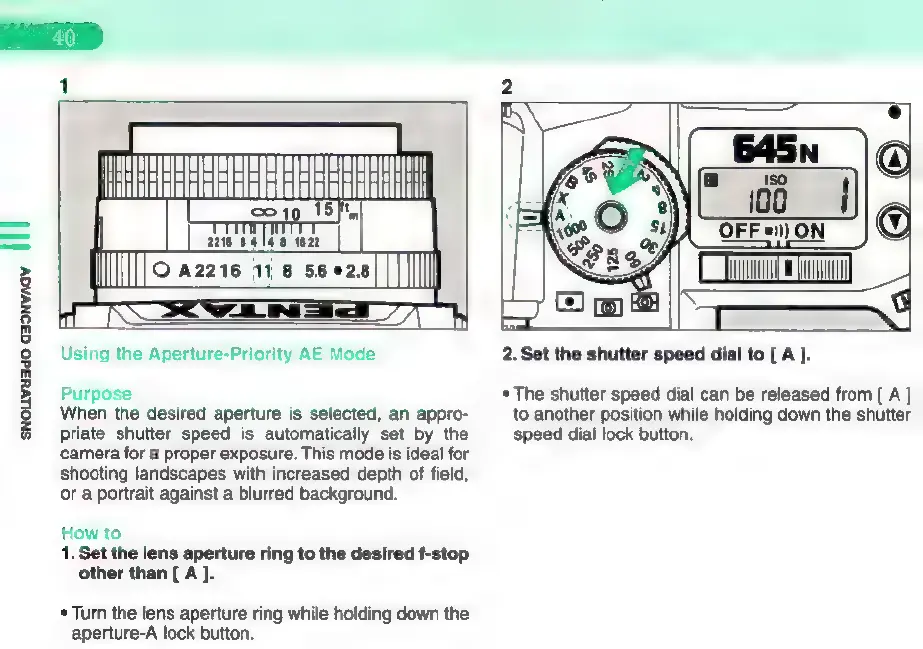
1.
Set
the
lens
aperture
ring
to
the
desired
f-stop
other
than
[
A
].
*
Turn
the
lens
aperture
ring
while
holding
down
the
aperture-A
lock
button.
2.
Set
the
shutter
speed
dial
to
[
A
].
*
The
shutter
speed
dial
can
be
released
from
[
A
to
another
position
while
holding
down
the
shutter
speed
dial
lock
button.

Other manuals for Pentax 645N

Related product manuals