EasyManua.ls Logo

Pentax 645N - Page 45

Pentax 645N
86 pages
Print Icon
To Next Page IconTo Next Page
To Previous Page IconTo Previous Page
Loading...
|
RN
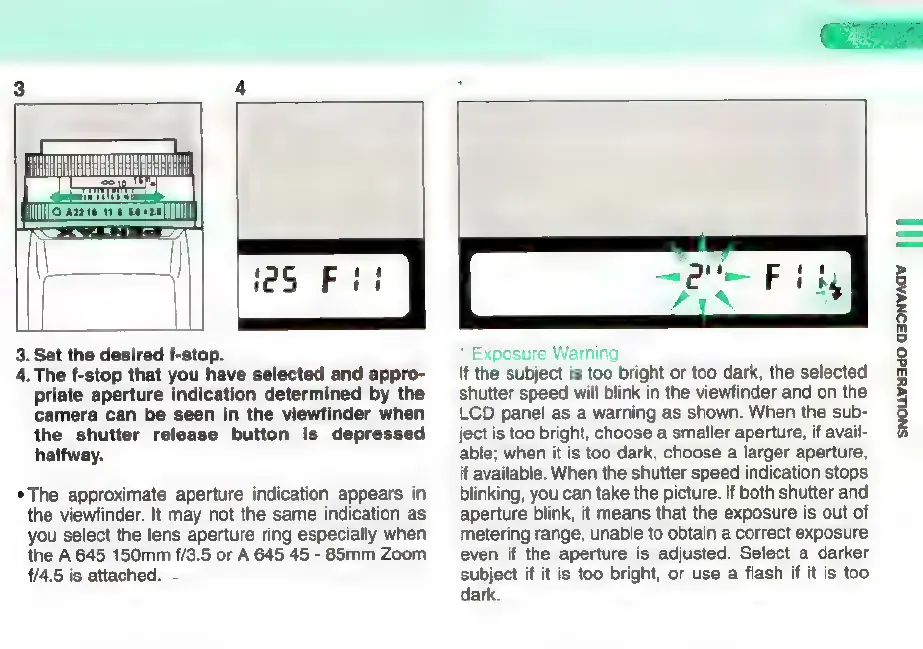
3.
Set
the
desired
f-stop.
4.
The
f-stop
that
you
have
selected
and
appro-
priate
aperture
indication
determined
by
the
camera
can
be
seen
in
the
viewfinder
when
the
shutter release
button
is
depressed
halfway.
*
The
approximate
aperture
indication
appears
in
the
viewfinder.
It
may
not
the
same
indication
as
you
select
the
lens
aperture
ring
especially
when
the
A
645
150mm
f/3.5
or
A
645
45
-
85mm
Zoom
1/4.5
is
attached.
*
Exposure
Warning
If
the
subject
is
too
bright
or
too
dark,
the
selected
shutter
speed
will
blink
in
the
viewfinder
and
on
the
LCD
panel
as
a
warning
as
shown.
When
the
sub-
ject
is
too
bright,
choose
a
smaller
aperture,
if
avail-
able;
when
it
is
too
dark,
choose
a
larger
aperture,
if
available.
When
the
shutter
speed
indication
stops
blinking,
you
can
take
the
picture.
If
both
shutter
and
aperture
blink,
it
means
that
the
exposure
is
out
of
metering
range,
unable
to
obtain
a
correct
exposure
even
if
the
aperture
is
adjusted.
Select
a
darker
subject
if it
is
too
bright,
or
use
a
flash
if
it
is
too
dark.
SNOLIVH34O
Q39NVAQV
| | |

Other manuals for Pentax 645N

Related product manuals