EasyManua.ls Logo

Pentax 645N - Page 46

Pentax 645N
86 pages
Print Icon
To Next Page IconTo Next Page
To Previous Page IconTo Previous Page
Loading...
SNOLIVH3dO
Q39NVAGV
| l
|
MI
©
22161056
00
f
SEW
INE
Sec
77
Using
the
Shutter-Priority
AE
Mode
Purpose
When
the
desired
shutter
speed
is
selected,
the
appropriate
aperture
is
automatically
set
by
the
camera
for
a
proper
exposure
according
to
the
brightness
of
the
subject.
This
mode
is
suitable
for
freezing
the
action
with
a
fast
shutter
speed
or
cap-
turing
a
flowing
dynamic
image
with
a
slow
shutter
speed.
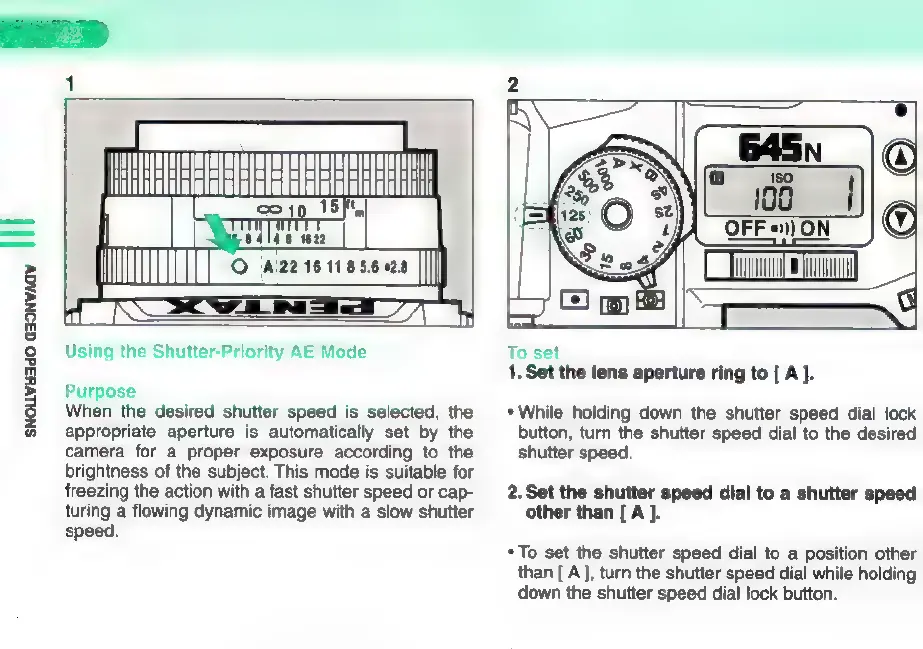
To
set
1.
Set
the
lens
aperture
ring
to
[
A
].
*
While
holding
down
the
shutter
speed
dial
lock
button,
turn
the
shutter
speed
dial
to
the
desired
shutter
speed.
2.Set
the
shutter
speed
dial
to
a
shutter
speed
other
than
[
A
].
*
To
set
the
shutter
speed
dial
to
a
position
other
than
[
A],
turn
the
shutter
speed
dial
while
holding
down
the
shutter
speed
dial
lock
button.

Other manuals for Pentax 645N

Related product manuals