EasyManua.ls Logo

Pentax 645N - Page 48

Pentax 645N
86 pages
Print Icon
To Next Page IconTo Next Page
To Previous Page IconTo Previous Page
Loading...
SNOLLWH3dO
Q39NVAQV
| |
|
|
itm.
|
MLO
«2216
11
8
5628]
[|]
mea
MANET
77
Using
the
Metered
Manual
Mode
Purpose
The
Metered
Manual
Mode
is
a
convenient
expo-
sure
mode
for
taking
pictures
using
the
same
shut-
ter
speed
and
aperture
setting
combination,
or
tak-
ing
creatively
under
or
overexposured
photographs.
To
set
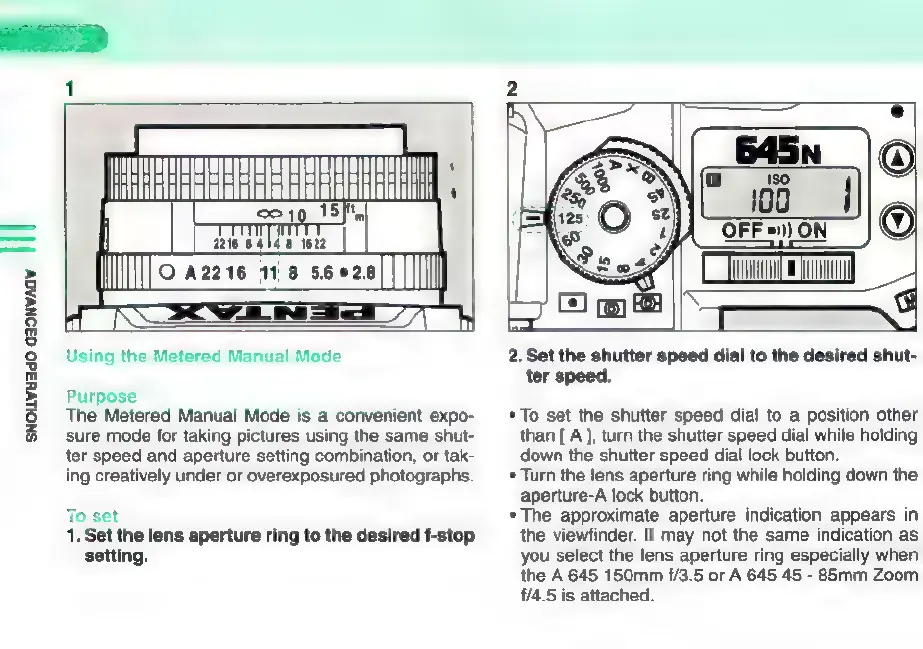
1.
Set
the
lens
aperture
ring
to
the
desired
f-stop
setting.
2.
Set the
shutter
speed
dial
to
the
desired
shut-
ter
speed.
*
To
set
the
shutter
speed
dial
to
a
position
other
than
[A
],
turn
the
shutter
speed
dial
while
holding
down
the
shutter
speed
dial
lock
button.
*
Turn
the
lens
aperture
ring
while
holding
down
the
aperture-A
lock
button.
*
The
approximate
aperture
indication
appears
in
the
viewfinder.
It
may
not
the
same
indication
as
you
select
the
lens
aperture
ring
especially
when
the
A
645
150mm
£/3.5
or
A
645
45
-
85mm
Zoom
£/4.5
is
attached.

Other manuals for Pentax 645N

Related product manuals