EasyManua.ls Logo

Pentax 645N - Page 53

Pentax 645N
86 pages
Print Icon
To Next Page IconTo Next Page
To Previous Page IconTo Previous Page
Loading...
AUTO
BRACKETING
EXPOSURE
MODE
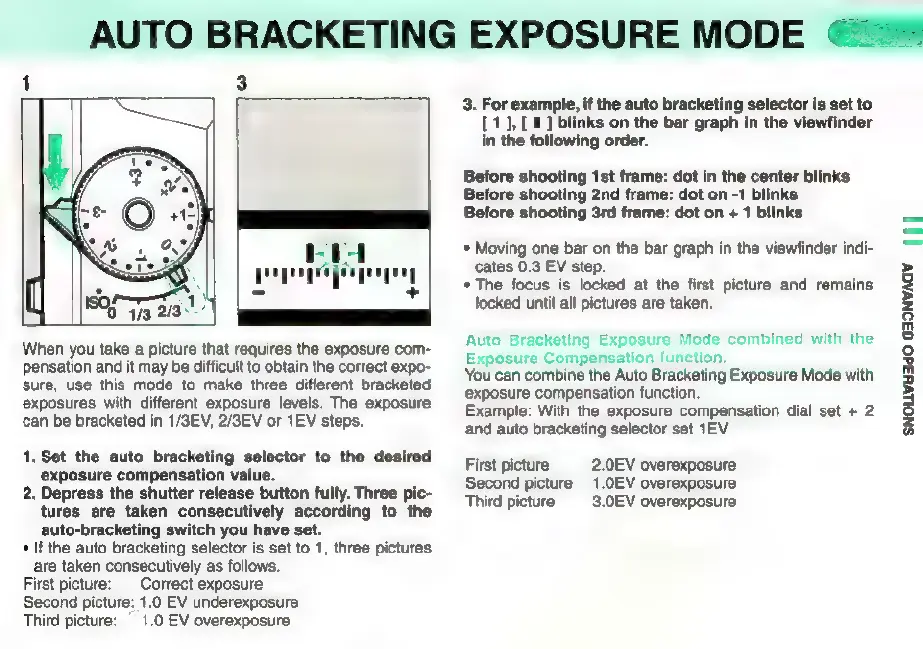
When
you
take
a
picture
that
requires
the
exposure
com-
pensation
and
it
may
be
difficult
to
obtain
the
correct
expo-
sure,
use
this
mode
to
make
three
different
bracketed
exposures
with
different
exposure
levels.
The
exposure
can
be
bracketed
in
1/3EV,
2/3EV
or
1EV
steps.
1.
Set
the
auto
bracketing
selector
to
the
desired
exposure
compensation
value.
2.
Depress
the
shutter release
button
fully.
Three
pic-
tures
are
taken
consecutively
according
to
the
auto-bracketing
switch
you
have
set.
*
If
the
auto
bracketing
selector
is
set
to 1,
three
pictures
are
taken
consecutively
as
follows.
First
picture:
Correct
exposure
Second
picture:
1.0
EV
underexposure
Third
picture:
1.0
EV
overexposure
3.
For
example,
if
the
auto
bracketing
selector
is
set
to
[1],
[
1
]
blinks
on
the
bar
graph
in
the
viewfinder
in
the
following
order.
Before
shooting
1st
frame:
dot
in
the
center
blinks
Before
shooting
2nd
frame:
dot
on
-1
blinks
Before
shooting
3rd
frame:
dot
on
«
1
blinks
*
Moving
one
bar
on
the
bar
graph
in
the
viewfinder
indi-
cates
0.3
EV
step.
*
The
focus
is
locked
at
the
first
picture
and
remains
locked
until
all
pictures
are
taken.
Auto
Bracketing
Exposure
Mode
combined
with
the
Exposure
Compensation
function.
You
can
combine
the
Auto
Bracketing
Exposure
Mode
with
exposure
compensation
function.
Example:
With
the
exposure
compensation
dial
set
+
2
and
auto
bracketing
selector
set
1EV
First
picture
2.0EV
overexposure
Second
picture
_1.0EV
overexposure
Third
picture
3.0EV
overexposure
SNOLLWH3dO
G3ONVAGY
|||

Other manuals for Pentax 645N

Related product manuals