Need help?
Do you have a question about the Pentax AF-540FGZ and is the answer not in the manual?
This mark indicates precautions that, if not followed, could result in serious injury to the user.
This mark indicates precautions that, if not followed, could result in minor or medium injury to the user or damage to the equipment.
Use 4 AA batteries; do not mix types; insert correctly; keep warm in low temps; remove if hot/smoking.
Explains indicators for Zoom, Format, Flash mode, Exposure compensation, ISO, Bar graph, Range, AF spotbeam, Sync mode, Bounce flash warning.
Explains indicators for Flash output adjustment, f/stop, Channel, and Wireless mode.
Uses 4 AA-size alkaline, lithium, or Ni-MH. Not compatible with Ni-Mn or Ni-Cd.
Enables automatic setting of flash coverage angle based on camera exposure timer and lens.
Enables manual setting of flash coverage angle; select when camera/lens is set to manual focus.
Fires pre-flash to measure subject conditions; sets main flash output for accurate results.
Adjusts flash output based on reflected light for correct exposure.
Uses built-in sensor for automatic flash output adjustment; for non-P-TTL/TTL Auto compatible cameras.
Set flash output manually (1/1 to 1/64) for manual exposure photography.
Turn on flash, select P-TTL mode, set zoom position, confirm range and ready lamp.
Turn on flash, select TTL mode, set sync mode, set zoom position, confirm range.
Turn on power, select Auto mode, set aperture/ISO, confirm range, set zoom, take picture.
Turn on power, select Manual mode, set zoom position, set lens aperture according to distance.
Enables sync with shutter speeds faster than X-sync speed; effective for fill-flash.
Turn on camera, attach flash, set sync mode to high-speed sync.
Take photos wirelessly in P-TTL mode; combine with built-in or other flash units.
Explains communication between flash units: shutter press, control flash, pre-flash, main flash.
Set wireless mode/channel, turn camera off, attach flash, set power to WIRELESS, select SLAVE, set channel.
Set camera to W(WIRELESS); confirm charge; flash output setting and exposure compensation in P-TTL.
Place flash unit, set power to WIRELESS, select SLAVE, set channel to match camera unit.
Set wireless mode/channel, attach flash, set power to WIRELESS, select MASTER, set channel.
Required shutter speed and exposure modes for high-speed sync photography.
Set flash mode to P-TTL, set zoom, enable built-in flash, set sync mode, set camera exposure/shutter speed.
Take photos wirelessly in auto or manual mode; combine with built-in or other flash units.
Balances subject and background exposure in night/evening settings using slow shutter speeds.
Built-in red spotbeam projector assists autofocus in dim/low-contrast conditions.
Procedure: Set power ON, select SB mode, set camera to autofocus, press shutter halfway.
Lists cameras supporting P-TTL and notes on auto-switching, sync modes, and display behavior.
Lists cameras supporting TTL Auto Flash and notes on sync modes, auto flash, and manual flash.
Lists digital and film cameras supporting wireless mode; notes on slave mode and combinations.
Lists cameras supporting slow-speed-sync and notes on limitations and conditions.
Required shutter speed and exposure modes for high-speed sync photography.
Lists cameras and notes on incompatible exposure modes for high-speed sync.
Method to calculate max/min distance using guide number, aperture, and ISO.
Table of guide numbers based on ISO, camera format, and zoom position.
Table of guide numbers for high-speed sync based on ISO, shutter speed, camera format, and zoom.
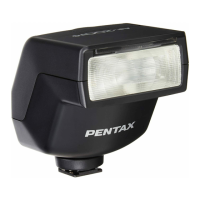
Clip-on, TTL auto zoom flash with serial control; max guide number 54 (ISO 100/m).
P-TTL auto, TTL auto, auto, manual; compensation -3.0 to +1.0.
 General
| Power Source | 4 x AA batteries |
|---|---|
| Flash Coverage | 24-105mm |
| Bounce Angle (Tilt) | Up: 90° |
| Flash Modes | Manual |
| Wireless | Yes, Wireless P-TTL |
| TTL Mode | P-TTL |
| Guide Number | 54 m / 177 ft at ISO 100 and 105mm position |
| Swivel Angle | Right: 180°, Left: 180° |

 To Next Page