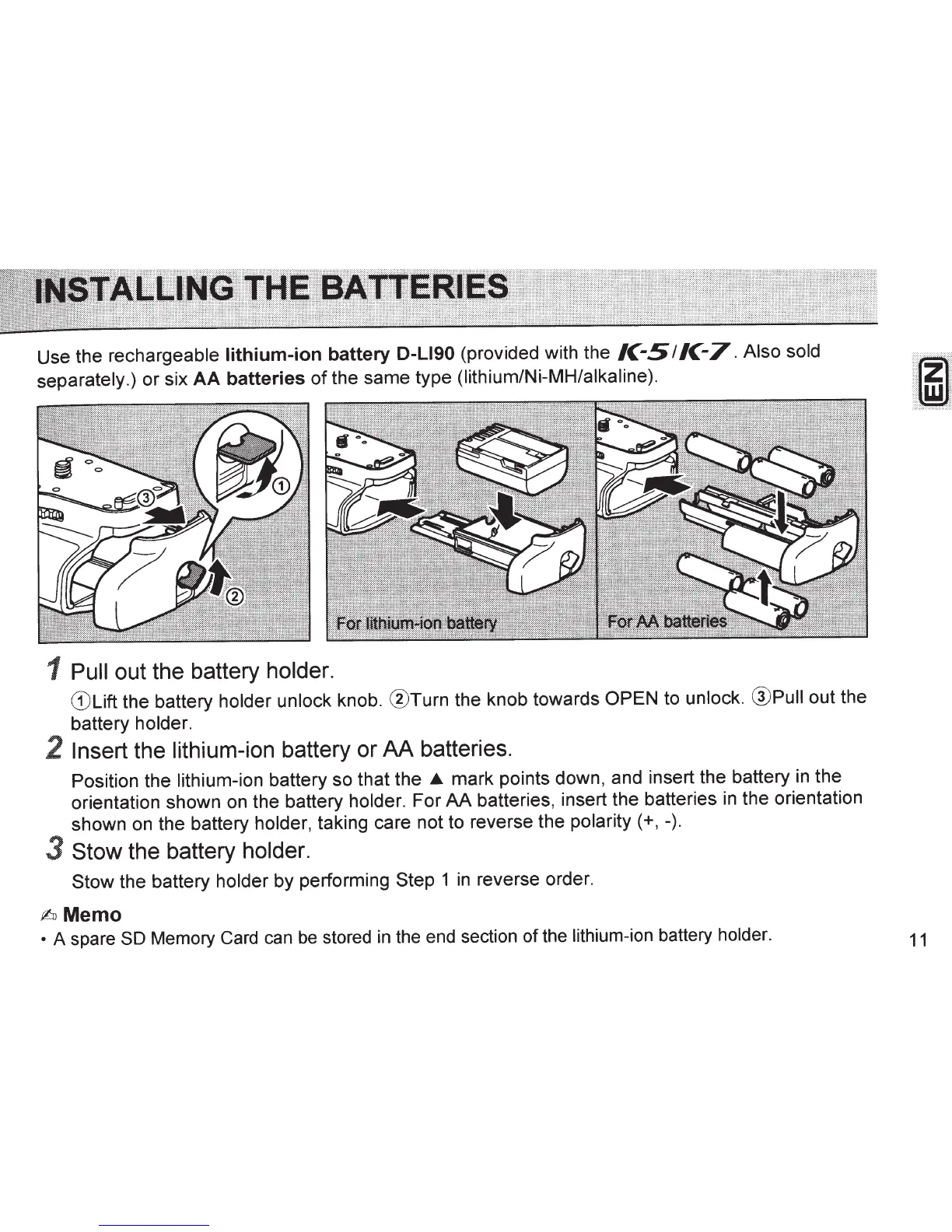
Use the rechargeable
lithium-ion
battery D-L190
(provided with the
/C-
5
I
/C-7.
Also sold
separately.)
or
six
AA
batteries
of
the same type (lithium/Ni-MH/alkaline).
1 Pull
out the battery
holder.
CD
Lift the battery holder unlock knob.
®Turn
the knob towards
OPEN to unlock. @Pull out the
battery holder.
2
Insert the lithium-ion
battery or
AA
batteries.
Position the lithium-ion battery so that the
_.
mark points down, and insert the battery in the
orientation shown on the battery holder. For
AA
batteries, insert the batteries
in
the orientation
shown on the battery holder, taking care not to reverse the
polarity(+,-).
3
Stow
the battery
holder.
Stow
the battery holder by performing
Step
1
in
reverse order.
fhJ
Memo
• A spare
SO Memory Card
can
be
stored
in
the end section of the lithium-ion battery holder.
11


 To Next Page
 Loading...